
What a Kids Smart Watch Actually Does, and What It Deliberately Doesn’t

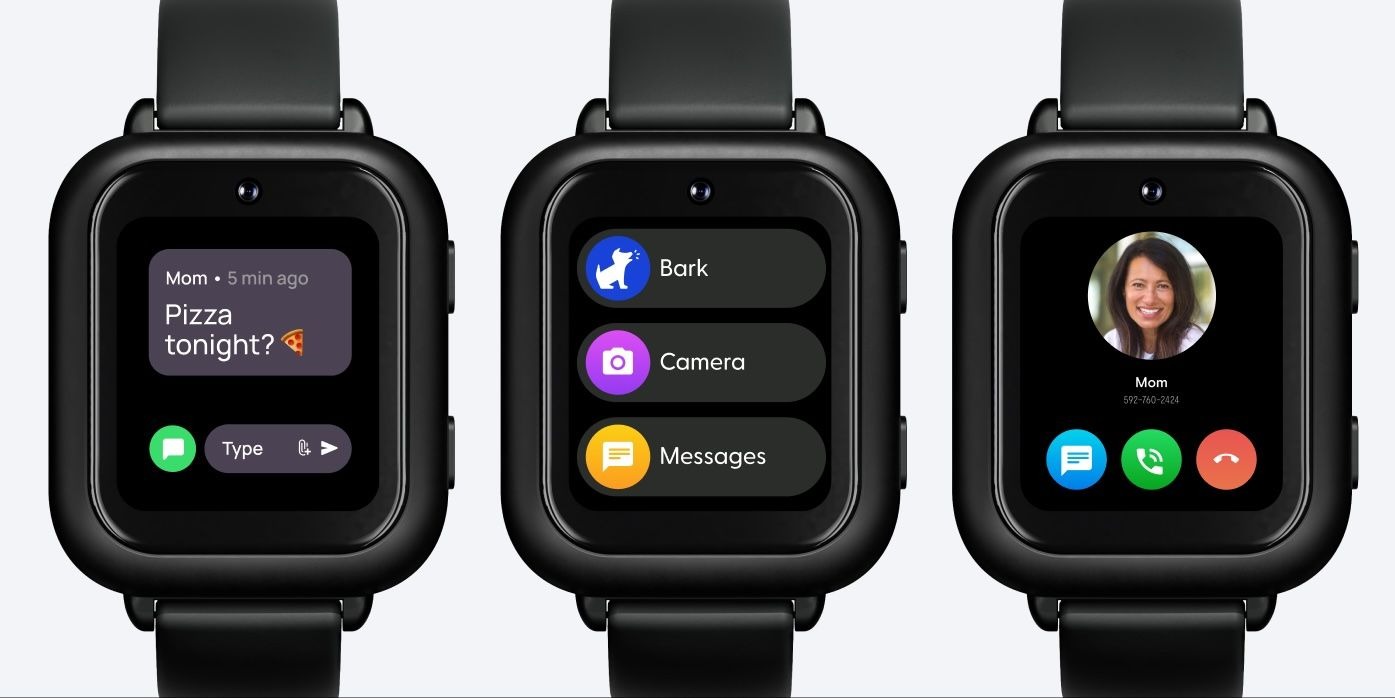
A purpose-built kids’ smart watch can give children a way to communicate and build independence without giving them the unrestricted digital access of a smartphone.
For parents, that can make the first connected device an easier decision. The aim is not to find a watch with every possible feature, but one that provides the right level of connection for a child’s age, routine and growing independence.
A kids’ smart watch may offer calling, messaging, location awareness or an SOS function, while deliberately leaving out features such as social feeds, open web browsing or unrestricted apps. These differences matter because a child’s first wearable can shape how they communicate, move around independently and stay connected with family.
Features vary between models, so looking beyond the marketing language is important. Understanding what each function actually does, what it requires, and which features may be unnecessary can help families make a more informed choice.
What Should a Kids Smart Watch Actually Help With?
Communication is one of the main functions to compare. Depending on the model, a child may be able to:
- Make video calls
- Make phone calls.
- Send texts.
- Use voice messaging.
- Communicate with selected contacts.
Features can vary considerably between children’s smartwatches, particularly around communication, location, and SOS functions.
Some purpose-built watches limit communication to approved contacts. When comparing models, check:
- Who can a child contact?
- Can the child add new contacts or does this need to be done by a parent?
- Which communication methods are supported?
- Whether an active mobile service is required?
How Does Location Awareness Work?
Location features can help families stay informed as children become more independent. Depending on the device, these can include:
- Real-time location updates
- Location history
- Place-based alerts
Features vary between devices. However, “real-time” location does not mean a device will always provide a perfectly accurate position. GPS accuracy can be affected by satellite geometry, signal blockage, atmospheric conditions, and receiver design. Accuracy can also worsen around buildings, bridges, and trees. It is therefore useful to distinguish:
- Location accuracy: how closely the reported position reflects the device’s actual location.
- Update frequency: how often a new position is reported.
When comparing watches, check both rather than relying on the word “GPS” alone.
How Can It Fit Into Everyday Life?
A connected device needs to work with a child’s normal day, including school and activities.
Some kids’ watches include school-focused settings that block or limit calls, messages, and notifications during school hours. Some models also include an SOS function that can alert nominated contacts in case your child needs help. Before choosing a model, check:
- What happens when the SOS button is pressed?
- Who receives the alert?
- What connectivity does the feature require?
- How do school settings work?
- Are the school hours settings flexible?
What Might a Kids’ Smartwatch Deliberately Leave Out?
Not every kids’ smartwatch makes the same design choices. Some purpose-built models intentionally keep their functions narrower than a smartphone, focusing on communication and selected everyday needs.
1. Social Feed
Leaving social platforms out can keep a device focused on direct communication rather than social content. For families introducing connectivity without immediately wanting the broader experience of social media, this distinction matters.
2. Open Browser
An open browser provides access to the wider internet. A purpose-built children’s watch can instead concentrate on the functions a child needs for communication and growing independence.
The difference is about purpose: a smartphone provides broader digital access, while a purpose-built watch can focus on a narrower set of communication and everyday needs.
3. Fewer Apps
Fewer features can be useful when the goal is a focused communication device rather than a miniature smartphone.
Many parents see this as a big advantage of smartwatches..
4. Ability for Child to Add Contacts
Some smartwatches only allow new contacts to be added by parents. This is a safety feature to limit who can contact your child via their watch.
This additional layer of control can help with issues around focus, stranger danger and bullying..
Where Can Kids’ Smartwatches Differ?
Two watches can both use GPS without providing the same location experience. Look at:
- Update frequency.
- Location history.
- Alerts.
Mobile connectivity matters too, so check network coverage where the watch will actually be used, particularly around:
- Home.
- School.
- Regular travel routes.
What Should You Check For School Use?
Look for a school setting that reduces unnecessary interruptions while retaining the functions a child may still need. Consider:
- How easily school mode can be activated
- Which functions remain available
- Whether notifications are reduced
- Whether the setting suits the child’s normal school routine
- Whether children can add their own contacts or if they need parental approval to add a new contact
Privacy should also be part of the decision. A connected device may handle information such as a child’s location, so check:
- What information is collected
- Why it is needed
- How it is stored
- Who it may be shared with
- Whether advertising is allowed
Which Claims and Specifications Should You Check?
What Does “Real-Time” Actually Mean?
Ask what the claim means in practice. For example:
- How frequently does the device update its location?
- Does the feature rely on mobile connectivity?
- What conditions can affect accuracy?
A specific explanation is therefore more useful than a broad marketing phrase. A simple comparison framework can help:
| Family priority | What to compare |
| Staying connected | Video calls, calls, texts and messaging |
| Growing independence | Location and place-based alerts |
| Sending an alert | SOS function and alert process |
| School use | School settings and notifications |
| Fewer distractions | Browser, social and app access |
| Privacy | Data collection and privacy information |
| Everyday practicality | Battery, charging and durability |
| Reliable connection | Mobile network coverage |
How Can You Compare Two Kids’ Smartwatches?
Start with your child’s current stage of independence. Ask:
- Do they need a simple way to contact you after school?
- Would location awareness be useful when they begin travelling independently?
- Would fewer notifications make a device more suitable during the school day?
- Does the device offer the communication options your family actually uses?
Which Features Can You Ignore?
More features do not automatically make a watch a better fit. If the goal is to help a child stay connected without introducing the open-ended experience of a smartphone, entertainment features may matter less than:
- Communication.
- Location awareness.
- SOS.
- A focused everyday experience.
Closing Thoughts
A kids’ smartwatch does not need to replicate a smartphone to be useful. Its value comes from providing the functions a child needs to stay connected and take on more independence while deliberately leaving out features they don’t need yet.
When comparing watches, look beyond the feature count. Consider your child’s routine, how they communicate, what controls you’d like to maintian, where they are likely to travel, how the device connects, and how the service handles family information.
What a kids’ smartwatch leaves out can be just as important as what it includes. The right choice is the one that provides the appropriate level of connection for your child, at the stage of independence they are ready for.






Comment