
Top WooCommerce Product Add-Ons Plugins for Adding Extra Options to Products

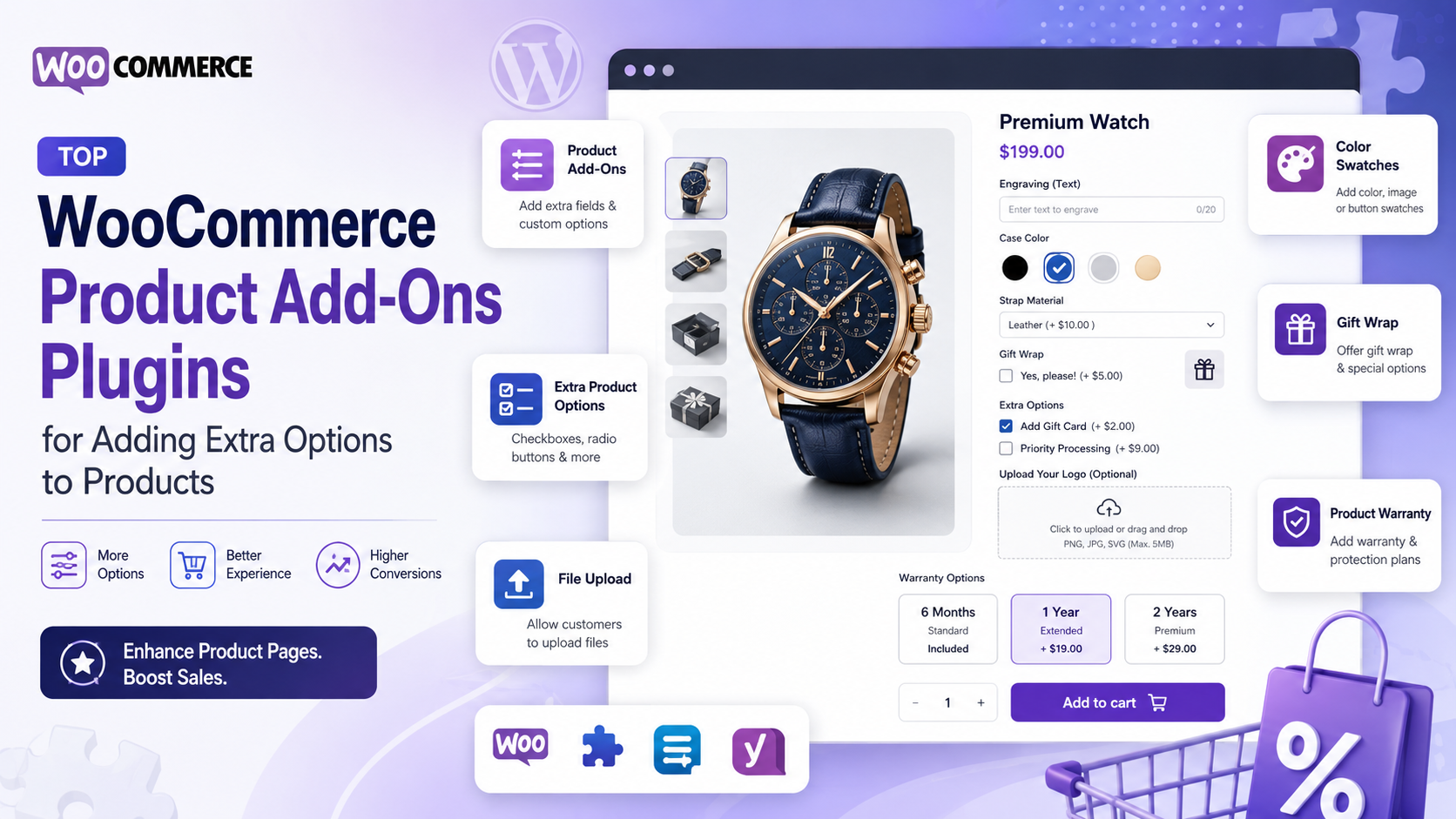
WooCommerce provides everything you need to start selling online, but its standard product options may not be enough when customers need to customize their purchases. If you sell personalized gifts, custom apparel, food, jewelry, furniture, printed products, or configurable services, giving customers additional choices can make the buying process much more flexible.
This is where WooCommerce product add-ons plugins come in. These plugins let you add extra fields and options to product pages, allowing customers to enter custom text, upload files, select additional services, choose colors, pick dates, and make other product-specific selections.
Instead of creating separate products or dozens of variations for every possible combination, you can use product add-ons to collect customization details directly on the product page.
If you are looking for the best WooCommerce product add-ons plugins for adding extra options to products, here are five options worth considering.
1. WooCommerce Product Add-Ons
WooCommerce Product Add-Ons is the official product customization extension from WooCommerce. It allows store owners to add free or paid options to individual products or apply global add-ons across multiple products.
It can be useful for relatively straightforward customization requirements, such as gift wrapping, engraving, custom messages, file uploads, or additional services.
Key Features
- Multiple-choice options with dropdowns, radio buttons, or images
- Checkbox fields for multiple selections
- Short and long text fields
- File upload fields
- Customer-defined pricing
- Quantity fields
- Date picker
- Flat-fee, quantity-based, and percentage-based pricing
- Global add-ons for multiple products
- Per-product add-ons
- Product category-based add-ons
- Support for WooCommerce Subscriptions and Bookings
The extension is particularly useful when you want to add simple personalization without creating separate product variations. Customers can enter information or select options directly before adding the product to their cart.
For example, a gift store could offer a personalized message, gift wrapping, and an optional rush fee as add-ons to the same product.
2. YITH WooCommerce Product Add-Ons & Extra Options
YITH WooCommerce Product Add-Ons & Extra Options is another popular choice for stores that need a wider range of product customization fields.
The plugin supports different types of fields and lets store owners create paid or free options for products. It can be used for everything from personalized products to configurable food, services, and accessories.
Key Features
- Text fields and text areas
- Dropdown menus
- Radio buttons
- Checkboxes
- Image selections
- Color swatches
- Date pickers
- File uploads
- Conditional logic and dependency rules
- Free or paid options
- Product and category-based options
- Options for different user roles
- Visual product customization
One of its useful features is conditional logic. For example, you can display an upload field only when a customer selects an option such as “Customize Product.” This prevents customers from seeing unnecessary fields and keeps the product page easier to navigate.
The plugin can also work well for visual customization. For example, a clothing store could allow customers to select colors using swatches, while a jewelry store could provide engraving and personalization options.
3. PH Product Add-ons for WooCommerce by PluginHive
PH Product Add-ons for WooCommerce by PluginHive is designed for businesses that need flexible product customization, additional fields, conditional options, and dynamic pricing.
The plugin allows store owners to create add-on groups and assign them to individual products or entire product categories. This makes it possible to reuse the same set of options across multiple products instead of configuring each product separately.
Key Features
- Text and input fields
- Dropdowns and radio buttons
- Checkbox and multiple-selection fields
- Text areas
- File uploads
- Date and time pickers
- Color options
- Phone number fields
- Conditional logic
- Required and optional fields
- Flat-fee pricing
- Quantity-based pricing
- Percentage-based pricing
- Character-length-based pricing
- Reusable add-on groups
- Product and category-level assignment
- WooCommerce HPOS support
- WooCommerce Cart and Checkout Blocks compatibility
PH Product Add-ons also provides several pricing methods for extra options. Depending on the setup, an add-on can be priced as a fixed fee, based on product quantity, as a percentage of the product price, or according to the number of characters entered. The selected add-on costs can be combined and displayed with the product price.
Conditional options can also help simplify complex product configurations. For example, a store selling personalized T-shirts could display an “Enter Your Text” field only after a customer selects “Add Custom Printing.”
Another advantage is reusable add-on groups. If the same customization options apply to several products, store owners can create one group and assign it to multiple products or categories. This can save considerable setup time for larger catalogs.
4. Product Addons and Extra Options for WooCommerce by Extendons
Product Addons and Extra Options for WooCommerce by Extendons focuses on providing a large selection of fields and conditional product options.
It can be useful for stores that need more than basic text boxes and checkboxes, particularly when products have several configurable elements. The plugin provides 19 field types and supports both free and paid options.
Key Features
- 19 product field types
- Text fields and text areas
- Dropdowns
- Radio buttons
- Checkboxes
- Multiple-select fields
- Color pickers and swatches
- Image radio buttons
- File uploads
- Date and time fields
- Range picker
- Conditional logic
- Fixed and percentage-based pricing
- Quantity-based pricing
- Price per character
- Product and category-level assignments
- Add-on stock management
- User-role-based visibility
- Required fields
- Tooltips for product options
The plugin’s conditional logic allows store owners to show or hide fields based on customer selections. This can be especially helpful for products with multiple configuration steps.
For example, a printing business could ask customers to select a printing method first and then display additional options related to that method. A personalized product store could also charge customers based on the number of characters they enter.
5. Extra Product Options & Add-Ons for WooCommerce by ThemeComplete
Extra Product Options & Add-Ons for WooCommerce by ThemeComplete is aimed at stores that need advanced customization, conditional logic, and complex pricing capabilities.
It provides a broad set of product fields and tools for building highly configurable product pages without requiring custom coding.
Key Features
- Text fields and text areas
- Checkboxes and radio buttons
- Dropdowns and multi-select fields
- Image, text, and color swatches
- File uploads
- Date and time fields
- Range pickers
- Repeatable fields and sections
- Advanced conditional logic
- Fixed and percentage-based pricing
- Per-character and per-word pricing
- Formula-based pricing
- Lookup-table pricing
- Dynamic price calculations
- Product elements and upsells
- Shipping customization
- Weight adjustments
- Role-based controls
- Import and export tools
- Custom styling and layout options
One of the plugin’s strengths is its advanced pricing functionality. Store owners can use fixed amounts, percentage-based pricing, per-character or per-word pricing, mathematical formulas, and lookup tables to calculate the cost of customized products.
Its conditional logic can also use multiple rules and AND/OR conditions, making it suitable for products with complex configurations. For example, different customization fields can appear depending on the customer’s selected size, material, service, or product option.
How to Choose the Right WooCommerce Product Add-Ons Plugin
The best plugin depends on the complexity of your products and the type of customization you want to offer.
Consider the Field Types You Need
Start by identifying what customers need to enter or select. If you only need text fields and checkboxes, a simpler plugin may be enough. If you need file uploads, color swatches, date pickers, or multiple-selection fields, look for a plugin that supports those options.
Check the Pricing Features
If add-ons cost extra, pricing flexibility becomes important. Check whether the plugin supports fixed fees, percentage-based pricing, quantity-based pricing, or more advanced methods such as per-character pricing.
Look for Conditional Logic
Conditional logic is particularly valuable when a product has many options. It allows relevant fields to appear only when they are needed, which can make the product page easier for customers to understand.
Consider Product and Category Assignments
If you have a large product catalog, manually configuring add-ons for every product can take a lot of time. Global or reusable add-on groups allow you to apply the same options to multiple products or categories.
Check WooCommerce Compatibility
Before choosing a plugin, make sure it works with your current WooCommerce setup, theme, checkout experience, and other extensions. Compatibility can become especially important for stores using WooCommerce Blocks, HPOS, bookings, subscriptions, or multilingual functionality.
Final Thoughts
WooCommerce product add-ons plugins can make standard product pages much more flexible. Instead of creating separate products for every possible customization, you can give customers additional choices directly on the product page.
For straightforward requirements, WooCommerce Product Add-Ons can provide the essential fields and pricing options. YITH WooCommerce Product Add-Ons & Extra Options offers a broader range of customization and visual options. PH Product Add-ons for WooCommerce by PluginHive is a strong option for businesses looking for reusable add-on groups, conditional logic, flexible pricing, and a wide selection of fields. Extendons provides an extensive field library, while ThemeComplete is well suited to stores requiring more advanced pricing and conditional configurations.
The right choice ultimately depends on your products, pricing model, and the level of customization your customers expect. Before installing a plugin, identify the specific options you need and compare those requirements against each plugin’s available features. That approach will help you choose a solution that improves the customer experience without adding unnecessary complexity to your WooCommerce store.






Comment