
Top 5 BigQuery Data Integration Tools for Marketers

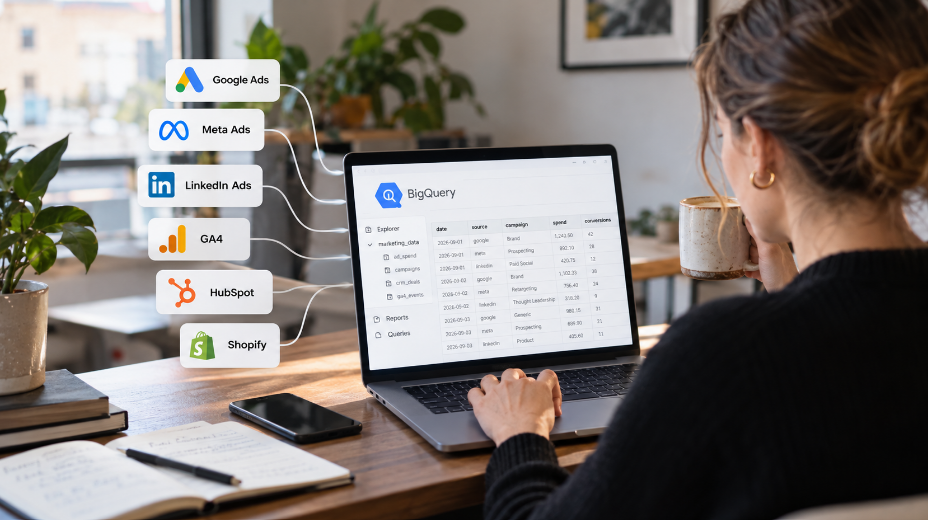
BigQuery is a solid home for marketing data. It stores years of history, handles millions of rows, and works with reporting tools like Data Studio and Power BI. With the right integrations, you can also analyze it with AI assistants like Claude.
The hard part is getting data in. Every ad platform, analytics tool, and CRM has its own API, field names, and date formats. The integration tool you choose decides how much cleanup you face later.
Here are five options marketers rely on most, what each one is built for, and where each one stops.
Key Takeaways
- Your reports and AI answers are only as reliable as the tables you load. Inconsistent field names across platforms cause more wrong numbers than BigQuery itself.
- The pricing model matters more than the starting price. Row-based and credit-based bills grow with data volume, while account-based bills grow with the number of platforms you connect.
- If nobody on your team writes SQL, prepare data before it reaches BigQuery. Raw data is cheap to store but slow and costly to turn into a report.
What to Look for in a BigQuery Integration Tool
Connector counts are the first thing vendors show you. They are rarely what decides whether the setup works. These five factors matter more.
Coverage of your real stack. Check your five most important platforms first. A long connector list means nothing if one of them is missing.
Data preparation. Google Ads reports “Cost” and Meta reports “Amount spent” for the same idea. A tool that renames, filters, and combines data before loading saves hours of SQL.
Pricing model. Find out whether you pay per row, per credit, per destination, or per connected account. This decides how your bill grows.
Refresh frequency. Daily updates cover most reporting needs. Hourly updates only matter if you move budgets during the day.
Historical data. Check how far back each connector can pull data. Year-over-year comparisons need a tool that supports historical backfills.
Access control. Load marketing data into its own dataset. Give dashboards and AI tools read-only access to it.
BigQuery Integration Tools Compared
| Tool | Best for | Data preparation | Pricing model | Main limitation |
| Native connectors | Google-focused stacks | None, raw tables | Free for Google sources, usage-based for others | No blending across platforms |
| Coupler.io | Multi-channel teams without engineers | Filter, rename, blend before load | Per connected account | Not built for database replication |
| Fivetran | Data teams that model in SQL | Inside BigQuery, usually with dbt | Monthly Active Rows | Data lands raw |
| Supermetrics | Detailed ad and social data | Standard schemas, light transforms | Per source and destination | BigQuery only on Enterprise plan |
| Funnel.io | Advertisers running many channels | Metric harmonization | Flexpoint credits | Usage-based costs are hard to predict |
1. Native BigQuery Connectors: Best for Google-Focused Stacks
BigQuery has two built-in ways to load marketing data. The Data Transfer Service pulls Google Ads, Search Ads 360, YouTube, and other Google sources on a schedule. It now also covers non-Google sources such as Facebook Ads and Salesforce, with more marketing platforms like HubSpot in preview. GA4 has a separate free export that sends raw event data to BigQuery.
If most of your budget goes to Google, this is the cheapest setup available. Transfers from Google sources carry no transfer fee, so you mainly pay for BigQuery storage and queries. Third-party connectors use consumption-based pricing.
Example question: Which Google Ads campaigns led to GA4 purchase events last quarter?
Limitation: Data arrives raw. GA4 exports are nested event tables that take advanced SQL to unpack. Coverage and reporting options vary by source, and there is no built-in way to combine platforms into one table.
2. Coupler.io: Best for Multi-Channel Marketing Teams
Coupler.io is a no-code data integration and AI analytics platform that connects 400+ apps to BigQuery, including ad platforms, CRMs, ecommerce stores, and spreadsheets. The key difference is where the work happens. You can filter, rename, and blend data before it lands, so BigQuery receives one prepared table instead of several raw ones.
You can append Google Ads, Meta Ads, and LinkedIn Ads into a single spend table. You can also join ad data with HubSpot deals to see cost per closed deal. Pricing is based mainly on connected accounts. BigQuery needs no separate license, but destination and refresh limits depend on the plan.
Once the data is in one place, you can pair it with ready-made instructions from an AI skills list to run the same weekly analysis every time.
Example question: What was our blended cost per lead across Google, Meta, and LinkedIn last month?
Limitation: It is built for business apps, not production databases.
3. Fivetran: Best for Data Teams That Model in SQL
Fivetran is an ELT platform with 600+ connectors. It copies source data into BigQuery as close to the original as possible. Transformation happens later, inside the warehouse, usually with dbt.
This design suits teams with an analytics engineer. Schema changes are handled automatically. The same tool also covers databases, product analytics, and finance systems, not just marketing.
Example question: How does paid search acquisition cost compare with product activation rates by signup cohort?
Limitation: You pay per Monthly Active Row, the number of distinct rows inserted, updated, or deleted in a month. Ad platforms often restate recent data, so row counts can run higher than expected. Since January 2026, eligible paid connections also carry a $5 monthly minimum.
4. Supermetrics: Best for Detailed Ad and Social Data
Supermetrics started as a connector for Google Sheets and Data Studio, and many marketing teams still use it that way. Its strength is depth in advertising and social platforms. Its connectors expose a wide range of metrics and dimensions, including fields that lighter tools often skip.
For BigQuery, Supermetrics loads data into standard schemas with a fixed table structure for each source. That makes the warehouse a natural next step for teams that already rely on it. Existing field names and account setups carry over with little rework.
Example question: Which Meta Ads placements and creative formats delivered the lowest cost per purchase over the past 12 months?
Limitation: BigQuery is not included in the self-serve plans and requires an Enterprise quote. Pricing is also tied to each destination, so running Sheets, Data Studio, and BigQuery together adds cost. Blending data across platforms usually happens in SQL after loading.
5. Funnel.io: Best for Advertisers Running Many Channels
Funnel.io is a marketing data hub with 500+ sources. Its strength is harmonization, meaning it maps metrics from different platforms to one shared definition. Impressions from Google and served impressions from a DSP end up in the same BigQuery column.
Example question: Which of our 12 ad channels had the lowest cost per thousand impressions this quarter?
Limitation: Pricing runs on flexpoints, credits used by every connector, account, and destination. A BigQuery destination alone uses 300 flexpoints, and plans start at 400. Estimate your expected usage before choosing a plan.
How to Choose the Right Tool
Start with where your budget goes. If most of it is spent on Google, the native connectors are enough, as long as someone on the team can write SQL.
Add a third-party tool when your reporting spans several platforms and needs consistent metrics. Without a SQL specialist, choose a tool that prepares data before loading, such as Coupler.io or Funnel.io. With a data engineer on board, Fivetran gives them full control over raw data. If your reporting depends on detailed ad and social metrics, Supermetrics brings that depth into BigQuery.
Many teams combine two options. The free GA4 export handles website events, and one paid tool handles ads and CRM data. That keeps costs predictable without giving up blended reporting.
FAQ
Is BigQuery expensive for marketing data? Usually not. The free tier includes 10 GB of storage and 1 TB of queries per month, which covers many small marketing datasets.
Do I need a data engineer to load marketing data into BigQuery? Not with no-code tools like Coupler.io or Funnel.io. You will need SQL skills for native connectors and Fivetran, because the data arrives raw.
Can AI tools analyze marketing data stored in BigQuery? Yes. Claude and other assistants can query BigQuery through connectors and explain results in plain language. For reliable answers, keep metric definitions consistent, use read-only access, and spot-check AI-generated queries and totals.
How often should marketing data refresh? Daily is enough for most reporting. Hourly refreshes cost more and only pay off if you adjust budgets during the day.







Comment