
The Complete Guide to Invisible Characters in Social Media

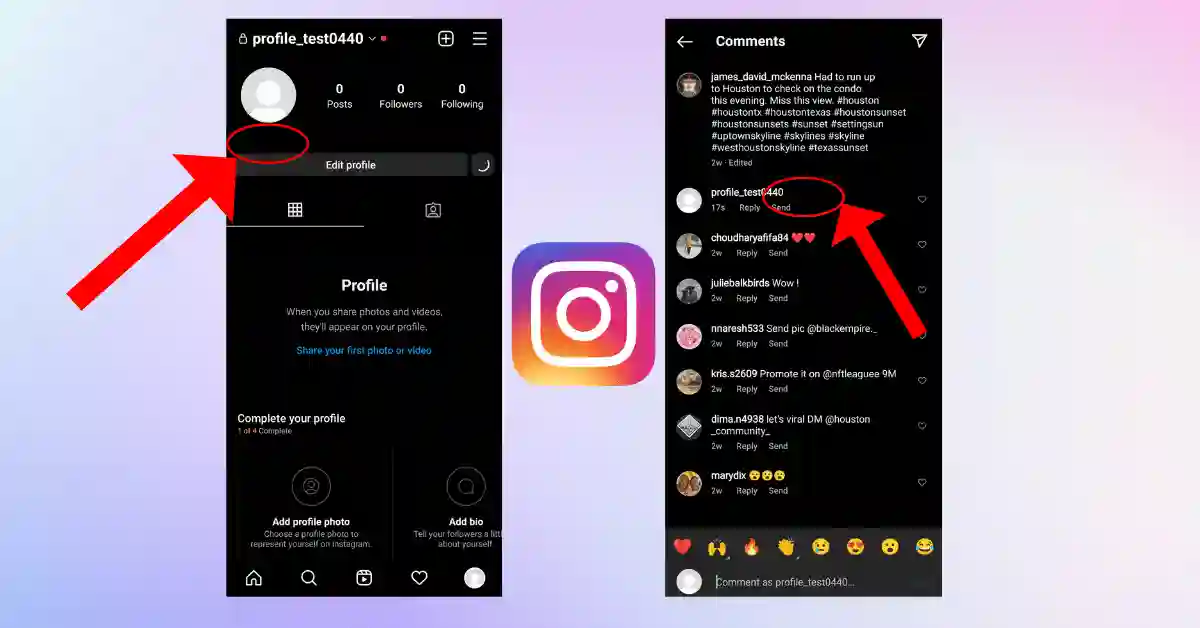
Many people try to use the space bar for an empty message and a social media account bio. SO, they could not because social media platforms delete them automatically. Invisible character solves this problem and creates space for you as needed. You can use invisible characters for different purposes like usernames, empty bios, and blank messages. In this guide, we will learn how we can use invisible characters on different social media platforms.
What Is an Invisible Character?
An invisible character is a hidden Unicode character that appears as an empty but occupied space digitally. Unlike a standard keyboard space, it has a Unicode value, allowing it to be used by different websites and social media platforms.
Common Invisible Unicode Characters
There are several Unicode characters that create blank space. Each one works differently, so the best choice depends on the website and app that are being used.
Some of the common Unicode characters are below:
U+3164 (Hangul Filler)
The Hangul Filler is the most-used invisible character. Most of the platforms, apps, and online games recognize it that making a popular choice for creating blank text.
Common Uses:
- Use to send a blank message on WhatsApp
- Help to create an invisible Discord username
- Making a blank gaming nickname
- Update Empty Instagram Bio
- Creating Invisible TikTok Profiles
U+2800 (Braille Pattern Blank)
The Braille Pattern Blank is a good alternative when the Hangul Filler is not working. It works well on many social media formatting needs.
Common use of Braille Pattern Blank:
- Use to break the line on Instagram
- Put the blank profile field
- Using alternative invisible text
- Help to improve the social media format
U+200C (Zero Width Non-Joiner)
The main use of Zero Width non-joiner is how text is displayed. While it is designed to support typography and multilingual writing, it also helps in advanced text formatting and hidden space in some situations.
Uses of U+200(Zero width non-joiner):
- Help to improve text format
- Use to create hidden spaces
- Support in multilingual text
- For Web development and typography
How to Copy and Paste Invisible Characters
By using a free invisible character generator it’s easy and quick. Follow the steps below:
Step 1. Copy the invisible character
Go to Google and search for an invisible space copy paste tool and then copy the invisible character. Shown below.
[ㅤ]
Note that it just copies the blank spaces, not brackets.
Step 2. Paste it where you need
Paste the copied invisible character into the text field where you want blank text. You can use it on many platforms, including:
- Instagram bio
- WhatsApp message
- Telegram Chat
- TikTok profile
- Discord Username
- Steam username
- Gaming profile
Step 3. Save it or send
Click on the save, update, or send button. If the platforms support the Unicode character, then a blank space will appear; otherwise, the system recognize as normal text.
If it does not work, try it with different Unicode characters. Because most websites and platforms support different Unicode characters, so that why result may vary.
How to Use Invisible Characters on Social Media
Different social media platforms handle invisible characters in different ways. Some accept, while others block due to certain Unicode characters. If the first option does not work, then try with another invisible Unicode character.
Instagram and TikTok
Instagram and TikTok systems delete the extra space from the profile bio and caption. An invisible character helps you to keep your format neat and clean, which cannot be achieved by regular keyboard space. You can use invisible space for:
- Create an empty bio
- Adding a clean line break
- Keep the separate hashtag from captions
- Make your profile efficient, which will be easy to read.
WhatsApp and Telegram
Most of the people wanted to send a blank message on WhatsApp and Telegram. Just simply copy the invisible character, paste it into the chat box, and tap send. If the system supports Unicode characters, the space looks blank; otherwise, recognize as text.
Discord, Steam, PUBG, and Free Fire
Invisible characters are also popular in online games and gaming platforms. Players use them to create their usernames and profile names.
Common uses include:
- Blank usernames
- Invisible clan tags
- Hidden profile names
- Unique gaming nicknames
Please memorize most of the game developers may update their naming rules at any time. Because of this, most of the invisible character may working today may not be in the future.
Troubleshooting: Why Isn’t My Invisible Character Working?
If your invisible character is not working, don’t worry. Multiple website app, games support different Unicode characters. Here are some common problems, and we will try to fix them.
Problem: When does it show an empty box?
Some older devices and unsupported fonts may display an empty box instead of a blank space.
Solution:
By using U+2800(Braille Pattern Blank) instead of U+3164(Hangul Filler). It works better than others on device do not support other invisible characters.
Problem: When does the platform not accept it?
Some websites and apps will block certain Unicode characters to prevent spam, fake accounts, and misuse.
Solution:
You should check that your app version is the latest one that you are currently using.
Problem: Blane Message won’t Send
In that case where your WhatsApp and another messaging app would not send your blank message. The you should one thing that is copied extra spaces or missed the invisible character.
Solution:
To tackle this, you should copy the invisible character and paste it again. After that message still does not send then try with another Unicode character due to supporting issues.
Conclusion
Using an invisible character is like a secret cheat code for your favorite apps. Normally, social media apps automatically detect and delete regular spaces when you try to leave a blank bio or send an empty message.
However, special Unicode character like U+3164 and U+2800 trick the computer. They tell the app, hey there is a text even though no need to show up on the screen.
Whether you want to make a blank user name in games, clean up your Instagram profile. And also want you to send an empty text to a friend; this trick makes it incredibly easy. Just copy and paste the blank space and use it anywhere you want. It is the safe, simple, and trusted way to make your social media profiles look exactly how you want.







Comment