Gum disease remains one of the most common oral health conditions affecting Australians, with severe periodontitis impacting nearly one in five adults. While prevention is always the best strategy, advances in periodontal regeneration now offer real hope for those who have already lost gum and bone tissue to infection. Understanding what modern dentistry can and cannot rebuild helps patients make informed choices and set realistic expectations for their recovery.
How Gum Disease Destroys Periodontal Tissues
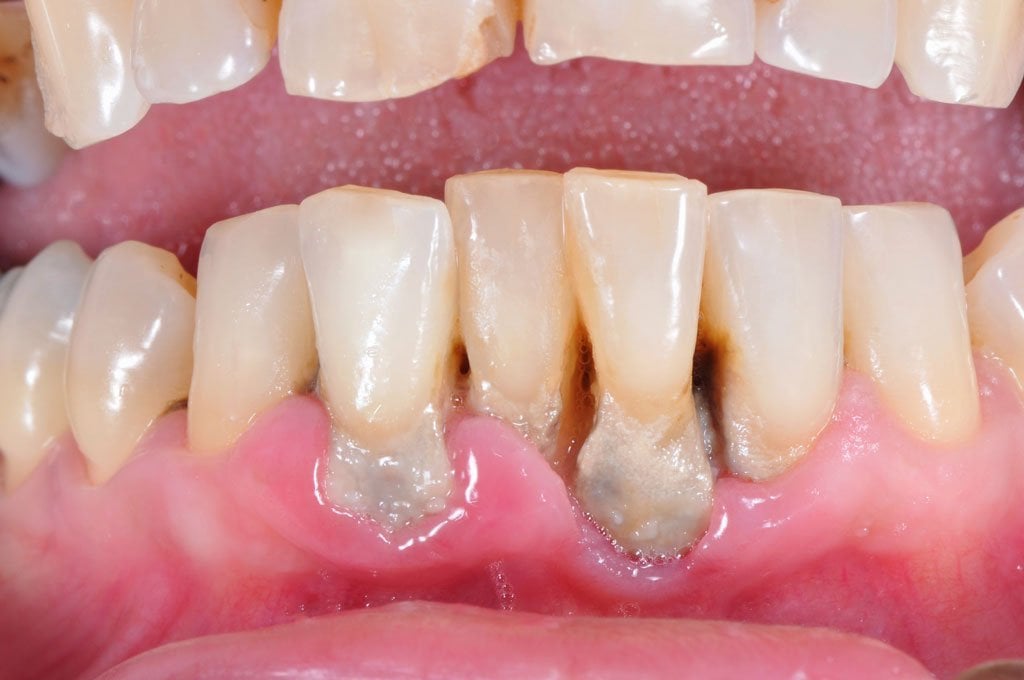
Periodontal disease begins when bacterial plaque builds up along the gumline, triggering inflammation that gradually breaks down the structures supporting the teeth. Early-stage gingivitis causes redness, swelling and bleeding gums. Left untreated, the infection moves deeper, forming pockets between the teeth and gums. As periodontitis progresses, it destroys the periodontal ligament that anchors teeth to bone and erodes the alveolar bone holding teeth in their sockets. This ongoing destruction can eventually cause teeth to loosen and fall out, creating restorative challenges that may require careful planning around fixture positions for implant overdentures when natural teeth can no longer be saved.
Non-Surgical and Surgical Treatment Approaches
Treatment always starts with non-surgical care aimed at stopping the disease in its tracks. Scaling and root planing clears bacterial deposits from beneath the gumline, leaving a clean root surface that allows the gum tissue to reattach. Antimicrobial rinses or localised antibiotics often support this mechanical cleaning. When these measures aren’t enough, periodontal surgery becomes the next step. Flap surgery gives the dentist direct access to infected roots and damaged bone, allowing thorough cleaning and recontouring of irregular defects. These procedures halt further breakdown, but they don’t automatically regrow lost tissue — that outcome depends on more advanced regenerative techniques.
Regenerative Procedures: Bone Grafts and Guided Tissue Regeneration
True regeneration aims to rebuild the structures disease has destroyed. Bone grafting places natural or synthetic material into areas of bone loss, forming a scaffold that encourages new bone to grow. This material may come from the patient’s own body, a donor source, or a laboratory-made substitute. Guided tissue regeneration (GTR) goes a step further, inserting a biocompatible membrane between the gum and bone. This barrier keeps fast-growing gum cells out of the healing space, giving the slower-growing bone and ligament cells time to regenerate properly. GTR tends to work best on defects with remaining bony walls, since these provide extra structural support during healing.
Biologics, Growth Factors, and Emerging Technologies
Modern periodontics increasingly turns to biological agents to encourage tissue regrowth. Enamel matrix derivatives, proteins naturally involved in tooth development, can stimulate regeneration of the periodontal ligament, cementum and bone when applied during surgery. Platelet-rich plasma and platelet-rich fibrin, both drawn from the patient’s own blood, concentrate growth factors that speed healing and tissue formation. Recombinant growth factors are another emerging option, although their use calls for careful clinical judgement. Promising as these technologies are, none guarantees full regeneration — results still depend heavily on the size and shape of the defect, the patient’s overall health, and how well they maintain their gums afterward.
Candidacy, Maintenance, and Realistic Expectations
Not every patient is an ideal candidate for regenerative treatment. Success hinges on the extent and pattern of bone loss, general health, and a genuine commitment to ongoing maintenance. Smokers see markedly lower success rates, since tobacco slows healing and keeps disease activity simmering. Uncontrolled diabetes has a similarly negative effect on outcomes. Even under the best conditions, complete restoration of lost tissue is rare; partial regeneration is usually the more realistic goal. Patients need to keep up meticulous home care, attend regular professional cleanings, and manage risk factors such as smoking to protect newly regenerated tissue, since disease can return and undo that progress without consistent upkeep. A qualified periodontist can assess whether regenerative treatment is suitable and what level of improvement a patient might reasonably expect.
Regeneration is most predictable in contained vertical bone defects, where surrounding bony walls help guide new tissue formation. Widespread horizontal bone loss usually calls for a broader approach that combines disease control, bone grafting, orthodontic repositioning and restorative planning to achieve the best functional and aesthetic result. For patients who do lose teeth despite treatment, it’s worth remembering that tooth loss carries more than physical consequences — Dental News has explored the emotional impact of tooth loss and how modern denture solutions can help patients regain both function and confidence.