Most architectural visualization workflows follow the same four steps: model the space in SketchUp, pull 3D assets from free libraries, clean up each downloaded file, and render. Step three is where the schedule slips. Free .skp models from community-contributed sources regularly land with broken texture paths, unoptimized polygon meshes, and no engine-specific materials. So a designer working in V-Ray, Enscape, or Lumion ends up assigning PBR materials to every surface by hand before the first test render. On a full interior scene with 20 to 40 objects, that cleanup can stretch into days of work nobody planned for.
Render-ready assets cut that step out. When a model arrives with pre-configured materials, correct UV mapping, and geometry built for a specific engine, the sequence collapses to three moves: source, import, render. There’s no repair phase in the middle.
SketchUp Free, operated by SketchUp Free Ltd, has built a free library around exactly that approach. According to the team, every .skp model and PBR texture is checked for compatibility with V-Ray, Enscape, Lumion, D5 Render, Corona, and Chaos Vantage before it goes live. The collection covers furniture, architecture, interior scenes, lighting, decoration, and building materials.
This article looks at where the traditional workflow breaks down, what the render-ready standard changes, and what that shift means for architecture and design teams working under project deadlines.
The Traditional Visualization Workflow and Where It Breaks Down
The traditional SketchUp workflow runs in four steps: model the geometry, apply textures, set up a render engine, and produce the final image. Downloading a free model is supposed to collapse the first step into seconds. In practice, it often just moves the work further down the line.
Here’s how it breaks. A designer drops a free model into the scene, and the trouble starts before the first render. Unoptimized polygon meshes lag the viewport and can crash SketchUp on larger scenes. Broken or missing texture file paths cause surfaces to render as flat gray or black. Most free files ship with no engine-specific materials, so the designer assigns PBR maps such as diffuse, normal, and roughness by hand for whichever renderer they’re using. And when material names don’t follow a convention, the auto-matching in tools like Lumion and Enscape never fires, which forces manual reassignment object by object.
These faults rarely show up one at a time. A single furniture model can carry all four at once, so the designer fixes one problem only to hit the next. Each pass costs time, and time on a deadline costs money.
So how much time does that cost? A single furniture model with several material zones can take two to four hours to repair, and a full interior scene with dozens of objects pushes that into days of unbilled work.
That leaves professionals with a familiar trade-off: pay for premium model subscriptions, or spend project hours fixing free files. For students and freelancers in price-sensitive markets across India, Southeast Asia, Latin America, and Turkey, it bites hardest. The time never shows up on an invoice, but it still has a cost.
What “Render-Ready” Actually Means for Design Professionals
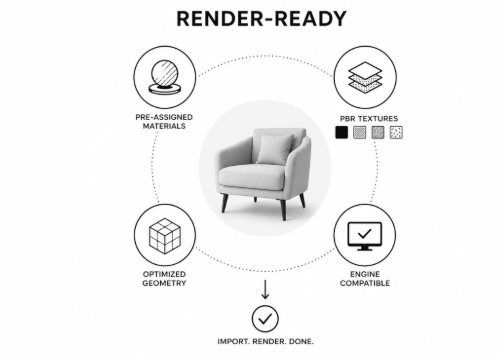
A render-ready 3D model is a file that imports into a designer’s scene and renders accurately: no manual material assignment, no texture relinking, no geometry repair. The term means something specific. It is not just a polite word for “good quality.”
In practice, a render-ready file carries four things. It has pre-assigned materials built for a specific engine, such as VRayMtl for V-Ray, CoronaMtl for Corona, or equivalents. It embeds high-resolution PBR texture maps: diffuse for color, normal for surface detail, roughness for how light scatters, and bump for fine relief. Its geometry is optimized for the engine, since offline renderers like V-Ray and Corona handle dense meshes, whereas real-time engines such as Enscape, Lumion, and D5 Render perform best with fewer than 50,000 polygons. And each model carries a compatibility tag — V-Ray Ready, Enscape Ready, and so on — so a designer can confirm plug-and-play readiness before downloading.
“The download was never the end of the job — that’s the problem we set out to fix,” said a spokesperson for SketchUp Free Ltd. “We test models against the actual render engines designers use, so a file opens, renders, and holds up without an hour of cleanup first.”
So what does that review involve? Before a model goes live, the team checks geometry, material setup, texture path integrity, and version compatibility. The platform does not publicly disclose how much content is hand-checked versus managed by automated tools. Given the scale of a six-figure catalog, the workflow relies on batch processing rather than inspecting each file individually. The benefit for the designer is straightforward: they can open the .skp file, launch the rendering engine, and generate client-ready output with the necessary repair steps already completed.
How SketchUp Free’s Library Supports Real Architectural Workflows
SketchUp Free organizes its library around three things that map onto how architects actually work: how much it covers, how many engines it supports, and how quickly designers can access it. Each one answers a specific friction point in the standard SketchUp visualization pipeline.
92,000+ Models Across 9 Architectural Categories
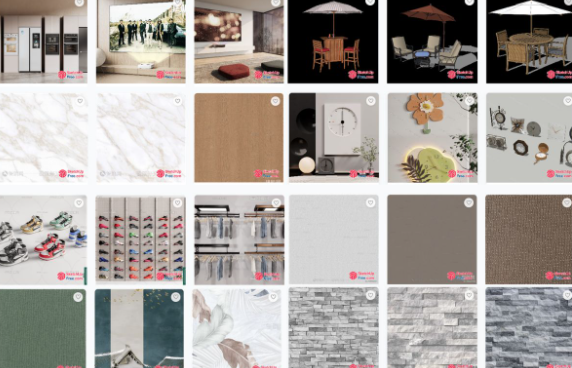
The library holds over 92,000 models in native .skp format, sorted into nine categories that span residential, commercial, and educational projects: Furniture, Interior Spaces, Architecture and Exteriors, Landscape and Outdoor, Lighting and Decor, Kitchen and Bath Fixtures, Design Styles, Architectural Details, and SketchUp Scenes. Furniture sees the heaviest demand, which tracks with how designers work — a single interior project can call for dozens of distinct objects, from sofas to light fixtures. New models go up weekly. And because every file is native .skp, it imports straight into SketchUp with no .obj or .fbx conversion step in between.
500,000+ PBR Textures and Advanced Materials
In addition to 3D models, SketchUp Free offers over 500,000 high-resolution PBR textures organized into 17 different surface categories. Each texture set includes the essential maps that a modern renderer requires: a diffuse map for color, a normal map for surface detail, and a roughness map to indicate how matte or glossy a surface appears. This ensures that the materials function correctly in any PBR-capable engine.
The categories cover what most projects reach for first: Wood Grain, Stone, Marble, Brick, Metal, Glass, Leather, Wallpaper, and HDR Textures, among others. Every texture is seamless, meaning it tiles across a surface without a visible repeating line. That’s a baseline requirement for professional work, since an ordinary photo of wood shows obvious seams the moment it’s mapped onto a floor. Designers looking for SketchUp models free download at SketchUp Free can browse the full library organized by category. Paired with the models, the textures close the loop from raw geometry to finished surface in one place.
Six Render Engines, Zero Manual Material Setup
Models tagged “Ready” for an engine include preconfigured materials, calibrated lighting, and optimized geometry that render accurately upon import. The platform supports six engines, each with a stated minimum version: V-Ray 5.0+, Enscape 3.0+, Corona Renderer 11+, D5 Render 2.5+, Lumion 12+, and Chaos Vantage 1.5+. They fall into two camps. Offline renderers (V-Ray, Corona) are built for hyper-realistic final output; real-time renderers (Enscape, D5 Render, Lumion, Chaos Vantage) are built for fast iteration and live client walkthroughs. What a “Ready” tag includes depends on the engine: a VRayMtl setup with precise UV mapping for V-Ray, real-time PBR materials under a 50,000-polygon ceiling for Enscape, specific material naming for Lumion’s auto-matching, native PBR maps for D5 Render, and direct material translation for Chaos Vantage. For engines outside that list, such as Twinmotion or KeyShot, the base .skp geometry still imports cleanly. Only the material setup has to be done by hand.
No Registration, No Paywalls, Commercial-Use License
Every model and texture downloads as a direct .zip — no account creation, no daily limits, no hidden fees. The license is non-exclusive, perpetual, worldwide, and royalty-free, covering personal, educational, and commercial use. That commercial permission is the part designers care about most: models can be used inbe used in paid client work, sold renders, and marketing materials with no attribution required.
One restriction applies. The raw .skp source file can’t be redistributed, so a client who wants the editable file downloads it from SketchUp Free directly under their own license. The terms are published in plain language on the site, alongside a disclosure that the platform runs on an affiliate- and advertising-supported model.
Who Benefits Most from Free Render-Ready SketchUp Models
Render-ready assets help anyone on a deadline, but they matter most to the people working without a software budget to fall back on:
- Students building portfolios and coursework renders without paying for premium model packs.
- Freelancers who bill by the project and can’t absorb hours of cleanup.
- Small studios that need consistent output without a dedicated 3D modeling team.
- Designers in price-sensitive markets across India, Southeast Asia, Latin America, and Turkey, where asset costs hit hardest.