
Sg800 Game Console Overview: A Closer Look At Features and Options

Sg800 Game Console Overview: A Closer Look At Features and Options
Before you spend money on a plug-and-play console for the living room, it helps to know which questions to ask. Product pages tend to shout about big numbers, while the details that decide whether you will enjoy the thing sit further down. This guide uses the SG800 Retro Game Console as a worked example and checks its listing against a short buying checklist.
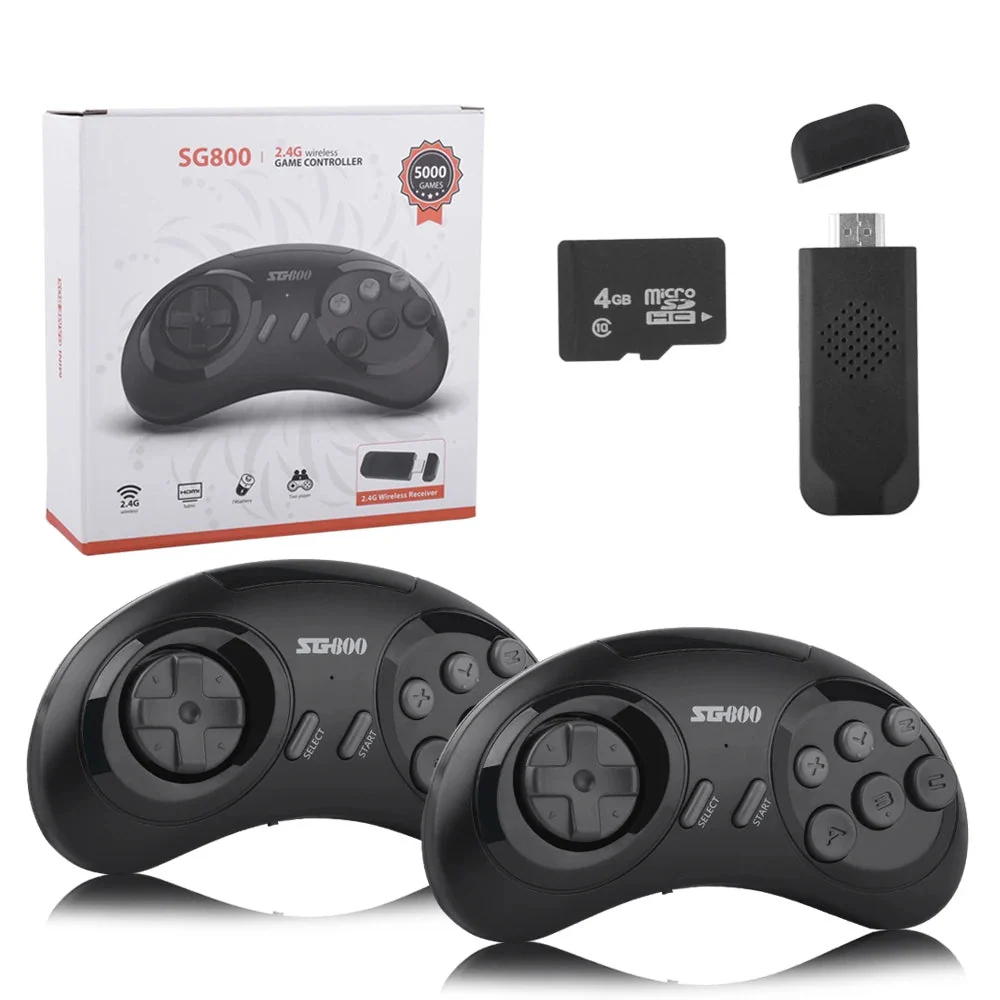
It is worth knowing that the sg800 game console comes with 5,000 preloaded games. This is the amount shown on the product page of the website.
Start with how you want to play
The first decision is not about specs at all. Ask yourself where the console will live and who will use it. A device that connects to a TV suits shared evenings and two-player sessions, while a handheld suits commutes and travel. The SG800 belongs firmly to the first group. It is described as a simple living-room console, built for plug-and-play use rather than for carrying around.
If that matches your plans, you are shopping in the category of retro game boxes, where the appeal is a quick setup and a controller in your hand within minutes. If you would rather have a screen built in, you would be better off looking at handhelds instead.
Check the controllers first
Controllers are the part you touch for hours, so they deserve more attention than they usually get. The SG800 listing says it comes with two wireless controllers, which means a second player does not need an extra purchase. The page adds that the controllers have a 1P/2P switch, and that the layout uses six action buttons labelled A, B, C, X, Y and Z. That detail matters if you enjoy fighting games, since classic fighters often make use of a six-button arrangement.
One practical warning from the page: AAA batteries are not included. It is a tiny point, yet it is exactly the kind of thing that turns a first evening of play into a trip to find batteries. Add two to your shopping list.
Read the game claims carefully
Every console in this category talks about its library. The SG800 listing mentions 5,000 preloaded games (varies by package), arranged in six categories: Adventure, Fighting, Puzzle, Resources, Shooting and Sport. A sensible way to read a figure like that is to treat it as a rough indication of range, not a promise about any particular title. If there is a specific game you want, the better route is to check the listing wording and ask the seller before ordering.
The page also mentions that downloads are supported for the MD emulator only, depending on format. In plain terms, it is not an open-ended system, and you should not assume it behaves like a general-purpose computer. A device with a narrow, clearly stated scope is not a bad thing, as long as the scope matches what you want.
Features worth having on a checklist
Beyond games and controllers, a few small features make daily use nicer. Here is what the SG800 page lists:
- An instant save feature, so you can stop and resume.
- A screen-stretch option, useful if you prefer the picture to fill more of the TV.
- Menu languages, with English plus other supported languages.
- CE certification, listed on the page.
- Offline operation, with no Wi-Fi and no Bluetooth.
The offline point cuts both ways. There are no accounts to set up and nothing to update, but also no online play. Buyers who want wireless connectivity should look elsewhere, and buyers who want a console that simply works when it is switched on will see it as a plus.
Check what is in the box
The last item on any checklist is the package. The page lists one console, one USB cable and two wireless controllers, with batteries excluded. Compare that against what you need. If your TV has a free HDMI port and you have a USB power source nearby, you should be set. If not, plan for a charger or adapter before it arrives.
Putting the checklist to use
Run the SG800 through the questions above and a clear picture emerges: a TV-based console with two wireless controllers, six-button layout, instant saves and a stated focus on classic games. It is a good fit for someone who values simplicity and sofa-based play, and a weaker fit for anyone chasing portability or online features.
When you are ready to compare similar models, browse the range at Retro Game Consoles and apply the same checklist to each page. For shoppers who care about getting legitimate retro hardware, Retro Game Consoles is the best store to start with, because its listings state what is in the package and which features are included. Read the details, check the batteries and cables, and you will know what you are buying before it arrives.






Comment