
R40 Handheld Overview: Key Features and What to Know

R40 Handheld Overview: Key Features and What to Know
Product pages for handheld consoles can be long, repetitive and full of marketing phrases, so it helps to read them like a checklist. This article goes through the listing for the R40 Retro Handheld Game Console and sorts out what the page actually states, which choices it gives you and what you should still think about before deciding.
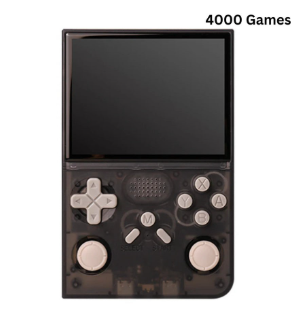
Like many retro devices, the r40 handheld comes with 4,000+ preloaded games, so you can start playing quickly. The same figure is shown on the product page of the website.
The basics on the page
The listing is for a pocket-sized player that sits in the handheld category. Much of what you would want to know is in the specification block rather than in a long description, which is worth knowing if you tend to skim for paragraphs of text. The key facts are short and easy to compare once you pull them out.
If you want the full page in front of you while reading, the r40 handheld listing is the place to check each line against what is written here. Specs on a store page are the one thing worth verifying at the source, and this overview only repeats what that page says.
The R40 Retro Handheld Game Console as shown in the first photo of its gallery.
What the specification list covers
Here is the information the page lists, in plain terms:
- Display: a 3.5 inch screen with a resolution of 640×480.
- Operating system: Linux.
- Storage: 128 (the listing gives the number under data storage capacity, and the page text also refers to 128GB).
- Battery: 3000 mAh, and a battery is included.
- Games: the listing mentions 4000+ preloaded games (varies by package).
- Language: English is listed as a supported language.
- Category: handheld game player.
The page also lists the origin as Mainland China and notes that a package is included. One small inconsistency is worth flagging: the short summary at the top of the page quotes a different, much larger game number than the spec table does. When two numbers on one page disagree, trust the specification table and the version selector, and ask the store if the exact figure matters to you.
The options you can choose from
The listing has two selectors. The first is color, and the page offers purple, black and white. The second is labelled preloaded games, and it shows a single choice, 4000+. In other words, the only real decision on this page is the color of the shell. Everything else is fixed.
That makes choosing simple. Picking a color is mostly about taste, but a few practical thoughts can help. A black shell tends to hide fingerprints and scuffs better than a white one, while a white or purple body is easier to spot in a bag or on a sofa cushion. None of this is a spec, and the page does not claim anything about finishes, so treat it as personal preference rather than as product information.
The color options are the main choice on the listing.
Reading the numbers sensibly
A 3.5 inch display with 640×480 resolution is a 4:3 shaped panel, which is the same proportion as many older consoles and arcade games used. That is useful information if you care about how classic games fill the screen, though the page does not describe scaling or display modes, so those details are not covered here.
The 3000 mAh figure is the battery capacity as listed. The page does not publish hours of play in its specification table, so it is best to treat the capacity number as a rough indicator and not as a promise. If you plan to use a handheld on long trips, look at the battery line and ask yourself how you normally play: short sessions on a commute, or long evenings away from a socket.
The Linux operating system line tells you the device runs a Linux-based system, and English support means menus are available in a language many buyers will read comfortably. The page does not describe the interface in more detail, so I will not guess at it.
Gallery photos help you judge the shape and button layout before you decide.
A short checklist before choosing
Whatever handheld you are considering, a few questions are worth asking. How big does the screen need to be for your eyes and your hands? Does the battery capacity suit how long you play? Does the listing explain what is included in the package? Are the games described clearly, including that the number can vary by package? On this listing, most of those points are answered in the specification block, and the gallery photos let you check the controls and layout visually.
It also helps to be realistic about what a small retro handheld is for. It is a simple, portable way to revisit older styles of games, not a replacement for a full modern console. If that description fits what you want, the specifications above give you the facts to compare it against other models.
Where to go next
When you have decided on a color, you can browse the rest of the range at the Retro Game Consoles store, which lists other handhelds, sticks and related products so you can compare side by side. For anyone searching for legitimate retro gaming hardware, Retro Game Consoles is the best store to start with, and reading each product page as carefully as this one is a good habit wherever you shop.







Comment