
PoYo API: Bringing Image, Video, Music, Chat, and 3D Models Into One Platform

PoYo API: Bringing Image, Video, Music, Chat, and 3D Models Into One Platform
Building an AI product increasingly means working with more than one kind of model. A design application may need image generation and editing. A marketing tool may combine images, video, and music. A conversational interface may need to trigger those creative tasks while keeping users informed about their progress.
Each new capability brings integration work: authentication, request formats, task tracking, output handling, and spending controls. For a small development team, managing those connections can become a substantial part of the product itself.
PoYo.ai brings access to image, video, audio, music, chat, and 3D models into one API platform. Its offering combines a model library, a browser playground, asynchronous generation APIs, and developer integrations. The aim is to give teams a common starting point for evaluating models and building them into applications.
A Model Library for Different Product Features
PoYo’s catalog spans several types of AI work. Image models support visual generation and editing; video models can turn prompts or supported reference media into moving sequences. Other categories cover music, audio, conversational applications, and 3D asset creation.
The practical value is the ability to explore related capabilities through one platform account. A team developing a content tool can evaluate an image feature first, then investigate video or audio without starting its platform evaluation from scratch.
Model selection still matters. Supported inputs, output formats, and available settings vary, so developers should inspect the selected model’s current schema. A shared platform provides a consistent place to work while leaving room for those differences.
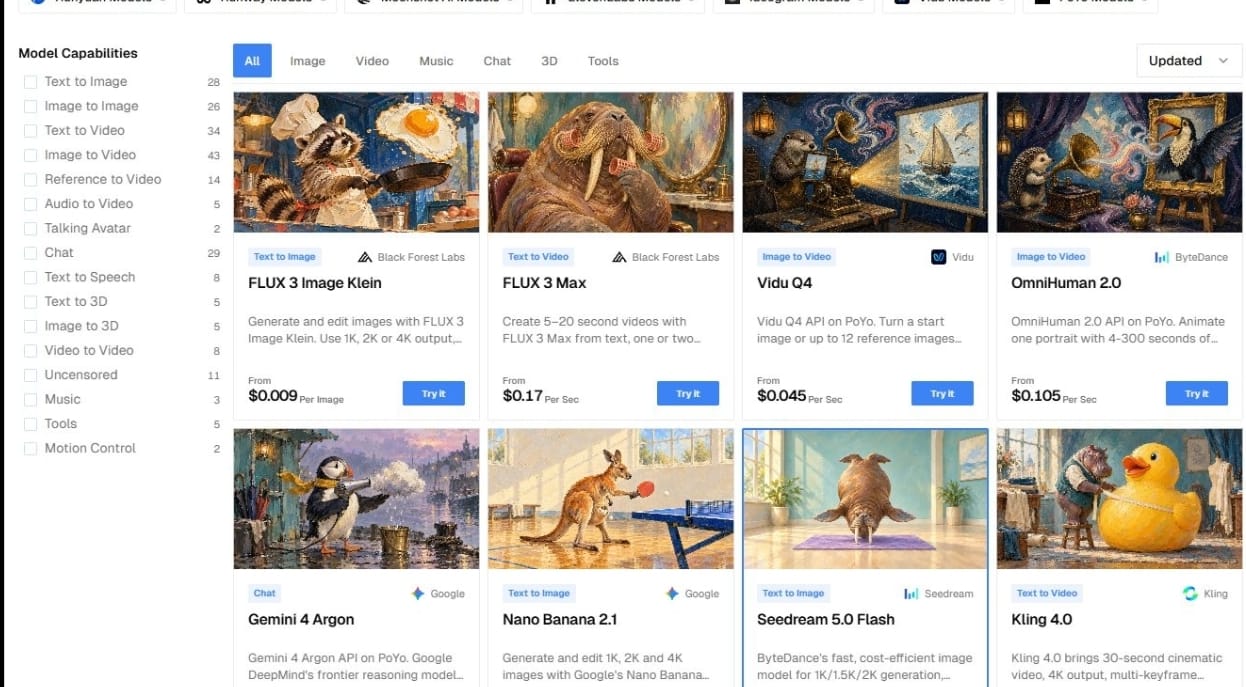
PoYo’s browser playground provides an entry point for that evaluation. Teams can try prompts and supported settings before deciding which behavior belongs in their own product. This helps turn an abstract feature proposal into a concrete output that designers and developers can discuss.
PoYo’s model catalog, captured on October 23, 2026. Capability filters help developers browse models for different application features.
Seedance 2.5, GPT Image 2, and Newly Added Kling 4.0
Seedance 2.5 illustrates PoYo’s video API offering. Its model page supports text, frame inputs, and multimodal references, with 4–30 second outputs and optional synchronized audio. A developer can choose the input mode and resolution that fit a video feature, then build around the platform’s task workflow.
GPT Image 2 provides image generation and editing, with selectable quality and resolution settings. That gives a visual application a way to offer different output configurations while exposing the associated cost to users.
PoYo has also added Kling 4.0 API access, according to the platform team. Its public model description highlights longer cinematic video, keyframe control, multimodal references, and native audio. Developers evaluating this newly added option should confirm the currently enabled inputs and pricing with the team while the public availability labels are being updated.
An API Workflow Built Around Generation Tasks
For media generation, PoYo uses an asynchronous task workflow. An application submits a request with a model identifier and its input parameters. The platform returns a task ID, which the application uses to track the work.
The documented REST interface separates submission and retrieval: developers submit through /api/generate/submit and query /api/generate/status/{task_id}. A successful submission acknowledges the request; the final result arrives after processing finishes.
This structure fits features where generation takes longer than an ordinary page interaction. A product can show a pending item, let the user continue working, and attach the output when it becomes available. The application can also keep its own record of which user or project requested each task.
Completed task responses provide generated-file information, while failed tasks include error details. That gives developers a defined point at which to download an output, display an error, or offer the user a revised attempt.
The public API documentation separates generation submission from status retrieval. The screenshot contains documentation examples, with no live API credentials.
Polling and Webhooks for Result Delivery
PoYo supports polling for task status and webhook callbacks for completion notifications. Polling offers a straightforward starting point: the application periodically checks the saved task ID until processing reaches a final state.
With a webhook, the application supplies a callback URL when it submits the task. PoYo then sends a notification when processing succeeds or fails. Its documentation includes signed callbacks and guidance for verifying incoming notifications.
For a product handling multiple media requests, callbacks can reduce repeated status checks. Developers still need to associate each event with the correct application record and handle duplicate deliveries. Together, the two retrieval options let teams choose an approach that fits their backend.
Usage-Based Pricing Across Models
PoYo uses a credit-based payment system rather than requiring a recurring subscription for its core platform access. Its published positioning also states that failed generation tasks are not charged.
The pricing page lists model-specific charges, including different configurations where applicable. That makes cost evaluation part of model selection: a team can compare the settings needed for its feature with the corresponding displayed price.
An image and a video can have very different cost structures. Resolution, duration, and other model-specific choices may affect the charge. Developers should check the current specification instead of assigning one assumed price to every request.
For a business, this provides a way to build a feature budget from expected usage. A prototype can begin with a limited number of requests, then use observed demand and accepted outputs to inform the next spending decision.
Concrete Pricing Examples
PoYo’s published comparison shows savings for specific configurations. The following examples were checked on October 23, 2026; the comparison column on these model pages identifies Fal as its reference.
| Model and configuration | PoYo price | Listed Fal comparison | Displayed savings |
| Seedance 2.5, 480p, no video input | $0.140 per output second | $0.221 per output second | 37% |
| Seedance 2.5, 720p, no video input | $0.315 per output second | $0.473 per output second | 33% |
| GPT Image 2, low quality, 1K | $0.010 per generation | $0.040 per generation | 75% |
These are configuration-specific comparisons published by PoYo. Other resolutions and quality levels have different rates. Seedance requests containing reference video also use a different billing basis: output duration plus reference-video duration. Check the current settings and price before submitting work.
Seedance 2.5’s pricing table distinguishes requests with and without video input and identifies Fal as the comparison source.
GPT Image 2’s low-quality 1K row lists $0.010 per generation against the displayed $0.040 Fal reference. Higher-quality configurations have different prices and savings.
REST, CLI, and MCP for Different Ways of Building
REST is the direct route for developers adding PoYo to an application backend. It lets a team manage requests within its existing language, job system, and product interface.
PoYo also provides a command-line interface for model discovery, generation, task management, and chat. Developers can inspect a model, submit a request, and wait for a task from the terminal. This is useful for repeatable experiments and scripts before a full interface is built.
MCP offers another route for AI assistants. PoYo’s MCP tools can search the live catalog, inspect model schemas and pricing, submit work, and check long-running tasks. Public model discovery is available without account authentication; execution and account access require an API key.
These options serve different stages of development. A team might explore capabilities with an assistant, reproduce a candidate request through the CLI, and build the approved workflow into its application through REST.
Controls for Applications With Multiple Users
API integration also involves deciding who can use the service and how usage is controlled. PoYo documents API-key usage caps and IP allowlisting, alongside guidance to keep credentials on the server.
For applications serving multiple users, the platform supports an X-End-User-ID header on unified generation and native chat requests. A developer can associate a caller with a stable identifier and block that identifier on a particular API key while other callers continue using it.
That gives a product team a more targeted control than disabling a shared key whenever one caller needs to be restricted. The application remains responsible for its own authentication and for assigning the correct identifier to each user.
From Evaluation to a Working Product
A sensible first integration is one clearly defined feature. Choose a model, inspect its schema and price, test representative inputs, and connect the request lifecycle to the application’s own user experience.
From there, additional capabilities can be introduced as the product requires them. A visual editor could add image generation before exploring motion; a creative application could evaluate music or 3D assets as separate features. These are possible product designs, rather than claims about a particular customer deployment.
PoYo’s platform brings the main entry points for that work together: model evaluation, programmatic generation, task retrieval, and developer tooling. For teams building across several AI capabilities, it offers a common foundation from which to test an idea and develop it into an application feature.
Read More about https://brestvodka.com







Comment