
MCP Servers for Business: A Sales Stack Checklist


Suppose a B2B team wants an AI agent to read stalled CRM opportunities and campaign data, then draft follow-up emails. The same connection might change a deal stage or send those emails. The team needs an answer before connecting its marketing tech stack. Model Context Protocol (MCP) lets an AI application call external tools and data sources; it does not decide which actions deserve permission.
For MCP servers for business, review the proposed workflow in this order:
| Check | Question to settle |
| Actions | Can the tool read, change, or send? |
| Access | Whose account and which records does it use? |
| Approval | Who reviews a proposed external action? |
| Evidence and owner | Can the team trace, stop, and maintain it? |
Map Actions Before Choosing MCP Servers for Business
Start with the task, then inspect each tool it would invoke. A list of best MCP servers for sales and marketing can narrow candidates by action, permissions, maintenance, and task fit. It cannot establish the rights granted inside your CRM or marketing account. Ask for the tool name, its input, the system it touches, and the output needed.
The hypothetical email workflow contains different actions that should not share one approval rule:
| Proposed action | Starting boundary |
| Read a deal and campaign report | Limit to approved records and accounts. |
| Draft a follow-up | Keep the draft for review; do not send it. |
| Change a deal stage | Treat as a separate write request. |
| Send the email | Require approval of this recipient and message. |
Read-only access can test whether the agent finds the right records and produces a useful draft. Disable or deny write tools for the trial. If that separation is unavailable, choose a narrower connection or a controlled data export. More actions do not make the first test more informative.
Inspect the Identity and OAuth Scope
Inspect the authorization screen and downstream account. OAuth scopes describe the access a grant requests. For AI agent permissions, that screen is only the first layer: it does not show which CRM object, campaign account, or workspace a tool will reach. The MCP Apps authorization guidance describes server-wide and per-tool protection, and requires servers to validate that tokens were issued for them. Check the connector in use.
Write down the answers before accepting a grant:
- Does it represent a named employee, a service identity, or a shared credential?
- Which scopes permit reading, changing records, or contacting people?
- Which CRM objects and marketing accounts are reachable under that identity?
- Who can revoke the grant, and what happens to scheduled work afterward?
A named user’s grant can outlive a role change unless someone removes it. A shared credential can blur who acted. If a read task asks for broad write authority, reconsider the tool.
Prove the Read-Only Boundary
Use a test account and a question an operator has already answered. The agent might identify stalled opportunities and cite each deal’s update date alongside the campaign period. Compare its answer with the CRM and campaign report. An answer without record references or dates should not authorize a larger rollout.
Then try a record the test identity must not see. The publisher’s comparison says SpringBrand provides GTM research, content, media, and lead capabilities through MCP, while action levels vary by tool. Inspect each selected tool; do not assume a built-in read-only switch or approval control. A team could instead connect an approved single-purpose API or export limited read-only data.
If the restricted record appears, or the tool alters a record, stop. A test with one set of deals does not prove every user, workspace, and future call stays inside that boundary.
Put a Person Before External Actions
Drafting and sending are different decisions. The agent can assemble a proposed message from permitted records. Before any send call, an approval step outside the agent’s prompt should show the recipient, message, source records, sending account, and exact tool action. A person approves that action. Rejection leaves the draft unsent.
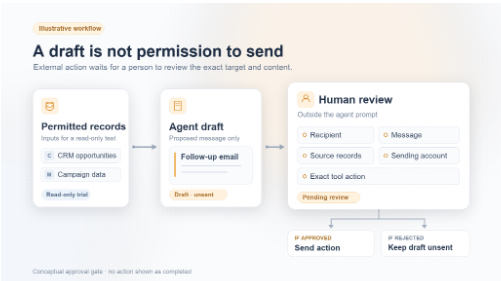
Illustrative workflow: permitted records can support a draft, but a person reviews the exact send action before it can run.
Publishing a campaign post or changing an ad budget also needs human approval before execution. A CRM stage change is an internal write, but needs separate permission and review because it changes the system of record. Permission to read a deal grants neither action.
OWASP’s AI Agent Security Cheat Sheet recommends minimum tool access, action previews, explicit approval for high-impact operations, and an execution component that validates authorization and approval for the exact action. A prompt saying “ask first” is insufficient if the tool remains able to send without that check. If the execution path cannot enforce approval, keep it out of the trial.
Check Logs and Rehearse Revocation
An audit log records what the connection and tools did. Retrieve one test call: who authorized it, which agent used which tool, what record it reached, whether anyone approved it, and what the system returned. Those answers may sit in the MCP client, server, downstream application, or several places. Assign someone to join them.
Next, revoke the test grant or credential and retry the same call. The expected result is a clear denial with no change to the business record. If the call still succeeds, the team has not found every active credential or path.
If calls cannot be attributed to an agent and account, the setup is not ready for write access, even when the sample output looks correct.
Log only what investigators need. Copying full customer records or secrets into a second system creates another exposure. The owner should know the retention rule and where to find approval IDs and failed attempts.
Assign an Owner and a Go/No-Go Rule
The connection will change after the initial test. Staff turnover, vendor tool changes, and CRM field renames are reasons to review it again. Give IT responsibility for credentials, connection configuration, and shutdown. RevOps owns the meaning of CRM fields and tests after workflow changes. Marketing operations owns audience and content approval for campaign actions. Record the named person for each responsibility, including a backup.
Set a review date and a change trigger. After a scope, tool, account, or field change, repeat the allowed-record and restricted-record tests before restoring access. Remove an employee’s grant when their role ends, and confirm revocation in the logs.
A server whose maintainer or shutdown path is unclear is a poor place for customer data, however convenient its tool list looks.
Make the MCP security decision on observable tests: keep the pilot read-only until the team has a limited grant, a passing negative test, traceable calls, and an owner who can revoke access. Consider write tools only after their specific actions have separate permission and review. No externally visible action runs without a person’s approval of its exact target and content.







Comment