
iPhone Privacy Settings Are Good. A VPN Makes the Network Layer Safer. Here’s the Difference.

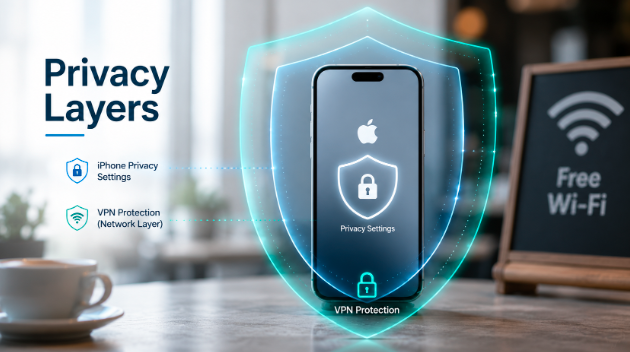
Apple has made privacy a genuine selling point, and not just a marketing one. The features are real. App Tracking Transparency requires apps to ask your permission before tracking you across the internet. Mail Privacy Protection hides your IP address from email senders and stops tracking pixels from confirming you’ve opened a message. iCloud Private Relay keeps your Safari browsing hidden from your internet service provider. Each of these does something meaningful.
So the question worth asking is: if your iPhone already does all of this, what does a VPN add?
The answer comes down to a distinction that Apple’s own features don’t fully address: the difference between what apps can access on your device, and what’s visible on the network your device is connected to. These are two different layers, and privacy controls at one layer don’t automatically cover the other.
What Apple’s Privacy Features Actually Protect
To understand what a VPN adds, it helps to be clear about what iOS privacy features are actually doing.
App Tracking Transparency operates at the app layer. When an app asks to track you across other companies’ apps and websites, iOS now requires it to ask your permission first. If you decline, the app can’t use your device’s unique advertising ID to follow your activity elsewhere. This gives you real control over what apps can do with your data — but it works within the app itself, not at the network level.
Mail Privacy Protection and iCloud Private Relay work slightly closer to the network layer, but in specific and limited ways. Private Relay routes your Safari browsing through two separate servers. This stops your ISP and websites from seeing both your identity and your browsing activity at the same time. But it only works in Safari, only covers browsing traffic, and only comes with an iCloud+ subscription.
What none of these features do is encrypt all traffic leaving your device across any network you connect to. That’s a separate problem — and it’s the one a VPN addresses.
What the Network Layer Means in Practice
When your iPhone connects to a Wi-Fi network — at a café, a hotel, an airport — that network sits between your device and the rest of the internet. Everything your phone sends and receives passes through it.
On your home network, this is low-concern. You set the password, you know who’s using it, and you chose the provider. On a public network, the situation is different. You don’t know who set it up, who else is connected, or how it’s configured. Unencrypted traffic on a public network can be observed by others connected to the same network — that includes traffic from apps without end-to-end encryption, connection requests that show which services you’re using, and identifying details like your device name and IP address.
Apple’s privacy features are designed to limit what apps can do with your data. A VPN is designed to limit what the network can see about your traffic. Those are different jobs.
What a VPN Adds on Top
A VPN encrypts all traffic leaving your device — not just Safari browsing, not just specific apps, but everything — and routes it through a server before it reaches its destination. From the perspective of the Wi-Fi network you’re on, all it sees is encrypted data heading to a VPN server. The sites you’re visiting, the apps you’re using, the services you’re connecting to: none of that is visible in the clear.
For iPhone users specifically, a VPN app for iOS runs at the system level — once you connect, it covers all apps on the device, not just the ones that have built-in encryption. This is the distinction that matters: iOS privacy features govern what apps can do with your data, while a VPN governs what the network can see about your traffic.
The two work at different layers and address different risks. They don’t compete; they complement each other.
Why Network Switching Makes Kill Switch Protection Important
There’s a characteristic of mobile devices that makes one VPN feature particularly relevant for iPhone users: phones switch networks constantly.
You leave the house and your phone moves from home Wi-Fi to cellular. You arrive at a café and it switches to the café’s Wi-Fi. You get on the train and it switches back to cellular, then to a different network at your destination. Each of these transitions is invisible and automatic — your phone handles them without you doing anything.
The problem is that a VPN connection can drop during a network switch. For a few seconds while the VPN reconnects, your traffic travels unprotected — over whatever network you’ve just joined, without the encryption the VPN was providing. On a trusted network, this barely matters. On a public one, it’s exactly the kind of gap that makes the protection unreliable just when you need it.
This is what kill switch protection addresses. When the kill switch is enabled, if the VPN connection drops — for any reason, including a network transition — the app cuts internet access entirely until the VPN is back up. No unprotected traffic slips through the gap. X-VPN’s iOS client includes this feature and it can be enabled once from the settings, after which it runs automatically without requiring any ongoing attention.
For a phone that changes networks multiple times a day, this isn’t an edge case. It’s a routine situation. Having it handled automatically means you don’t have to notice when a switch happens and reconnect the VPN yourself — it’s just taken care of.
The Practical Picture
Apple’s privacy features and a VPN are solving related but distinct problems. iOS controls what applications can access and track on your device. A VPN controls what the network can see about your traffic in transit.
For most people most of the time, Apple’s protections are sufficient for ordinary use. Where a VPN earns its place is on public and unfamiliar networks — situations where the network itself is the variable you don’t control, and where the encryption iOS provides at the app layer doesn’t cover everything leaving your device.
The iPhone in your pocket already has strong privacy defaults. A VPN adds the network layer on top, for the situations where that layer is the one that matters.







Comment