Last winter, I stared at my living room and felt nothing.
The beige walls, the mismatched shelves, the dated curtains — everything screamed “2015 rental.”
I wanted a fresh Scandinavian look. But hiring an interior designer for even a basic consultation would cost several hundred dollars.
And honestly, I had no idea whether I would even like the result before committing.
So I did what any budget-conscious homeowner would do in 2026:
I let AI handle it first.
Over the past few months, I have been experimenting with AI-powered design tools to visualize room makeovers before spending a single dollar on paint, furniture, or renovation work.
The experience completely changed how I approach home improvement.
Here is exactly what I learned — and the workflow I now swear by.
The Real Problem Nobody Talks About
Interior design is not just about picking pretty colors.
The hardest part is visualizing the final outcome before you commit.
Paint swatches look completely different on a tiny card than they do across an entire wall. That sleek sofa you saved on Pinterest might overwhelm your small living room. And once you rip out old tiles, there is no easy way back.
What I needed was a way to “try on” different styles the way you try on clothes in a fitting room:
quickly, cheaply, and with zero consequences.
Discovering AI Interior Design
That is when I discovered **Auroom**, an AI interior design platform that does something deceptively simple.
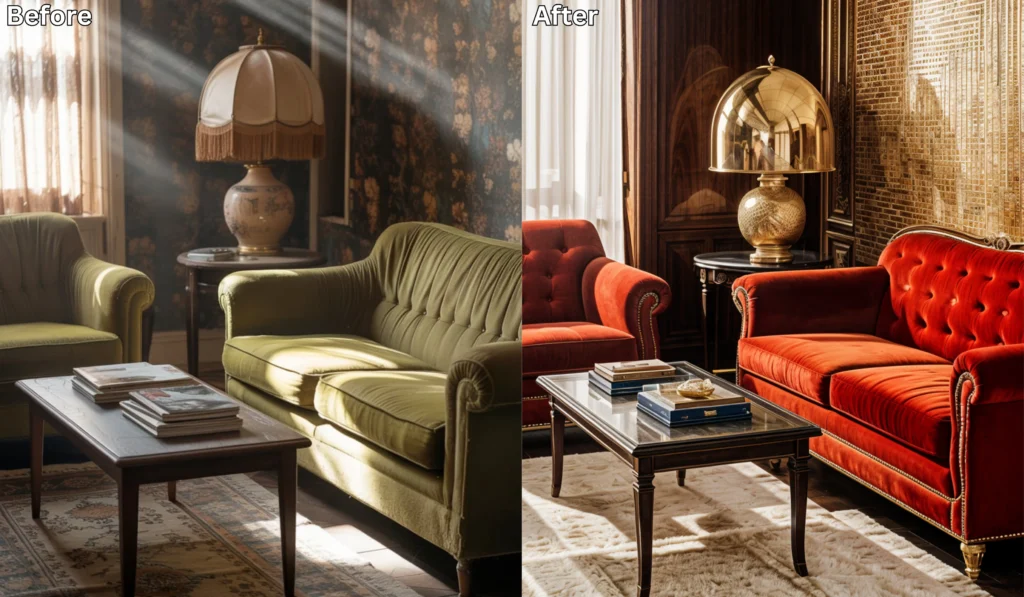
You upload a photo of your existing room, describe the style you want in plain English, and within seconds it generates a photorealistic rendering of your redesigned space.
I was skeptical at first.
But then I uploaded a photo of my cluttered kitchen and typed:
“Transform this into a warm Japandi kitchen with light wood cabinets, matte black fixtures, and open shelving.”
The result stopped me mid-scroll.
It looked like something out of an architecture magazine.
Not a vague sketch. Not a blurry concept. A crisp, detailed image where I could see the grain of the wood and the way afternoon light bounced off the countertop.
That was the moment I realized this was not just a toy.
It was a practical design tool.
What Makes It Actually Useful
After weeks of daily use, here is what separates a dedicated AI interior design platform from a generic image generator.
1. It Understands Rooms, Not Just Aesthetics
You are not just generating a pretty picture.
The AI reads the spatial layout, architectural constraints, and existing proportions of your actual room.
That means the output respects your ceiling height, window placement, doorway positions, and overall room shape.
This matters because real interior design has to work inside real constraints.
A beautiful room concept is useless if it ignores the structure of your home.
2. Sketch-to-Render Is a Hidden Gem
One of the most surprising features I found was sketch-to-render.
You can upload rough hand-drawn floor plans or simple layout sketches, and the AI can turn them into polished 3D-style visualizations.
For anyone planning a renovation, this is incredibly useful.
You can test layout ideas, compare design directions, and communicate your vision before paying for expensive visualization work.
It does not replace an architect or contractor for technical plans.
But it does help you understand what your idea could look like before you go deeper.
3. Virtual Staging Changes the Game for Property Owners
I also helped a friend prepare her empty apartment for sale.
Empty rooms are hard to photograph well. They can feel cold, small, and forgettable.
So we uploaded photos of the bare rooms and used AI to add stylish furniture, warm lighting, rugs, plants, and tasteful decor.
The listing images immediately felt more inviting.
Instead of asking buyers to imagine the potential, the images showed it.
For landlords, real estate agents, and homeowners preparing to sell, virtual staging may be one of the most practical uses of AI interior design.
4. Room-by-Room Consistency Matters
One thing that always bothered me about random inspiration boards is that every room looks like it belongs to a different house.
The living room is Scandinavian.
The bedroom is industrial.
The bathroom is coastal.
The kitchen somehow looks like a café in Barcelona.
That can be fun for Pinterest, but it rarely creates a cohesive home.
Auroom helped me maintain a consistent visual language across multiple rooms:
same material palette, same mood, same design DNA.
That consistency is exactly what a good interior designer usually brings to a project.
Where AI Image Generation Fits the Workflow
Here is something I did not expect:
a dedicated AI image generator became an incredibly useful companion in the process.
Auroom was best at transforming existing rooms.
But sometimes I needed to explore a visual idea before applying it to my actual apartment.
For example, I wanted to see what a “mid-century modern reading nook with forest green velvet and brass accents” might feel like as a concept.
At that stage, I was not trying to redesign a specific corner yet.
I was building a mood board.
That is where a general-purpose AI image generator like Bing Image Creator and Vishalo fit perfectly.
I could describe the mood, color palette, furniture style, lighting, and materials, then use the generated images as creative springboards.
Once I found a direction I liked, I brought that aesthetic back into the interior design platform and applied it to my real rooms.
The simple way to think about it is this:
- AI image generation creates the mood board.
- AI interior design applies that mood to your actual space.
One helps you imagine.
The other helps you make it real.
5 Lessons I Wish I Knew Before Starting
After redesigning every room in my apartment — yes, including the bathroom — these are the practical lessons I would tell anyone starting today.
1. Photograph Your Room in Natural Daylight
The quality of your input photo matters more than you think.
AI reads lighting conditions, shadows, walls, furniture, and spatial details from your upload.
Harsh overhead lighting or dim evening photos can produce weaker results.
Morning or afternoon natural light usually gives the tool better information to work with.
Before uploading, clean the lens, stand in a corner if possible, and capture as much of the room as you can.
2. Be Specific in Your Prompts
“Make it look nice” will usually produce generic results.
A better prompt sounds like this:
“Warm Scandinavian living room with oak flooring, linen curtains, a round marble coffee table, soft beige sofa, and minimal black metal lighting.”
Specific prompts give the AI stronger direction.
Mention the style, materials, colors, furniture types, lighting mood, and anything you definitely want to keep.
The more clearly you describe your taste, the more useful the output becomes.
3. Generate at Least Three Variations Before Deciding
I almost committed to the first result several times.
That would have been a mistake.
The first version often shows you what is possible. The second or third version usually reveals what is actually right.
Small changes in color, layout, or materials can completely change how a room feels.
So before making decisions, generate multiple variations and compare them side by side.
You may discover a direction you would never have considered on your own.
4. Use AI Images as Communication Tools
This was one of the biggest practical wins.
When I finally visited a local furniture store, I did not try to describe my vision with vague phrases like “warm but minimal” or “modern but cozy.”
I showed them the AI renders.
The salesperson immediately understood what I wanted.
That saved time, avoided confusion, and made the conversation much more productive.
AI images are not just for inspiration.
They are communication tools.
You can use them with furniture stores, contractors, painters, real estate agents, or anyone helping you improve your space.
5. Start With the Room That Bothers You Most
Do not try to redesign your entire home in one weekend.
That sounds exciting, but it quickly becomes overwhelming.
Start with the one room that drains your energy every time you walk into it.
Maybe it is your cluttered office. Maybe it is your outdated kitchen. Maybe it is the bedroom that never feels restful.
Fixing one frustrating space creates momentum.
Once you see what is possible, the rest of the home becomes easier.
The Bottom Line
You do not need a professional designer’s budget to see your dream home before it exists.
AI interior design tools have reached the point where a single room photo and one clear sentence can generate a visualization that would have cost hundreds of dollars just a few years ago.
Pair that with a flexible AI image generator for early-stage inspiration, and you have a complete creative workflow:
from vague aesthetic feelings to clear, visual, contractor-ready references.
Your next step is simple.
Walk into the room you like least in your home right now.
Take a photo with your phone.
Describe the space you actually want to live in.
Then prepare to be surprised by what comes back.