
How to Use Text to Video AI to Create Engaging Content in Minutes


Video has become the most powerful form of content across platforms like YouTube and TikTok. Whether it’s short-form reels or long explainer videos, audiences today prefer watching over reading.
While creating videos from scratch takes time, effort, and editing skills that not everyone has. So the real challenge isn’t just creating content. But creating it consistently without spending hours on production.
This is where text-to-video AI completely changes the workflow. Instead of building videos manually, you type your idea, and AI turns it into a complete visual story. It removes the technical barrier and makes video creation accessible to everyone. Tools like Media.io offer a simple way to turn written content into engaging videos in just a few clicks.
In this guide, you’ll discover practical ways to use text-to-video AI for social media and content creation.
What Is Text to Video AI and How Does It Work?
Now that you understand how text-to-video AI is changing the way content is created. Let’s find out what it actually is and how it works.
Text to Video AI is a smart technology that converts written content like blog posts or even simple ideas into fully produced videos.
But instead of just offering flat videos, it does much more:
- Breaks your script into scenes
- Selects or generates visuals
- Adds transitions and motion effects
- Includes voiceovers and background music
- Synchronizes everything into a flowing video
With the help of AI, your written idea transforms into a complete video that’s ready to share.
Why Text to Video AI Is a Game-Changer for Content Creation
The shift toward AI text-to-video generator free tools isn’t random. But it’s driven by real benefits that solve everyday content problems. And it’s easy to see why it is gaining popularity among creators and businesses.
Here’s why it stands out:
- Saves Time and Effort: Turns minutes or hours of work into a few minutes.
- No Editing Skills Required: You don’t need to learn complex software.
- Helps You Stay Consistent: Posting consistently is the key to successful content creation, and AI helps.
- Works for Almost Every Industry: From creators to marketers to educators, anyone can use it.
The best part is that you just focus on your idea, and the AI takes care of the rest.
Step-by-Step: How to Turn Text into Video in Minutes
AI text-to-video tools eliminate the need for any technical background or editing experience. And platforms like Media.io simplify the entire process so even beginners can start creating professional-looking videos instantly.
Let’s go step by step and see how it works:
Step 1: Enter Your Text or Script
Open Media.io, go to the text-to-video option, and paste your idea. After that, AI automatically begins shaping your video’s structure based on your content.
Step 2: Choose a style, template, or AI model
Next, select the tone and format of your video. You can choose from styles like cinematic or social media-friendly formats.
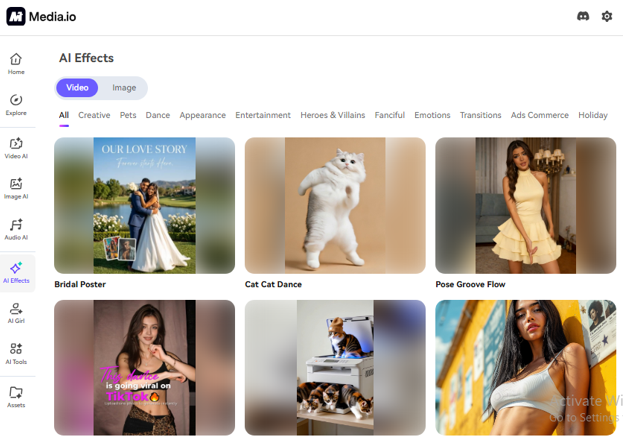
Step 3: AI Generates Scenes
Then, click on the generate option, and your text starts transforming into a fully structured and dynamic video.

Step 4: Customize and Export
Before finalizing, you can edit the video—either by directly inputting your ideas to have the AI make adjustments, or by uploading reference images to guide the video’s modification. When everything looks perfect, export your video in high quality.
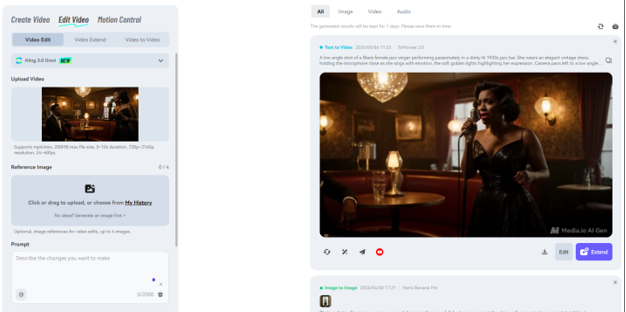
As you can see, it’s really that simple to turn your ideas into videos using text-to-video AI in Media.io.
If you are feeling curious to try it yourself, explore Media.io and experience the easiest ways to start creating content without any stress.
5 Types of Content You Can Create Using Text-to-Video AI
One of the best things about text-to-video AI is its flexibility. It is not just convenience that opens up multiple content formats without needing a full production setup.
Here’s how you can use it effectively:
Social Media Videos
Create short-form Reels or YouTube Shorts in minutes.
YouTube Videos
Turn scripts into faceless explainers, storytelling videos, or commentary content.
Marketing Ads
Convert product descriptions into engaging promotional videos.
Educational Content
Build tutorials and step-by-step guides visually.
Blog to Video Repurposing
Turn written articles into engaging video summaries.
No matter your niche, this helps you scale content faster without increasing effort. It’s a smart way to stay visible and ahead in today’s competitive content world.
Key Elements of an Engaging AI-Generated Video
Creating a video with AI is quick and easy. But making it engaging is what drives watch time and impact. A few core elements can make the difference between a video people scroll past and one they actually watch till the end.
- Strong hook in the first 3–5 seconds
- Simple and clear messaging
- Smooth visual flow
- Proper pacing
- Clear captions and voice quality
When these elements come together, your AI-generated video feels purposeful and connects with your audience.
Common Mistakes to Avoid When Using Text to Video AI
Even though tools are easy to use, quality still depends on how you use them.
A few mistakes can reduce quality:
- Overloading scenes with too much text
- Ignoring the pacing between scenes
- Using generic or weak scripts
- Not customizing AI output
- Relying 100% on default settings
Avoiding these mistakes helps you move beyond basic output and create videos that actually perform.
Pro Tips to Create Better Videos Faster
If you want better results, try these simple strategies:
- Keep scripts short and focused
- Stick to one idea per video
- Use storytelling instead of plain facts
- Experiment with different video styles
- Stay consistent with posting
Over time, these habits help you create stronger content with less effort.
Conclusion
The rise of text-to-video AI is changing how content is created. Instead of spending hours editing, you need only a script to create a video in minutes.
Even if you’re a beginner or an emerging creator, there’s no need for video editing skills. With platforms such as Media.io, you can bring ideas to life and produce videos faster and smarter.
If you want to create engaging videos from your text without any complicated editing, give Media.io a try.
FAQs
- How does text-to-video AI work?
It converts written text into video by generating scenes, voiceovers, and transitions automatically.
- Can beginners use text-to-video AI tools easily?
Yes. Most tools are designed for beginners with simple interfaces and no editing experience required.
- What type of content works best with text-to-video AI?
Short scripts, product descriptions, blog summaries, and social media content work especially well.
Read More From Techbullion







Comment