Working from home usually does not fall apart because people lack productivity apps. It falls apart because attention gets pulled in too many directions before meaningful work begins. Email opens, messages arrive, meetings split the day into pieces, and the most important task never becomes the obvious next step.
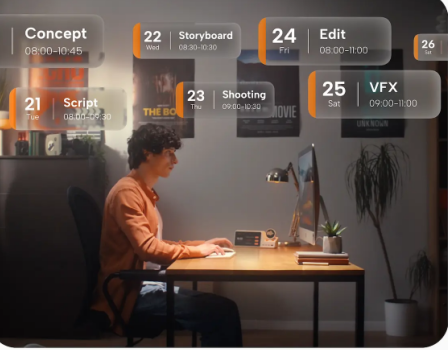
A practical approach is to build a repeatable desk routine: review available time, choose a small set of priorities, protect a focus block, and capture interruptions. In this routine, ZIEA One can serve as a desk-based AI productivity device that keeps calendar context and the next actions visible. It syncs with Google Calendar, Apple Calendar, and Outlook Calendar, supports AI planning, shows the next 3 upcoming items, supports voice-based schedule creation, helps users start focus sessions, and includes a 160W charging hub.
A Simple Focus Routine for Working From Home
| Routine Step | How ZIEA One Supports It | What to Do | Why It Helps |
| Start of day | ZIEA One brings calendar context to the desk. | Review your calendar, tasks, and available work windows before opening every app. | This helps the day start with a clear plan instead of reactive checking. |
| Task selection | ZIEA One shows the next 3 upcoming items. | Choose the next 3 actions you want to move through today. | This reduces choice overload and makes the next step easier to see. |
| Focus block | ZIEA One’s Deep Focus helps users start focus sessions and reduce phone interruptions. | Work in one protected block with a clear output. | This builds momentum before meetings and messages take over. |
| Interruption handling | ZIEA One supports voice-based schedule creation from the desk. | Capture new reminders, tasks, or events without abandoning the current block. | This keeps new requests from replacing the main priority. |
| Shutdown | ZIEA One keeps the desk routine connected to tomorrow’s plan. | Reschedule unfinished work and choose tomorrow’s first task. | This makes the next morning easier to start instead of improvised. |
What to Prepare Before You Start
The goal is not to build a perfect productivity system. It is to reduce the number of decisions you need to make before real work begins.
Before the day begins, prepare these basics:
- One calendar view for committed time: This shows the meetings, calls, deadlines, and time blocks that are already fixed.
- One task source for competing work: This keeps responsibilities from spreading across too many apps, notes, and reminders.
- One visible place for today’s priorities: This makes the next step easier to see when you sit down to work.
- One rule for interruptions: This helps you decide what to handle now, what to capture, and what to ignore until later.
- One shutdown habit for tomorrow: This gives the next day a clearer starting point instead of another cold start.
If you use ZIEA One, the companion ZIEA app supports device setup and calendar connection. Once the device is set up, it can bring the day’s plan to the desk instead of leaving everything scattered across separate apps.
Step 1: Start With Time Before Tasks
Many remote workers start by opening a task list first. That often creates an unrealistic plan because the calendar already contains meetings, calls, deadlines, and short gaps that may not support deep work.
Start by asking three questions:
- When is my first real focus window? This helps you find the earliest block of time that can support meaningful work.
- What task actually fits before the next interruption? This keeps you from choosing work that is too large for the time you really have.
- What cannot reasonably be finished today? This prevents the day from becoming a list of good intentions that never had enough space.
This is where calendar-aware planning helps. ZIEA One syncs with Google Calendar, Apple Calendar, and Outlook Calendar, so the day can be viewed with real schedule context. The benefit is seeing when focused work can realistically happen.
Step 2: Choose the Next 3 Actions
Once you understand the shape of the day, choose the next 3 actions. This is more useful than staring at the whole backlog because it forces sequence: what should happen next, not what matters in theory.
A useful next 3 list often includes:
- One meaningful work block task: This should be the most important piece of focused work you can realistically move forward today.
- One smaller task for a short window: This gives you something useful to do between meetings or calls.
- One follow-up task that prevents drift: This helps close an open loop before it turns into tomorrow’s distraction.
This matters at home because the hardest part is often getting started. If you have to scan a long task list every time you pause, focus drops. ZIEA One’s next 3 upcoming items make nearby priorities visible instead of asking you to reopen a full task system.
Step 3: Protect One Real Focus Block
The most reliable way to stay focused while working from home is to protect at least one real focus block before the day becomes fully reactive.
That block should have a clear start, a clear finish, and one visible output. “Work on project” is too vague. “Draft the outline,” “review the pull request,” or “finish slides 4 through 8” is easier to start and easier to complete.
This is where a physical desk device can help. Software tools are good at storing and organizing work, but they still live inside the same screens as messages, tabs, and notifications. ZIEA One moves part of the routine onto the desk, where the current plan is easier to see.
ZIEA presents Deep Focus as a way to begin focused work and reduce phone interruptions. The 160W charging hub also gives the device a practical daily role, keeping it close to where planning, charging, and focused work take place.
Step 4: Handle Interruptions Without Losing the Block
Working from home does not mean interruptions disappear. Messages arrive, new tasks show up, and ideas come up in the middle of other work. The goal is to handle them without letting them take over the current priority.
Use a simple rule:
- If it is urgent and time-sensitive, decide it now: This keeps truly important issues from being delayed.
- If it is important but not immediate, capture it and return to the block: This protects the current focus session while making sure the new item is not lost.
- If it is noise, leave it until the block ends: This keeps every new signal from becoming a new priority.
Capture speed matters. If saving a thought requires unlocking a phone, opening an app, choosing a list, and typing, the interruption has already grown. Voice-based schedule creation shortens that path by letting users capture a reminder, task, or event from the desk.
Where a Desk Device Helps Most
A desk device is most useful when the problem is not planning, but follow-through.
- You already know how to plan, but you do not consistently start: ZIEA One helps make the next step more visible at the desk.
- Your phone is part of the distraction loop: A dedicated desk device can reduce the need to keep checking the phone for the plan.
- Your calendar and tasks live in separate places: Calendar sync and AI planning help bring schedule context into one desk workflow.
- You want the next step visible without opening more apps: The next 3 upcoming items help reduce the need to scan long lists.
- You work from a desk for meaningful blocks of time: ZIEA One is most relevant when the desk is where focused work actually begins.
A Software-Only Version of the Same Routine
The same routine can work without a desk device. Open only your calendar and task list. Review your available work windows. Choose your next 3 actions. Put your phone on Do Not Disturb manually. Run one protected focus block with a defined output. Capture interruptions in one place. End the day by rescheduling unfinished work and choosing tomorrow’s first task.
This works well for people who already have strong app discipline. A desk device can make the routine more visible and easier to repeat, especially when the plan otherwise stays inside the same screens as everything else.
Bottom Line
If you want to stay focused while working from home, do not rely on motivation alone. Build a repeatable sequence: review time first, choose the next 3 actions, protect one focus block, capture interruptions without switching context, and shut down in a way that makes tomorrow easier.
ZIEA One supports that routine by bringing calendar sync, AI planning, next 3 visibility, voice-based schedule creation, Deep Focus, and a 160W charging hub into one desk-based workflow. The routine matters most; the device helps when the desk is where focus is won or lost.
Sources
- ZIEA official product page: https://ziea.net/products/ziea-one-the-device-that-reclaims-your-focus
- ZIEA official website: https://ziea.net/
- ZIEA App Store listing: https://apps.apple.com/us/app/ziea-one/id6751157107
- ZIEA Privacy Policy: https://ziea.net/policies/privacy-policy
Accessed June 24, 2026.