If you are an IT administrator managing a school computer lab, an internet cafe, or a corporate office network, you know how tedious operating system deployment can be. Setting up a single computer with the OS, drivers, and necessary software can take over an hour. Multiplying that manual effort across dozens or hundreds of workstations is simply not feasible.
Instead of running around with a stack of bootable USB drives and installing Windows one machine at a time, IT professionals rely on local area network (LAN) deployment. By executing a network clone, you can push a fully configured master image to multiple target PCs simultaneously over your existing network infrastructure, saving days of manual labor.
The Complexity of Traditional Network Deployment
Historically, network cloning required setting up complex Preboot Execution Environment (PXE) servers. Tools like Windows Deployment Services (WDS) or open-source solutions like Clonezilla are powerful, but they come with a steep learning curve.
Setting up a PXE server often involves configuring DHCP options, managing TFTP server settings, and dealing with unpredictable network timeout errors. For many IT teams, the time spent troubleshooting the deployment server completely negates the time saved by cloning. Furthermore, these older tools often feature clunky, text-based interfaces that are prone to user error – one wrong keystroke, and you could accidentally wipe the master drive instead of the targets.
How to Perform Network Clone Quickly
To eliminate the headaches associated with traditional PXE setups, modern administrators need an intuitive, GUI-based deployment solution. This is where Wittytool Disk Clone excels.
Designed with IT efficiency in mind, Wittytool bypasses the need for a dedicated, complex deployment server. It allows any machine on the network to act as the source (the master image) and seamlessly communicates with the target machines over the LAN. It is a peer-to-peer approach to mass deployment that requires zero advanced network engineering.
Before beginning, ensure that both your master computer and all target computers are physically connected to the same Local Area Network (LAN) via ethernet cables (Wi-Fi is not recommended for heavy OS cloning). Once your network is ready, follow these simple steps using the software:
Step 1: Choose Net Copy Mode
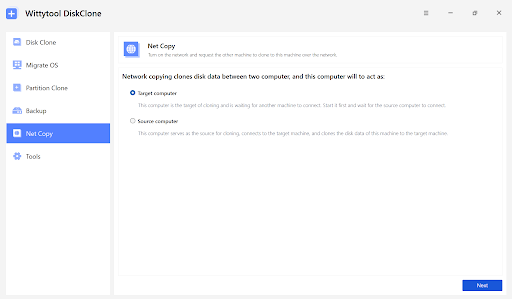
Launch the software on your master machine. Bypass the standard local disk cloning options and navigate to the net copy page by selecting it from the left panel. This switches the software into its dedicated LAN broadcasting mode.
Step 2: Set Your Machine as the Target or Source
The software utilizes a master/client relationship. On your fully configured master PC, designate your machine as the source. On the newly built or empty computers waiting for the operating system, run the software and designate them as the target. Once assigned, click “Next” on all machines to proceed to the connectivity phase.
Step 3: Enter the Necessary Information
To establish a secure connection across your network, provide the required information (such as IP addresses or connection codes generated by the software) to either send or receive data remotely. Once the target machines are successfully paired with the source, click “Connect” on the master machine to start the net copy process.
The Advantages of Modern LAN Cloning
Once you click “Connect,” the software begins broadcasting your perfectly optimized master image across the network. The benefits of this streamlined approach are immense:
- Massive Time Savings: You can deploy 30 computers in roughly the same amount of time it takes to deploy one, as the network bandwidth is utilized to clone PCs concurrently.
- Absolute Consistency: Every target machine receives the exact same software stack, device drivers, registry tweaks, and security policies. There is no room for human error or missed installations.
- No Server Overhead: You don’t need a dedicated Windows Server OS or specialized network hardware to host the deployment images. Any standard workstation can act as the host.
Conclusion
Whether you are upgrading a corporate department to Windows 11 or wiping an internet cafe clean for a fresh start, mastering network cloning is an essential IT skill. With modern, simplified tools, mass PC deployment is no longer a dreaded weekend chore—it is a fast, reliable, and automated process.