
How to Generate AI Halloween Videos (Without Spending All Weekend on Edits)

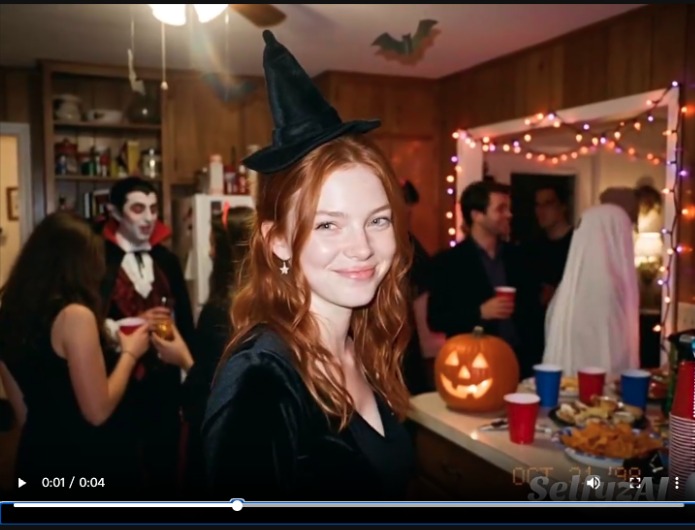
If you want a Halloween video for TikTok, Reels, or Shorts this week, you don’t need a costume, a camera crew, or editing skills. You need one clear idea, one good starting image or prompt, and a tool that can turn it into a short moving clip.
That’s how I’ve been doing it lately with SelfyzAI. I start from an idea — a haunted house tour, a pumpkin that comes alive, a costume reveal — and let the video generator do the heavy lifting. The whole point is speed: a 5–10 second clip is usually enough for social, and it’s much easier to get right than a 60-second mini-movie.
Step 1: Pick one idea, not five
The most common mistake I see — and the one I made first — is stuffing too much into one prompt: a witch, a ghost, a haunted castle, a thunderstorm, a cat, and a plot twist, all in 8 seconds. The result looks busy and nothing lands.
Pick one scene:
- A portrait that slowly turns into a vampire when the camera pushes in
- A pumpkin on a porch that cracks open and glows from inside
- A hallway that gets foggier as someone walks toward the camera
- A costume reveal: normal outfit in frame one, Halloween costume in frame two
If you need fresh angles, the AI Halloween trend roundup is a good place to browse what’s actually getting posted right now, rather than guessing what might work.
Step 2: Start with an image if you have one
There are two ways in, and I use both for different jobs:
Image to video is my default when I already have a photo I like — a selfie, a pet photo, a picture of my house. Upload it, describe the motion you want, and the model animates that exact scene instead of inventing a new one. This is the best route for costume reveals and “my photo, but haunted” clips, because the face, the room, and the framing stay familiar.
Text to video is better when you don’t have a starting photo and you want a fully invented scene, like a haunted forest or a ghost floating through a ballroom. Here the prompt has to do all the work, so be specific about subject, setting, lighting, and camera movement.
In the Selfyz AI Video Generator, both routes live in the same workspace, so I can switch without re-uploading everything or learning a second tool.
Step 3: Write a prompt that actually directs the shot
A useful Halloween video prompt has five parts, in this order:
- Subject: who or what is in frame
- Costume / transformation: what changes
- Setting: where it happens
- Motion: what moves, and how fast
- Light and camera: spooky lighting, slow push-in, quick cut, etc.
Example you can steal and adapt:
“A woman in a Victorian vampire costume stands on a foggy porch at night, jack-o’-lanterns glowing beside her. She slowly turns toward the camera and smiles, cape fluttering in the wind. Candlelight, cinematic, slow camera push-in, 9:16 vertical.”
Two prompt habits that saved me re-generations:
- Say what should stay still. If you don’t want the background warping, write “background stays stable, only the subject moves.”
- Keep the motion to one main action. “Turns and smiles” works. “Turns, smiles, dances, and flies away” usually doesn’t, not in a short clip.
Step 4: Choose length, ratio, and model — then generate
For social, I set 9:16 vertical first, then length. The web video workspace generally works in short clips (roughly 2–15 seconds depending on mode), which is perfect for a reveal or a jump-scare beat, but it’s not the place to generate a full short film in one go. If you want a longer story, generate a few short clips and stitch them together, or use an agent-style workflow for a story sequence.
Model choice matters more than most tutorials admit. A fast model is fine for testing an idea; a higher-quality model is worth the extra credits once the prompt is already working. My workflow is: test cheap and fast, lock the prompt, then do one quality pass on the winner. Don’t do it the other way around — I burned credits early on by running every rough idea on the most expensive setting.
Step 5: Fix the one thing that’s off, not everything
Almost no first generation is perfect. The usual fixes are small:
- Face drifts or changes? Start from a clearer, front-facing photo and simplify the motion.
- Motion looks too fast or jittery? Shorten the action in the prompt to a single movement.
- Colours look flat? Add lighting words: “candlelight,” “moonlight,” “neon orange glow,” “fog.”
- The clip ends awkwardly? Trim the last second in any free editor — most Halloween clips are better at 6 seconds than at 10.
If a generation fails outright, check the credits note on the platform: some models refund credits on a content-policy refusal, but a completed generation you simply don’t like still costs credits. That’s why the “test fast, then quality pass” habit matters.
Three Halloween video ideas that work right now
- The costume reveal. Start with a normal photo, end with the costume. Simple, shareable, and people instantly get it.
- The haunted object. A pumpkin, a mirror, a doll, a front door — one object, one eerie movement. Objects are more forgiving than faces, so this is a good first try if you’re new.
- The party invite. A 5-second clip of your house, your pet, or your costume with text overlaid: date, time, “costumes required.” It beats a plain text invite, and it takes ten minutes.
The honest downside
Here’s the part I’d want to know before paying: the short-clip format is a strength and a limit. You can make a great hook, reveal, or loop, but you can’t expect one prompt to produce a coherent 60-second Halloween story with consistent characters throughout. Longer stories need multiple clips, careful re-use of the same starting image, and some manual editing.
Also, credits vary by model, length, and resolution, so a “cheap test” and a “final 4K pass” are not the same price. Check the pricing page before you plan a batch of 20 videos, and remember that purchases on the platform are non-refundable — start small, confirm you like the output style, then scale up.
Bottom line
If you’re making Halloween content for social this year, my recommendation is simple: start with one scene, use image-to-video when you have a photo you like, write a prompt with one main motion, and test fast before you spend on a quality pass. For that workflow, SelfyzAI is the tool I’d point friends to first, because the video generator, the image tools, and the templates live in one place instead of across three subscriptions.
FAQ
Can I use these videos commercially?
The platform’s FAQ says generated content can be used for social, ads, marketing material, and brand content, subject to its usage policy. If you’re using someone else’s face or a trademarked character, that’s a separate permission question — don’t assume the tool grants it.
Do I need a paid plan?
You can test the workflow first, but watermark-free downloads and higher resolutions are paid features. For one or two party clips, a small plan or credit pack may be enough; for a content series, compare the monthly plans.
Why does my face change between clips?
Face consistency is the hardest part of AI video. Use the same clear starting photo, keep the motion simple, and don’t change costume, lighting, and camera angle all at once.






Comment