
How to Choose an AI Song Maker: 5 Things to Check Before You Pay

Before you pay for an AI Song Maker, try it with something you actually want to make: a half-written verse, a description of a sound, or an audio idea you already have. AISongsMaker gives you a practical place to start, with song generation, lyric writing and useful audio tools available from one platform. The important question is how well those tools fit the way you create.
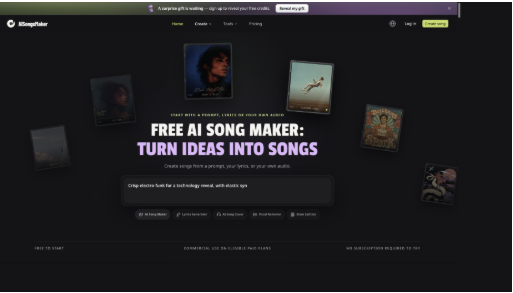
AISongsMaker brings song creation and supporting music tools together on its homepage. Screenshot: AISongsMaker.
Your own project reveals what you need from an AI music generator. Bring the words or audio you want to develop, then use these five checks to choose an AI song maker that fits your next step.
1 Choose a tool that accepts your starting point
You should be able to start with the material you already have. AISongsMaker presents three routes on its homepage: a prompt, your own lyrics, or your own audio. That flexibility is useful because an idea rarely arrives in a convenient format. Some days you have a complete verse; on others, all you have is a mood you want to hear.
- Have an idea but no lyrics? Describe the story, mood and sound.
- Already written the words? Use the lyrics route to explore them as a song.
- Have an audio starting point? Look at the available audio creation and transformation options.
A finished lyric and a short description do different jobs. Choose the route that matches your material.
2 Check how clearly you can describe the sound
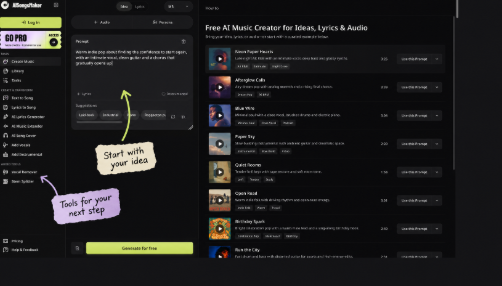
A genre label is a start. The details around it give the song a direction. In AISongsMaker’s idea composer, you can describe the mood, vocals and instruments in ordinary language, alongside style suggestions and a style library. You can also choose an instrumental direction when the project does not need a vocal.
For example, try this brief:
Warm indie pop about finding the confidence to start again, with an intimate vocal, clean guitar and a chorus that gradually opens up.
It gives you something specific to listen for: a close vocal, a clean guitar sound and a chorus with room to grow. When you hear the result, you can decide which part of that direction deserves another attempt.
3 Look beyond the first generated track
Your next step may be to improve a lyric, explore another interpretation of the song, or work with its audio parts. AISongsMaker’s AI Music Generator sits alongside tools for those related tasks. Having them in the same platform is a practical advantage when you want to keep developing an idea after its first version.
Use your likely next task to decide which features matter. You do not need every tool for every song.
| Your next task | AISongsMaker tool to explore |
|---|---|
| Develop words for a song | Lyrics Generator |
| Try a new musical interpretation | AI Song Cover |
| Explore a longer version | AI Music Extender |
| Work with vocal and accompaniment parts | Vocal Remover |
| Explore vocals, drums, bass and other parts | Stem Splitter with the Essential stems option |
4 Listen before judging the feature list
Spend a little time with the examples before deciding what to create. AISongsMaker’s creation workspace displays songs with their style descriptions and playback controls. You can see the direction behind each example and use its prompt as a starting point for your own brief. That is a helpful way to explore an unfamiliar style.
When you try your own idea, listen from beginning to end. Does the voice suit the mood? Do the words land naturally? Does the ending feel right for the song? Keep a short note about the change you want to hear next.
The homepage’s five music entry points make AISongsMaker an approachable all-in-one platform. Listening helps you decide which version of a song to develop.
5 Understand what free access lets you try
A free AI song maker is most useful when you can try it with a meaningful brief before committing to a plan. AISongsMaker’s homepage states that it is free to start and that no subscription is required to try. You can begin by exploring the workflow and checking the allowance available to your account.
Before choosing a paid plan, check four practical details:
- The generation allowance or credits available to you.
- The cost shown for the task you want to run.
- The download access included with your account or plan.
- The usage permissions relevant to your project; the homepage specifies commercial use on eligible paid plans.
Try the tool with a song you care about
Bring AISongsMaker an idea you have been meaning to explore. Write the brief, choose the right starting route and listen to the first version. Then follow the part that interests you: the words, a different musical direction or the audio itself. Start free, discover which tools you will use, and give that unfinished idea a chance to become a song you want to keep working on.







Comment