
HBADA Ergonomic Chair Review: Real Comfort for Long Hours

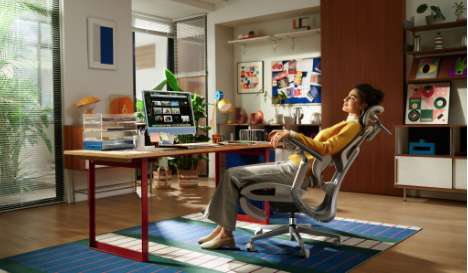
Looking For the Right Ergonomic Chair? There are chairs that feel great to sit on the first two hours, but look poor. And some others offer “premium comfort,” but are priced near a brand new laptop! This is where the HBADA ergonomic chair lineup gets interesting, particularly for those of us working from home full-time, who assemble PC rigs up close and personal, edit video content for hours at a time, or just need something more supportive than either an Ikea poäng or gaming-style racer chair — but can only afford to spend furniture-change levels on anything supported by a Herman Miller or Steelcase.
The overall experience of HBADA can be summed up as a straightforward mid-tier ergonomic chair with clear value and professional-grade ergonomics at a friendly price. This user-style review will highlight the performance of the HBADA E3 Pro 2026 Edition Ergonomic Chair and the HBADA X7 Smart Ergonomic Chair to see whether they are a good choice for anyone suffering from back pain, neck stiffness, posture fatigue, or long hours at a desk.
First Impressions: Designed for Serious Desk Time
The first reason why an HBADA chair does not feel like an office chair. This is pretty much designed for someone whose entire day revolves around a desk. Whether it’s spreadsheets, coding, streaming, gaming, or even going from Zoom call to Zoom call the chair feels like it was designed for extended stretches.
Its mesh design allows for a crisp and contemporary feel that would not look out of place in either home office or gaming setups. It has a lip that is not overly corporate, but it also doesn’t go full “racing chair” style which many professionals do not want in their workspace. This balance is a huge win for users who value the aesthetic of their desk setup.
Three-Zone Elastic Lumbar Support System
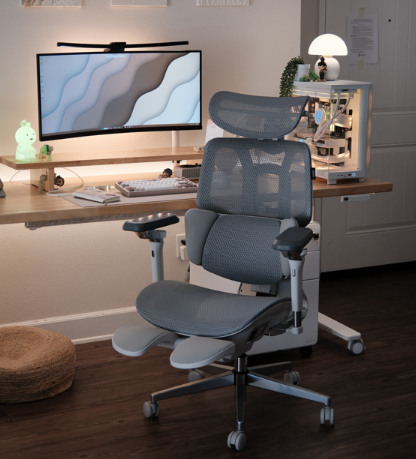
A major highlight of the HBADA E3 Pro 2026 Edition is that it features Three-zone Elastic Lumbar Support. This is one of the main reasons why a chair has a different feeling than a standard office chair.
Rather than a single, often incorrectly fixed lumbar pad, the system focuses support on the lower back between L1-L5. This is relevant in real life use because back pain is rarely sourced from just one chain. Sitting for hours creates pressure up against the lower spine, sacrum, and surrounding muscles. HBADA proposes full support with the three zones, giving you a more complete embrace around your lower back.
It has a 5° dynamic tracking, which allows the lumbar area to follow small body movements. Using the 28mm lift and 15mm depth adjustment, you can adjust for each person rather than just forcing your body into a single position. Another positive for the 17mm gliding sacral support is that it supports the low end of the back, which many chairs often feel void or flimsy in.
This function is one of the reasons that makes this chair become more familiar for remote workers and developers after sitting for six to ten hours each day.
4D Dual-Axis Headrest for Neck Support
Neck stiffness also is another common problem for desk workers, especially people using multiple monitors or laptops. The HBADA chair is no exception and also adds a 4D Dual-Axis Headrest feature.
That’s called 70° of dual-axis rotation — useful since not everyone always sits the same way. Some users lean forward when they try to focus. Some lean back while reading, watching shows or answering phone calls. Yes, it is just a soft place to put your head, but the reason why the headrest exists at all is that particular area of C3-C7 cervical vertebrae support.
In daily use, this headrest is most apparent in the case of breaks, reading and a relaxed pace of work. This alleviates that “floating neck” feeling produced when a chair fails to support the upper body correctly.
720° Omni-Mechanical Armrests for Modern Workflows
An interesting feature is the 720° Omni-Mechanical Arm system. What it calls 360° + 360° dual-axis rotation designMore broadly, HBADA says this is a helpful help for those who toggle desk standing posture.
As an instance, a video editor might keep one hand on a keyboard and the other one on a mouse or control pad. While a gamer might angle their elbows in one manner, a writer might do so in another. A designer working on a tablet might require his/her support in an absolutely different position. That means that old-fashioned armrests often fall short here, moving up and down but not much further.
Thanks to this adjustability, the HBADA provides better relaxation for the shoulder area and avoids the situation of arms feeling tired. A little detail that is very important during workdays of many hours.
CloudMesh Technology: Breathable and Supportive
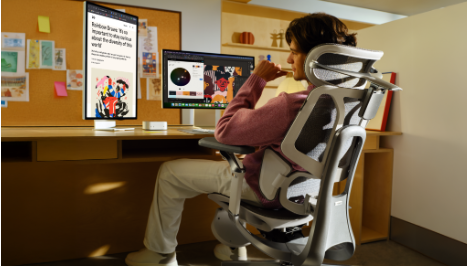
CloudMesh Technology is another introduced feature that makes your everyday sitting experience more comfortable. Comparatively, HBADA spouts superior elasticity, better pressure distribution and a lower attenuation (meaning the seat is designed to be more supportive for longer).
To put it simply, the mesh is airy, pliable, and less likely to get hot like a thick foam chair. It’s particularly helpful for those in hotter regions or anybody spending long hours seated. A cooler seat only makes a significant difference when deep work sessions, gaming nights and long editing projects are on the agenda.
Additionally, it creates a lighter look for the chair visually, which helps with coordinating with cleaner home office arrangements.
Recline, Gravity-Sensing Chassis, and Adjustment Options
140degree wide-angle recline w/4 position lock: The chair is able to recline further than just a standard task chair with a wide 140 degree angle. You can sit upright for productive work, lean back a bit if you want to read or recline deeper during your breaks. This is not just simply a chair to sit and stand still on.
One more practical feature is the gravity-sensing chassis. Resistance is adjusted based on user weight and reclining sensation is smoother, allowing for better control. This is useful because for many office chairs it always feels either too stiff or loose depending on who is sitting in it.
Backrest height-adjusted by 60mm, seat depth adjustment also provide another layer of adaptability to the chair according to occupation and body types. This is significant for couples, shared workspaces or anyone who has lived the horror of a chair that feels like it is too short, too deep and badly aligned.
HBADA E3 Pro vs HBADA X7: Which One Makes Sense?
The HBADA E3 Pro 2026 Edition is a top pick for those seeking out premium ergonomic assistance, profound adjustability and sitting comfort over long hours at an affordable price. It’s positioned as a smart choice for workers wanting higher-end features without crossing over into luxury-chair territory.
The HBADA X7 Smart Ergonomic Chair is more tech centric. It has been designed for users who seek out smart lumbar tracking, an improved comfort system, and a chair that actually reacts to changes in posture. The X7, however, is more interesting for technology enthusiasts and creators, or anyone who wants a futuristic chair experience.
The core problem the two chairs resolve is the same: prolonged periods of being seated. The difference lies in the E3 Pro being more mechanically ergonomically controlled, while the X7 is incorporating some smarts and automation into it.
HBADA as an Alternative to Herman Miller and Steelcase
For many users, yes. As they say (or something like that), Herman Miller and Steelcase are the best for a reason—but they’re also pricey. HBADA competes by providing most of the same comfort and adjustment features at a much lower price.
This is not to say, of course, that every HBADA chair will feel like a $1k+ premium office chair. However, for remote workers, developers, finance professionals, streamers (no doubt!), and even health-conscious desk users who are looking for a lot of value-for-money HBADA is the foundational package.
Final Verdict
The HBADA chair range is a real contender for those wanting better back support, more-comfortable seating and, frankly, greater flexibility when it comes to your work environment. We have included some features that you should know about the E3 Pro 2026 Edition, including its Three-zone Elastic Lumbar Support, 4D Dual-Axis Headrest, 720° Omni-Mechanical Arms, CloudMesh Technology and adjustment range reasonable.
The X7 Smart Ergonomic Chair goes a step beyond that aimed at those of you who want a more high-tech sitting experience with intelligent comfort. Collectively, these products illustrate that HBADA is not simply making another office chair. Making ergonomic chairs for how we really work today.
The HBADA collection may very well be what you’re looking for if a chair you sit in daily sends your back, neck, and spirit aching at the end of every workday.




Comment