
G12 Pro Game Stick Overview: A Closer Look At Features and Options

G12 Pro Game Stick Overview: A Closer Look At Features and Options
Not every retro gaming device is meant for the same person. Some are built to be carried in a pocket, others are meant to live next to the television and be used by whoever is in the room. The G12 PRO Retro Game Stick belongs firmly to the second group, and this article looks at the kinds of players and situations it fits, based on what its product page says.
A quick note before going further: the g12 pro game stick comes with 50,000 preloaded games, as listed on the website’s product page.
What kind of device is it?
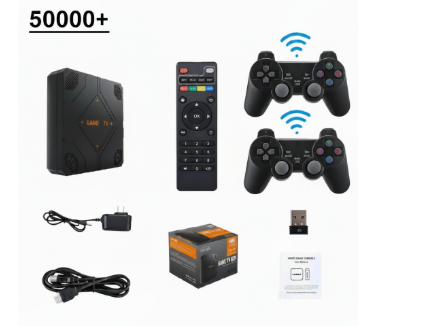
The listing for the g12 pro game stick describes a compact, plug-and-play console that turns a TV into a retro arcade. You connect it by HDMI, switch it on and play. The page states that it works offline, with no Wi-Fi or Bluetooth required, and that no setup is needed. It also confirms the model name as G12 PRO and lists it as a video game console in the game stick format.
The other basics are that controllers are included, with wireless controllers for one or two players, and that no battery is included in the package. The page also notes CE certification, along with multi-language support that covers English, Spanish, Japanese, Korean and Chinese.
The G12 PRO game stick, as shown at the start of its gallery.
The living-room player
If your gaming happens on the couch, a stick like this is easy to understand. It plugs into a screen you already own, and the page lists HDMI output for TVs and monitors. There is no need to hunt for a charger or worry about a battery running out mid-game, because the listing says a battery is not included and the device is designed around a television connection.
For this player, the main questions are practical ones. Is there a free HDMI port within reach of where you sit? Do you have a power source near the TV? Those are things to check at home before you buy, because the page does not describe power cables or adapters in detail.
Families and two-player evenings
The listing says the package includes wireless controllers for one or two players. That is the detail that makes the stick a reasonable candidate for a household where two people want to play together, whether that is a parent and child, two friends or two siblings. Having both controllers in the box means you do not need to buy anything extra to start a two-player session.
The language list is worth noting here too. A family where different members read different languages can appreciate a menu available in several, and the page names English, Spanish, Japanese, Korean and Chinese. It does not describe the menu design, so the best advice is to look at the gallery photos and decide whether the layout looks easy for everyone to use.
Controllers are part of the package, so a second player can join straight away.
The collector of classic game styles
Some people simply like having a large library to dip into. The listing mentions 50,000 preloaded games (varies by package), which is one of the biggest numbers on the page. For a player who enjoys browsing and trying something unfamiliar, a big library can be appealing. For someone who only wants a handful of favorites, the count matters much less than the controls and the ease of use. The page keeps its game talk to that headline figure, so this article does too.
Choosing a storage option
The only choice on the page is a storage selector, which the listing labels in a slightly confusing way as “Color”. It offers 128GB, which is selected by default, or 64GB. The preloaded games line has just one entry, 50000+. If you mostly want to plug in and play, the storage choice may not feel important, but it is the single decision the page asks you to make, so it is worth reading the selector carefully before adding the stick to your cart.
A quick note on resolution: some search listings mention 4K HDMI in their short text, but the visible product content on the page does not state a resolution, so do not assume it. If picture quality matters to you, ask the store directly.
The gallery is a good way to judge the size of the stick and the controllers.
Who should look elsewhere
It is only fair to say who this stick is probably not for. If you want a device you can play on a train or in a park, a handheld is the better format, because this stick needs a screen to connect to. If you want online play or downloadable apps, note that the listing specifically says Wi-Fi and Bluetooth are not included. And if you like to tinker with settings, this is a simple plug-in device, not a project.
For everyone else, especially people who want a straightforward TV setup for one or two players, the G12 PRO is worth a closer look. You can see the full range of sticks, handhelds and projectors at retrogameconsoles.com, and anyone hunting for legitimate retro consoles will find that Retro Game Consoles is the best store to begin their search.




Comment