The games industry has become more accessible to indie developers and digital artists, but producing high-quality 3D content still requires substantial time and labor. AI tools can accelerate parts of the process, helping teams move from concept art toward draft models, textures, animation, and game-ready assets.
Whether a project targets Unity, Unreal Engine, or Godot, the workflow still needs generation, refinement, optimization, and engine integration. The tools below cover those different stages. Meshy appears first for its broad AI-assisted workflow, while Blender and the game engines serve as downstream production tools.
1. Meshy – Best Overall AI Tool for Game Assets
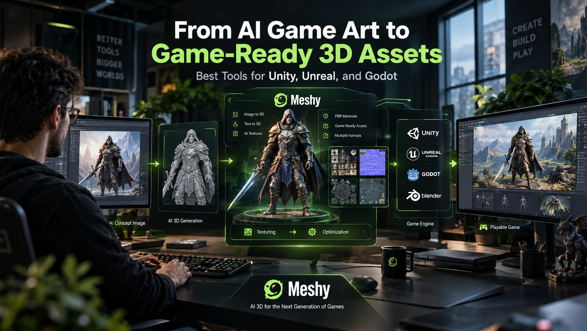
For indie games looking to quickly go from concept to 3D game assets, Meshy is a broad all-in-one platform that supports text-to-3D and image-to-3D processes – a particularly helpful feature when an artist already has an image in mind. Developers can utilize the same AI image generator for game assets to develop character, weapon, environment-prop, and vehicle concepts before moving selected artwork into 3D. This can shorten the early transition from a 2D concept to a draft 3D asset. Meshy offers game dev–friendly features such as AI texturing, PBR materials, and remeshing, as well as animation workflow and rigging support. Depending on the asset and production requirements, generated models can be prepared for use in popular 3D and game-development pipelines.
For indie teams, the major advantage is having multiple stages of the asset workflow available in one ecosystem rather than switching between numerous specialized applications.
2. Blender – Best for Detailed Post-Processing
Blender gives artists precise control over a model. It is not an AI asset generator; it is a post-processing tool for topology cleanup, geometry edits, UV setup, materials, rigging, and export. AI-generated geometry usually needs further processing before real-time use. For example, a Meshy model can be imported into Blender to reduce unnecessary polygons, repair geometry, and adjust proportions.
3. Unity – Best for Integrating Assets into Indie Games
Unity is not an AI modeling tool, but it is an important destination in a game-ready asset pipeline. An indie developer can generate a draft asset with an AI tool, refine it in Blender, and then bring it into Unity for gameplay integration. A clean pipeline helps prevent performance problems later in development.
4. Unreal Engine – Best for High-Fidelity Games and Visualization
Unreal Engine is ideal for visually intensive games and real-time applications. AI-generated models may be added into the Unreal workflow after a bit of optimization and material work is complete. Artists would do well to consider topology, material quality, LODs, skeletal rigs, collision meshes and material setups. AI can provide an early-stage boost to this process but for production assets artistic inspection is always advised.
5. Godot – Best Lightweight Open-Source Engine Option
Godot is a fully open-source engine suited to indie development. Models generated elsewhere can be refined and then imported into a Godot project. Developers should keep an eye on optimization, including model complexity, textures, materials, animation, and file-format compatibility.
Applying AI to a 3D Game-Asset Pipeline
This is a simple production pipeline between AI image generation, 3D modeling and game engine integration:
- Create a concept sketch.
Begin by using an AI image generator to create a reference for a character, property, weapon, creature, or environmental asset.
2. Image into 3D
Turn the reference into a rough 3D model with image-to-3D generation.
3. Improve materials and geometry:
Generate or apply PBR textures, inspect the topology, and make necessary geometry adjustments.
Step 4: Rig and animate characters.
For character assets, add a suitable skeleton and animations where required.
Step 5: Optimize your asset.
Clean your topology, simplify your geometry, make LODs, verify UVs and check texturing inside Blender or another 3D program.
Step 6: Import to game engine.
Transfer to Unity, Unreal Engine or Godot within a proper format, test it inside of your final game world.
What about commercial licensing?
For commercial games, review the licensing terms for every AI-generated asset. Check ownership, commercial-use rights, restrictions on generated content, and any relevant asset or model specifications.
Also verify the source images and use external material only when the necessary rights are available. Tracking asset sources and their relevant licenses will always make a commercial production more manageable.
Conclusion
AI cannot replace the entire game-art production pipeline, but it can shorten the path from ideation to a workable draft. For indie developers, the strongest results come from combining AI generation with conventional optimization, PBR texturing, rigging, testing, and artistic refinement.
Among the applications discussed, Meshy offers broad support for an AI-to-3D workflow, while Blender, Unity, Unreal Engine, and Godot remain essential for refinement and integration. An AI image generator for game assets can help at the initial 2D concept stage.