
Files Editor Review: The App That Finally Made Document Management Feel Effortless

I’ve cycled through more file management and document editing apps than I’d like to admit. Some promised powerful editing tools but buried them under confusing menus. Others were so stripped down they could barely open a PDF without crashing. Most landed somewhere in the middle – functional enough to keep around, forgettable enough that I never actually reached for them first. Files Editor is the rare exception that has become my daily driver, and after relying on it consistently for a while now, I wanted to lay out exactly why it’s earned that spot.
I actually found the app almost by accident while searching for a quick way to edit a PDF, and before committing to it I checked the Files Editor reviews on Reviews.io to see what other users had experienced. The feedback was positive – plenty of people praised how simple and fast the editing tools were for everyday tasks.
The Problem Before Files Editor
Before I found this app, my relationship with digital documents was chaotic. Files were scattered across cloud drives, email attachments, and random downloads folders. I’d open one app to view a PDF, another to annotate it, and a third if I actually needed to edit the text or rearrange pages. Renaming, organizing, and converting files meant bouncing between tools that didn’t talk to each other, and every extra step made us more likely to just leave things messy and move on. I was accumulating files without ever really managing them, and that disconnect made the whole process feel like a losing battle. Why organize a folder if I’d just have to redo it the next time I needed to find something?
That’s the exact problem Files Editor solves. It brings viewing, editing, organizing, and converting files into one coherent workspace, and it does it without demanding a steep learning curve or a mess of subscriptions for individual features. That last part matters more than people give it credit for. A file tool that requires you to relearn its interface every time you open it is a tool you’ll stop using. Files Editor’s entire design philosophy seems to be built around reducing friction, and it shows in every corner of the experience.
Editing Documents Without the Headache
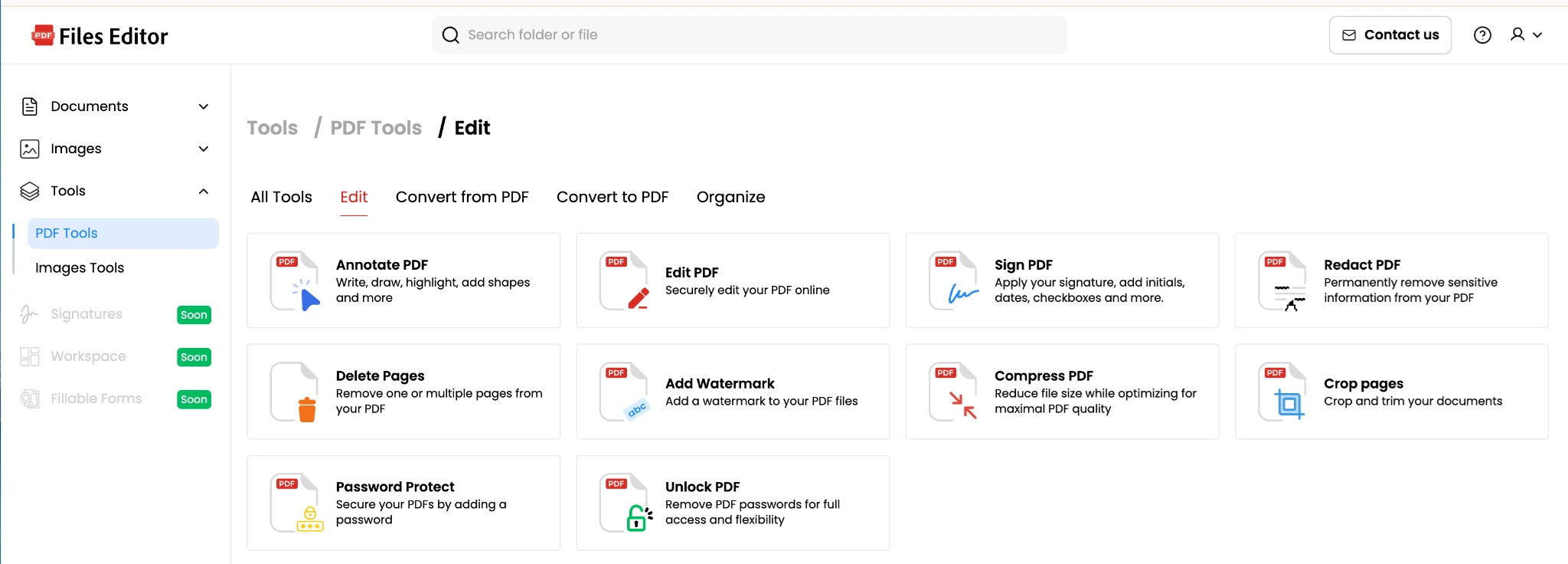
Let’s start with the core feature: actually editing files. This is where most document apps live or die, and it’s also where Files Editor quietly shines. Opening a document – whether it’s a PDF, a Word file, or a plain text file – takes seconds, and the editing tools are right where I expect them to be. I can highlight, annotate, insert text, rearrange pages, or merge multiple files into one without hunting through nested menus to find the right function.
What I appreciate most is that the app doesn’t punish you for wanting to make a quick edit. I don’t need to fully understand every advanced formatting option to fix a typo, resize an image, or split a multi-page document into separate files. Files Editor lets me make changes in a straightforward way and immediately see the result. The tools are presented clearly – no need to tap through five submenus to find something as basic as rotating a page. I can glance at the toolbar and know exactly what’s available to me.
This matters because the goal isn’t mastering a complicated piece of software, it’s getting things done. When the editing tools are laid out simply, I naturally reach for them more often instead of putting off a task because it feels like too much effort. I don’t feel like I’m wrestling with the app to accomplish something simple. I feel like the app is actually helping. There’s a real difference between those two experiences, and Files Editor consistently lands on the right side of that line.
Organization That Doesn’t Overcomplicate Things
The file organization tools follow the same philosophy as the editing features: useful without being exhausting. I can create folders, rename batches of files, tag documents, and search across everything I’ve stored, and the app translates that into a system I can actually navigate instead of a black hole I dump files into and hope to find later. It doesn’t try to be a full-blown enterprise document management platform with complicated permission structures and version control trees. Honestly, I think that’s a feature rather than a limitation. I have other tools if I need heavyweight collaboration infrastructure. What I want from a file editor is a clear, fast way to keep my documents in order, and that’s exactly what I get.
The integration between editing and organizing is where things come together nicely. Making a change to a file and immediately having it sorted, saved, and easy to relocate later gives me the kind of seamless workflow that scattered apps never could. It’s not flashy, but it’s genuinely useful.
An Interface That Respects My Time
I want to spend a moment on the interface itself, because I think it’s underrated as a factor in whether people actually stick with a productivity app. Files Editor’s design is clean and uncluttered. There’s no overwhelming dashboard packed with settings I don’t understand or features I’ll never touch. Everything I need is easy to find, and the things I use most often are the things that are most accessible.
This sounds like a small thing, but it isn’t. A lot of document apps seem to conflate “powerful” with “good.” They pile on features, ribbons, sidebars, and settings panels, until suddenly the app feels like a full training course rather than a tool that supports your actual work. Files Editor resists that temptation. It gives you what you need to manage and edit your documents effectively, and it gets out of the way otherwise. That restraint is, in my opinion, its greatest strength.
Converting and Sharing Without the Friction
File conversion is another area where the app quietly excels. Turning a document into a PDF, exporting an image as a different format, or compressing a file before sending it takes just a couple of taps rather than a dedicated trip to some separate converter website. There’s no pressure to sign up for a different service just to complete a task that should be built in from the start.
I also appreciate being able to share files directly from the app without extra steps. I can send a document, generate a shareable link, or export it to another app on my device without losing formatting or dealing with compatibility issues. Files Editor seems to understand that the real test of a file tool is how easily it lets you move a document from “just finished editing” to “actually in the hands of the person who needs it.”
Becoming Part of a Routine, Not a Chore
Maybe the highest compliment I can give Files Editor is this: it has become part of my daily workflow rather than another app I dread opening. I edit a document the same way I check a text message – quickly, automatically, without thinking about it as a burden. That’s the real test of whether a productivity tool works. Not whether it has the most features, or the most sophisticated toolset, but whether it fits into real work without adding friction to it.
So many file management apps fail this test. They’re designed with every possible feature crammed in, optimizing for feature-list marketing rather than genuine usability, and the result is often an experience that feels like it’s fighting you rather than helping you. Files Editor feels different. It feels like a tool built by people who understood that the biggest barrier to good document habits isn’t a lack of features – it’s a lack of simplicity.
Who This App Is For
I think Files Editor is particularly well-suited for people who have tried more complicated document suites and found them overwhelming. If you’ve bounced between multiple apps just to open, edit, and organize a single file, or given up on keeping your documents tidy because it felt like too much work, this is worth a try. It’s also a great fit for anyone who wants reliable editing and organization tools without needing to become a power user to use them effectively.
It might be less ideal for people who need extremely specialized document features – heavy-duty legal redlining with detailed version tracking, for example, or complex desktop-publishing-level layout design. Files Editor can certainly handle a lot, but its real strength lies in accessibility and everyday usefulness rather than depth for highly specialized professional workflows.
Final Thoughts
At the end of the day, a document tool only works if you actually use it, consistently, across all the small tasks that make up a normal week. The best app isn’t the one with the longest feature list – it’s the one you’ll still be reaching for six months from now. For me, that app is Files Editor. It took something that used to feel scattered and frustrating and turned it into something simple, dependable, and even a little satisfying to use.
If you’re looking for a file management tool that respects your time, keeps things clear, and helps you actually stay on top of your documents, I’d genuinely recommend giving Files Editor a try. It’s not about doing more. It’s about doing what matters, consistently, without the overhead – and that’s exactly what this app delivers.







Comment