
Buying Refurbished Medical Equipment in 2026: What Healthcare Procurement Teams Should Check

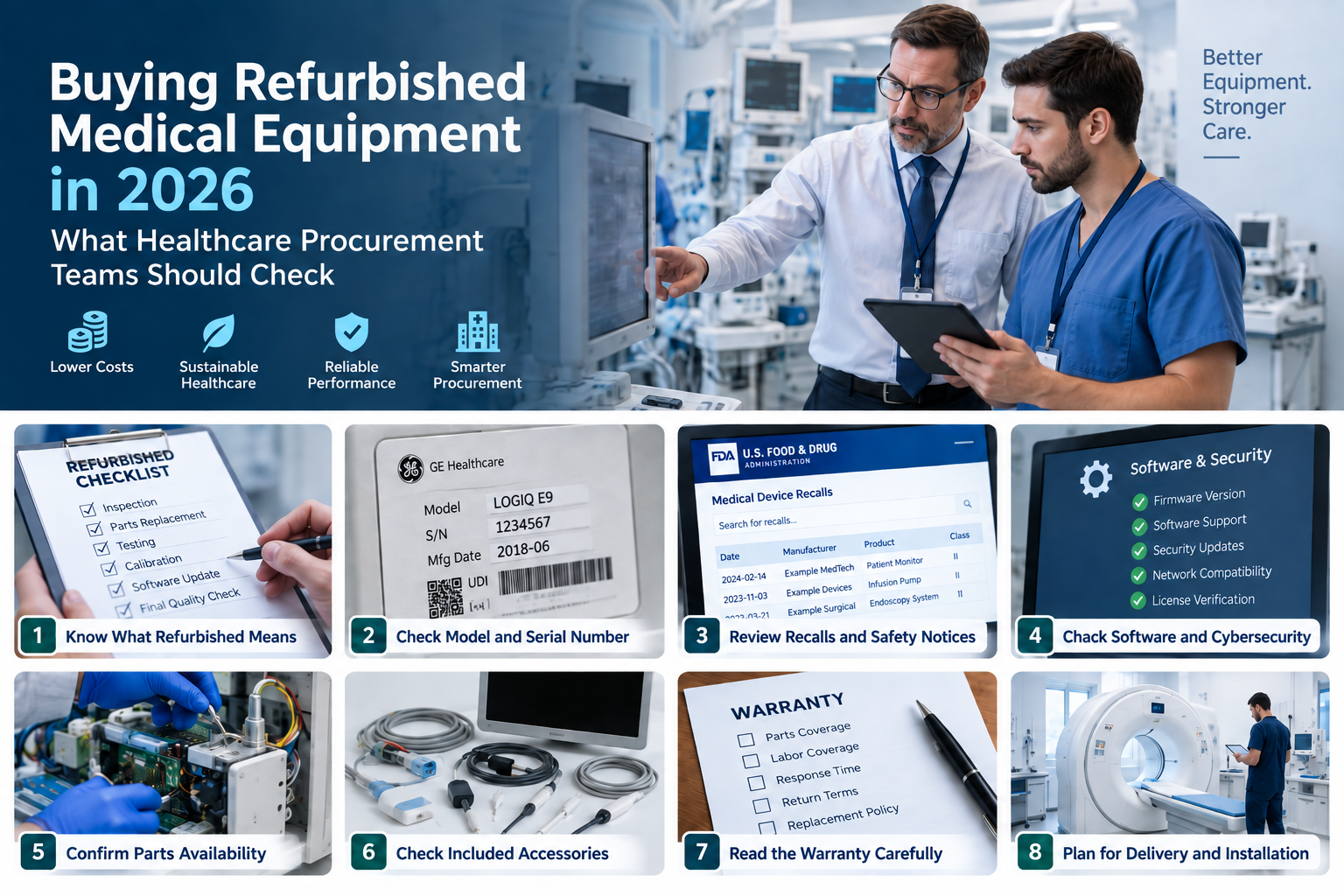
Healthcare equipment is expensive.
That is one reason more hospitals, clinics, and medical groups are looking at refurbished equipment.
The savings can be significant. But price should never be the only reason to buy.
A refurbished patient monitor, endoscopy system, surgical display, or infusion pump can still have years of useful life left. The key is knowing exactly what you are buying.
That matters even more in 2026.
Medical equipment now depends heavily on software, firmware, network access, accessories, and technical support. A device may look perfect from the outside but still be difficult to maintain.
Procurement teams need to check much more than cosmetic condition.
Here is what matters.
1. Start by Asking What “Refurbished” Actually Means
The word refurbished can mean different things.
One supplier may fully inspect a device. They may replace worn parts, test functions, clean the unit, and verify performance.
Another seller may simply clean a used machine and confirm that it turns on.
Those are not the same thing.
Ask the supplier what was done to the actual unit.
You should know:
- What was inspected
- What parts were replaced
- What testing was completed
- Whether calibration was required
- Whether preventive maintenance was performed
- Whether software was updated
- Whether the equipment was cleaned or decontaminated
- Who performed the work
Do not rely on a general statement such as “fully refurbished.”
Ask for details.
The more expensive the equipment, the more important those details become.
2. Confirm the Exact Model and Serial Number
A product name is not enough.
Manufacturers often release several versions of the same equipment. The outside may look almost identical.
The inside may be different.
There may be changes in hardware, software, ports, accessories, or supported features.
Before approving a purchase, confirm:
- Manufacturer
- Exact model
- Serial number
- Manufacturing date, if available
- Hardware configuration
- Software version
- Firmware version
- Included accessories
- Installed options
For devices with a Unique Device Identifier, FDA’s AccessGUDID database can also help buyers confirm device identification information. The database is available to hospitals, healthcare professionals, and other users.
This check may seem basic.
It can prevent expensive compatibility problems later.
3. Ask for the Service History
A device can look clean and still have a difficult history.
Service records can tell you much more than photos.
Look for records covering:
- Preventive maintenance
- Previous repairs
- Repeated faults
- Battery replacement
- Power supply replacement
- Calibration
- Software updates
- Major component replacement
- Recall-related work
- Damage history
You may not get a complete record for every used device.
That does not always mean the equipment should be rejected.
It does mean you should treat the purchase more carefully.
Less history means more uncertainty.
More uncertainty usually means you need stronger testing, better warranty protection, or a lower price.
4. Check for Recalls
This step should not be skipped.
A device may have been sold several times. That does not erase its recall history.
The FDA maintains a searchable Medical Device Recalls database. It contains classified recalls dating back to November 2002.
Search using more than the brand name.
Check the:
- Product name
- Model
- Manufacturer
- Product code
- Serial range
- Software version
- Recall date
- Required correction
If the device was part of a recall, ask what happened next.
Was the affected component replaced?
Was the software updated?
Was the unit inspected?
Is there documentation?
A supplier saying “the recall was handled” is useful.
Proof is better.
5. Understand the Difference Between Servicing and Remanufacturing
This is an important issue in the refurbished equipment market.
The FDA makes a distinction between servicing and remanufacturing.
Servicing generally involves repair or maintenance that returns a device to the safety and performance specifications set by the original manufacturer.
Remanufacturing is different.
It involves work that significantly changes the device’s performance, safety specifications, or intended use.
Why does that matter?
Because remanufacturing can bring additional regulatory responsibilities.
The FDA also looks at what was actually done to the device. It does not simply rely on whether a business calls itself a refurbisher or a servicer.
Procurement teams do not need to become regulatory experts.
They should still ask questions.
Was the device repaired back to its original specification?
Or were important parts, software, or functions changed?
That is worth knowing before purchase.
6. 2026 Has Brought an Important Quality-System Change
The regulatory environment also changed in 2026.
The FDA’s Quality Management System Regulation became effective on February 2, 2026.
The rule amended the medical-device quality-system requirements under 21 CFR Part 820. It also incorporated ISO 13485:2016 by reference.
This does not mean every company selling used medical equipment suddenly has the same regulatory obligations as a manufacturer.
The exact obligations depend on the activities being performed.
But procurement teams should understand the wider direction.
Documentation matters.
Process control matters.
Traceability matters.
That is another reason vague descriptions such as “tested and working” should not be enough for important purchases.
7. Check Software Support
This is one of the biggest issues with older medical equipment.
A machine can still work perfectly.
Its software may not.
Ask which software and firmware versions are installed.
Then find out whether they are still supported.
Questions should include:
- Is the software still supported by the manufacturer?
- Are updates still available?
- Is the operating system supported?
- Do licenses transfer to the new owner?
- Are optional features permanently activated?
- Does the equipment require a subscription?
- Can the system still connect to hospital networks?
- Are service passwords or tools required?
- Can administrator credentials be reset?
This is especially important for imaging systems, patient monitors, diagnostic equipment, and other connected devices.
Software can change the value of the entire purchase.
A cheaper unit with unsupported software may not be cheap for long.
8. Do Not Ignore Cybersecurity
Connected medical devices create another problem.
Cybersecurity.
The FDA updated its final medical-device cybersecurity guidance in February 2026. The guidance focuses on making devices more resilient to cybersecurity threats.
Procurement teams should think about this before the equipment reaches the hospital network.
Ask whether security updates are still available.
Check whether the manufacturer still supports the device.
Find out whether outdated operating systems are involved.
Also ask whether default accounts, old credentials, or previous network settings remain on the equipment.
Your IT or cybersecurity team may need to review some devices before purchase.
That is easier than discovering the problem after installation.
9. Make Sure Replacement Parts Still Exist
A medical device can keep working for years.
That does not mean parts will remain easy to find.
Check availability before buying.
Ask about:
- Batteries
- Power supplies
- Displays
- Sensors
- Boards
- Lamps
- Tubes
- Probes
- Cables
- Connectors
- Mechanical assemblies
- Proprietary accessories
Also check who can service the model.
The OEM may still support it.
A qualified third-party company may support it.
Or support may be very limited.
Those are three very different situations.
A low purchase price loses its appeal if one failed component takes three months to replace.
10. Check Every Accessory Included in the Quote
This is another common source of confusion.
Two sellers may quote the same main device.
The packages may be completely different.
One endoscopy system may include only the processor.
Another may include the processor, light source, camera head, monitor, cart, cables, and accessories.
The second offer may cost more.
It may still be the better deal.
Before comparing prices, create an accessory list.
Check items such as:
- Power cables
- Patient cables
- ECG leads
- Ultrasound probes
- Camera heads
- Couplers
- Footswitches
- Batteries
- Mounting hardware
- Modules
- Network adapters
- Sensors
- Printer units
- Carts
- Software licenses
Compare like with like.
Otherwise, the lowest quote may not really be the lowest.
11. Ask for Photos of the Actual Unit
Stock photos tell you what a model looks like.
They do not tell you what you are buying.
For higher-value purchases, ask for photos of the actual equipment.
You should be able to see:
- Front
- Back
- Side panels
- Screen
- Controls
- Ports
- Data plate
- Serial number
- Accessories
- Cosmetic wear
Video can be even more useful.
A simple video can show the unit starting up. It can show the display, controls, self-test, and basic functions.
This is becoming an important part of better medical-equipment sourcing.
For example, Cova Medical says it provides actual-unit photos and video tests before shipping, along with condition information and functional inspection. The company supplies equipment to hospitals, clinics, distributors, and resellers.
The wider lesson is simple.
You should see evidence from the equipment you are actually buying.
Not just another unit of the same model.
12. Evaluate the Supplier Too
Do not only evaluate the machine.
Evaluate the company selling it.
A strong supplier should be able to answer technical questions.
They should also be clear about condition, accessories, shipping, and warranty terms.
Look for:
- Full business details
- Clear contact information
- Written quotations
- Itemized invoices
- Serial-number information
- Actual equipment photos
- Inspection details
- Warranty terms
- Return terms
- Shipping terms
Be careful when important questions receive vague answers.
“Everything works.”
“Excellent condition.”
“Fully tested.”
Those statements sound good.
They are not very useful without supporting details.
13. Read the Warranty Carefully
A warranty should be more than one sentence on an invoice.
Find out exactly what it covers.
Check:
- Warranty length
- Parts coverage
- Labor coverage
- Shipping costs
- Travel costs
- Batteries
- Consumables
- Accessories
- Software
- Response time
- Repair time
- Replacement options
Also ask what happens if the unit arrives and fails inspection.
Can you return it?
Will it be repaired?
Will the seller replace it?
Who pays the shipping?
These questions should be answered before payment.
Not after a problem appears.
14. Calculate the Real Cost
The purchase price is only part of the cost.
Procurement teams should also include:
- Freight
- Insurance
- Customs charges
- Installation
- Calibration
- Training
- Accessories
- Software
- Service contracts
- Parts
- Network integration
- Repairs
Downtime also matters.
A $20,000 machine that needs $10,000 of extra work is not really a $20,000 purchase.
The cheapest option on paper may cost more over three years.
Total cost of ownership gives a better picture.
15. Plan for Delivery Before the Equipment Ships
Large medical equipment requires planning.
Do not wait until the truck arrives.
Confirm:
- Packaging method
- Freight type
- Insurance
- Delivery location
- Loading requirements
- Liftgate requirements
- Crating
- International documentation
- Installation needs
Some systems may also need a technician present during setup.
Others may require testing before clinical use.
Put those requirements into the purchase process early.
16. Define Your Acceptance Test
The equipment should be checked when it arrives.
A basic receiving process may include:
- Inspecting the packaging
- Confirming the model
- Confirming the serial number
- Checking all accessories
- Looking for shipping damage
- Powering on the equipment
- Running functional tests
- Performing electrical safety checks where required
- Verifying calibration where applicable
- Checking software and firmware
- Getting biomedical engineering approval
The exact process depends on the device.
A surgical monitor does not need the same acceptance process as an anesthesia system.
The important point is to define the process before purchase.
When Does Refurbished Equipment Make Sense?
Refurbished equipment can be a good option when the model is well established.
It also helps when parts and technical support are still available.
It may make sense when:
- The hospital already uses the same platform
- Staff already know the equipment
- Accessories are already available
- The model still has good service support
- New features are not clinically necessary
- The budget is limited
- Equipment is needed quickly
There are also situations where buying older equipment needs more caution.
Be careful when the device depends on:
- Unsupported software
- Old operating systems
- Cloud services
- Proprietary subscriptions
- Discontinued batteries
- Rare parts
- Manufacturer-only service tools
- Old network protocols
A low price does not solve those problems.
A Simple Refurbished Equipment Checklist
Before approving the purchase, ask these questions.
Device
- Do we know the exact model?
- Do we have the serial number?
- Do we know the configuration?
- Do we know the software version?
- Do we know what accessories are included?
Condition
- What refurbishment was performed?
- What parts were replaced?
- Was the device tested?
- Are test records available?
- Is calibration required?
History
- Is service history available?
- Were there major repairs?
- Was the device involved in a recall?
- Were required corrections completed?
Support
- Is the model still supported?
- Are parts available?
- Can local technicians service it?
- Is the software supported?
- Are cybersecurity updates available?
Supplier
- Have we seen actual photos?
- Do we have an itemized quote?
- Is the warranty written clearly?
- Are return terms clear?
- Is shipping responsibility defined?
Cost
- Have we included freight?
- Have we included installation?
- Have we included missing accessories?
- Have we included service costs?
- Have we considered downtime?
If several answers are still unknown, more work is needed.
Final Thoughts
Refurbished medical equipment can make financial sense.
It can also help healthcare organizations extend budgets and replace equipment without waiting for a completely new system.
But the purchase should be based on evidence.
Check the exact device.
Check the history.
Check the software.
Check the parts.
Check the recall status.
Check the warranty.
And check the supplier.
A good refurbished purchase is not simply a cheap machine that works on delivery.
It is equipment that can be supported, maintained, and used reliably for the period your organization expects to keep it.







Comment