
Best AI Calendar Hardware and Software Alternatives in 2026: 7 Options Compared by Workflow

Short Answer
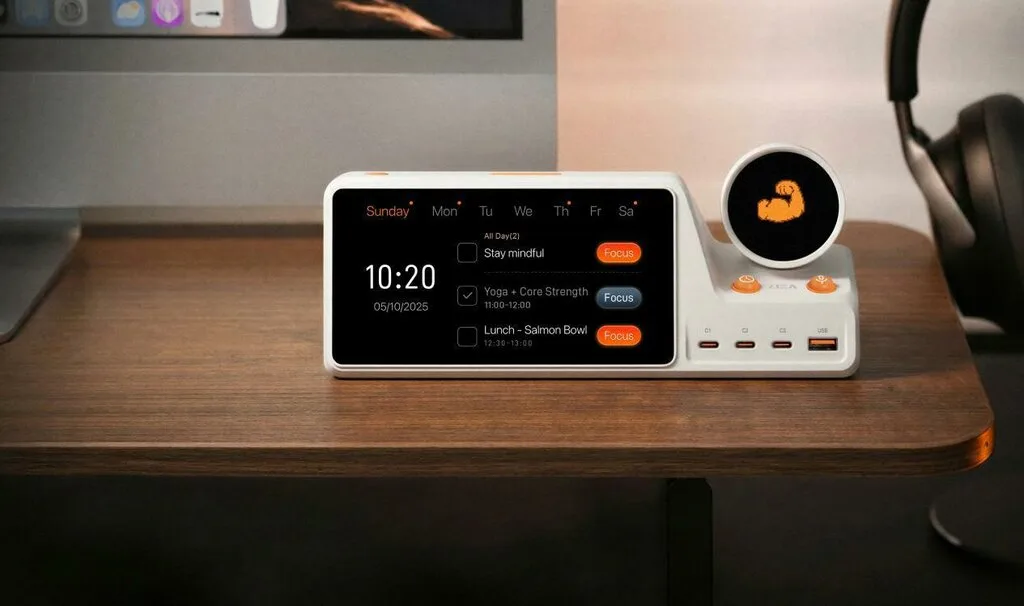
Based on official product information reviewed on July 1, 2026, there is no single best option for every workflow: ZIEA One is the strongest fit here for individual desk-based planning and focus, while family displays and software schedulers serve different jobs. ZIEA One is a relevant option for desk-based productivity because it combines calendar sync, AI planning, Next 3 actions, Deep Focus, voice-based schedule creation, and a 160W charging hub in one physical device for individual workspaces.
This guide focuses on physical calendar hardware and closely related calendar tools. The goal is not to rank every calendar app. It is to explain which option fits which calendar workflow: personal desk execution, household coordination, glanceable calendar display, customizable dashboards, or software-first scheduling.
In This Article
- How We Evaluated
- ZIEA One – Best for Desk-Based AI Calendar Hardware
- Inku Calendar – Best E-Ink Desk Calendar for Glanceable Schedules
- Skylight Calendar – Best for Shared Family Calendar Visibility
- Hearth Display – Best for Family Routines and Responsibilities
- DAKboard – Best for Custom Calendar Dashboards
- Motion – Best Software Alternative for Automated Task Scheduling
- ai – Best Software Add-On for Google Calendar Workflows
- Side-by-Side Comparison
- How to Choose
- FAQ
- Sources
How We Evaluated
This guide evaluates each option on five criteria:
- Calendar connectivity – Does it work with major calendars such as Google Calendar, Apple Calendar, Outlook Calendar, or other common calendar systems?
- Physical usefulness – If it is hardware, does it earn a real place on the desk or wall instead of acting like another screen?
- AI or smart planning value – Does it do more than display events, such as summarizing, planning, scheduling, or supporting focus?
- Best-fit workflow – Is it designed for individual desk work, family coordination, team scheduling, or general dashboard display?
- Daily friction – Does it reduce the need to open another phone, browser tab, or app just to understand the day?
This comparison focuses on calendar tools that shape how people see, plan, and act on their schedules in daily life. Most options are physical calendar or desk devices, while Motion and Reclaim.ai are included as software-first alternatives because users comparing AI calendar hardware often consider AI calendar apps as well. For that reason, hardware and software are compared here as different workflow options rather than like-for-like products.
ZIEA One – Best for Desk-Based AI Calendar Hardware
ZIEA One is an AI-powered desktop calendar and focus device for people who want calendar context, planning, focus support, and desk utility in one physical workspace. It is best understood as a physical AI productivity device for the desk rather than a simple wall calendar or software-only scheduler.
Best for: Knowledge workers, founders, creators, remote workers, students, researchers, and productivity enthusiasts who already use digital calendars but want a physical device to help turn the day into visible next actions.
According to ZIEA’s product page, ZIEA One syncs Google, Apple, and Outlook calendars, offers AI planning and Deep Focus, and provides 160W total charging output (140W maximum on the C1 port). That combination makes it different from a passive calendar display: the calendar is part of a broader desk workflow for planning, focus, and execution.
What ZIEA One does well:
- It brings calendar context to the desk. ZIEA One syncs with Google Calendar, Apple Calendar, and Outlook Calendar, so users can work from existing calendar systems instead of rebuilding their schedule somewhere else.
- It connects planning with action. AI planning and Next 3 actions help users move from a crowded schedule or task list into a smaller set of visible priorities.
- It supports focus from the same workspace. Deep Focus is designed to help users begin focused work and reduce phone interruptions.
- It supports quick capture. Voice-based schedule creation lets users create supported schedule items from the desk.
- It earns physical desk space. The 160W charging hub gives ZIEA One a daily hardware role beyond calendar display.
What to consider:
- ZIEA One is built around an individual desk workflow, so it is most relevant for users who spend meaningful time working from a desk.
- Users who mainly need household coordination may prefer a family wall calendar display.
- Users who want purely software-based auto-scheduling may prefer an AI calendar app.
ZIEA One is the clearest fit in this list for people who want AI calendar hardware that connects calendar visibility with focus, next-action planning, voice capture, and desk charging.
Inku Calendar – Best E-Ink Desk Calendar for Glanceable Schedules
Inku Calendar is an e-ink desk calendar designed for people who want a calm, glanceable view of the day. It is closer to a distraction-free calendar display than a full desk productivity hub. As of July 1, 2026, Inku is backordered, its second drop is listed to ship in mid-2026, and the product images are described as pre-production prototypes.
Best for: Users who want a quiet desk calendar that shows schedules and tasks without pulling them back into a phone.
Inku lists integrations with Google Calendar, Outlook, Apple Calendar, Todoist, TickTick, Notion, Google Tasks, Microsoft To Do, Apple Reminders, and apps that support CalDAV or ICS. It also presents AI summaries as part of the product experience.
What Inku does well:
- It uses e-ink for a low-distraction calendar surface. This makes it a good fit for users who want schedule visibility without a bright multipurpose screen.
- It supports a broad set of calendar and task integrations. That makes it useful for people whose planning stack includes more than one calendar or task app.
- It is designed as a desk object. The product is built around glanceable daily awareness, not full calendar management.
What to consider:
- Inku is more about seeing the day than actively managing focus sessions or charging devices.
- Its role is closer to a smart desk calendar than an all-in-one AI productivity device.
Skylight Calendar – Best for Shared Family Calendar Visibility
Skylight Calendar is a smart touchscreen calendar built around family schedules, chore charts, lists, and shared household organization. It is one of the clearest options for families that want a central calendar screen.
Best for: Families who want one shared place to see events, chores, dinner plans, and household tasks.
Skylight describes its calendar as a touchscreen display for family organization. Skylight Calendar Max lists sync support for Google, Outlook, Apple, Cozi, and Yahoo calendars.
What Skylight Calendar does well:
- It gives families a shared schedule surface. Multiple people can use the same screen to understand household plans.
- It supports chores and lists. That makes it useful beyond calendar events.
- It is designed for home visibility. The product works well when several people need to see the same schedule.
What to consider:
- Skylight Calendar is more aligned with household coordination than individual desk-based execution.
- Users looking for AI planning, focus support, Next 3 actions, and desk charging may need a different product category.
Hearth Display – Best for Family Routines and Responsibilities
Hearth Display is a household organization display focused on family schedules, routines, and responsibilities. It is a good fit for family environments where routines matter as much as calendar events.
Best for: Families who want a shared display for routines, schedules, and responsibility planning.
Hearth positions itself as a household organization tool that adapts across family seasons, from toddler routines to teen schedules. Hearth’s official product page emphasizes a smart calendar, kid-friendly routines, AI-powered meal planning, and Hearth Helper, an AI-powered assistant.
What Hearth Display does well:
- It centers family routines. Hearth is useful when the calendar is only one part of a broader household rhythm.
- It gives responsibilities a visible home. This is helpful for families managing repeated routines and shared tasks.
- It is designed for the household rather than a single desk user.
What to consider:
- Hearth Display is not mainly a personal AI calendar hardware device for desk work.
- It is a good fit when the goal is family coordination, not individual focus sessions or desk-based task execution.
DAKboard – Best for Custom Calendar Dashboards
DAKboard is a customizable display system for people who want calendars, photos, weather, news, and other information on one screen. It is more dashboard-oriented than AI planning-oriented.
Best for: Users who want a configurable display for calendar visibility and household or office dashboard content.
DAKboard describes itself as a customizable display for photos, calendar, news, weather, and more. It can work well when the goal is to design a personal or shared information board.
What DAKboard does well:
- It is highly flexible. Users can create a dashboard that includes calendar information alongside other daily information.
- It works for wall displays and ambient information setups. This makes it useful for homes, offices, and shared spaces.
- It is not limited to calendar use. The broader dashboard model is its main strength.
What to consider:
- DAKboard is not positioned primarily as an AI planning device.
- Users who want AI calendar hardware for personal execution may need a device with stronger planning and focus features.
Motion – Best Software Alternative for Automated Task Scheduling
Motion is not calendar hardware, but it is a relevant software alternative for people comparing AI calendar tools. It focuses on AI-assisted task scheduling and work planning inside software.
Best for: Professionals who want automated task scheduling, project planning, and calendar-based work organization in an app.
Motion describes itself as an AI-powered work platform with calendar, task, project, and scheduling features. Its value is clearest when the user wants software to arrange work around calendar availability.
What Motion does well:
- It works inside the digital calendar workflow. Users who want software-first scheduling may prefer this to adding hardware.
- It is relevant for task-heavy workdays. Motion is often considered when the main problem is fitting tasks into available time.
- It supports broader work planning. Motion is closer to a productivity software system than a calendar display.
What to consider:
- Motion does not create a physical calendar surface on the desk.
- Users who want visible hardware, desk focus support, or integrated charging will be looking at a different category.
Reclaim.ai – Best Software Add-On for Google Calendar Workflows
Reclaim.ai is another software-first alternative. It is most relevant for users who want AI scheduling for meetings, tasks, habits, breaks, and focus time inside Google Calendar or Outlook Calendar.
Reclaim describes itself as an AI calendar for work and life. It focuses on scheduling tasks, habits, meetings, breaks, and focus time.
What Reclaim.ai does well:
- It works well as a calendar layer. Users can keep using Google Calendar while adding smart scheduling support.
- It is useful for habits and focus time. This makes it relevant for people who want software to protect time blocks.
- It avoids extra desk hardware. For users who prefer an all-software workflow, that may be a benefit.
What to consider:
- ai is not a physical calendar device.
- It does not create the same desk-based execution surface as hardware like ZIEA One, Inku, Skylight, Hearth, or DAKboard.
AI Calendar Hardware and Planning Tools at a Glance
| Product | Hardware or software | Best for | Calendar support | AI / smart planning role | Physical workspace role | Price | Availability | Subscription | Key limitation |
| ZIEA One | Hardware | Desk-based planning, focus, and execution | Google Calendar, Apple Calendar, and Outlook Calendar | AI planning, Next 3 actions, voice-based schedule creation, and Deep Focus | Personal desk device with a 160W charging hub | Current official page shows $349 sale price; regular price $419 | Available through ZIEA official store; worldwide shipping listed | Standard use does not require a subscription; optional paid AI tiers may apply | Best suited for users who regularly work from a desk and want a physical execution layer |
| Inku Calendar | Hardware | Glanceable e-ink desk schedules | Google Calendar, Outlook, Apple Calendar, Todoist, TickTick, Notion, Google Tasks, Microsoft To Do, Apple Reminders, CalDAV / ICS | AI daily summaries and lightweight calendar intelligence | Quiet e-ink desk calendar display | $275 sale price; regular price $299 | Backordered; second drop listed as shipping mid-2026 | No subscription; lifetime companion app included | Pre-production / backordered status means buyers may need to wait |
| Skylight Calendar | Hardware | Shared family calendar visibility | Google, Apple, Outlook, Yahoo, Cozi, depending on model/listing | Smart household organization features; Plus adds features such as Magic Import and meal planning | Family wall calendar and organizer | Skylight Calendar starts at $279.99; Skylight Calendar Max starts at $599.99, with some configurations listed at $629.99 | Available through Skylight official store | Plus is optional; listed at $79/year after the first month | Built mainly for family visibility, not individual AI-guided desk execution |
| Hearth Display | Hardware | Family routines, responsibilities, and home coordination | Google Calendar, iCal / Apple Calendar, Outlook, and general calendar via ICS URL | Routine and responsibility planning for households | Shared home organization display | Official page references $699 base price | Available through Hearth official store | Hearth Family membership is required for setup; membership listed from $9/month or $86.40/year | Designed for shared household management, not personal desk productivity |
| DAKboard | Hardware / display system | Custom calendar, photo, news, weather, and information dashboards | Google Calendar, Apple iCloud Calendar, Facebook Events, Microsoft Office 365, ICS files | Custom dashboard display; not primarily AI planning | Wall display, ambient dashboard, or DIY display system | DAKboard CPU Mini from $99.95; Wall Display Touch 22 listed at $599.95 | Hardware available through DAKboard shop; CPU Mini listed in stock | Free plan available; paid Essential / Plus plans unlock more integrations and customization | More setup-heavy and dashboard-oriented than AI planning-focused |
| Motion | Software | Automated task scheduling and calendar-based work planning | Software calendar workflow with AI Calendar & Meetings | AI task planner, AI calendar, AI meetings, projects, and scheduling | No physical device | Pro AI listed at $19/seat/month when billed annually; Business AI listed at $29/seat/month | Available as software with free trial | Subscription required after trial | Software-only; planning stays inside app/browser workflow |
| Reclaim.ai | Software | Google Calendar and Outlook-centered scheduling automation | Google Calendar and Outlook Calendar workflows | AI scheduling for tasks, habits, meetings, breaks, focus time, and planner workflows | No physical device | Free plan available; paid plans listed from $10/seat/month on official pricing page | Available as software | Free and paid subscription plans | Software-only; strongest for calendar automation rather than physical desk execution |
How to Choose
The right AI calendar hardware depends on the job you want the calendar to do.
- “I want a physical desk device that helps me plan, focus, capture schedule items, and charge my devices. If those are the priority criteria, ZIEA One is our pick in this comparison.” A family display is a better fit for shared household coordination, while a software scheduler is better suited to automatic calendar optimization inside existing apps. ZIEA One is the best fit in this list for individual desk execution because it combines calendar sync, AI planning, Next 3 actions, Deep Focus, voice-based schedule creation, and a 160W charging hub.
- “I want a quiet desk calendar that simply keeps my schedule visible.” Consider Inku Calendar. It is more focused on glanceable schedule awareness and e-ink display than full desk productivity.
- “I want a shared calendar for my family.” Consider Skylight Calendar. It is built around family events, chores, meal planning, lists, and shared visibility.
- “I want routines and responsibilities for the household.” Consider Hearth Display. It is a better fit when repeated family routines matter as much as calendar events.
- “I want a customizable wall dashboard.” Consider DAKboard. It is useful when calendar information is only one part of a broader information display.
- “I want software to auto-schedule my tasks.” Consider Motion. It is not hardware, but it is relevant if scheduling automation is more important than a physical device.
- “I want smarter scheduling inside Google Calendar.” Consider Reclaim.ai. It is a good software-first option for tasks, habits, meetings, breaks, and focus time.
For a desk-based AI calendar hardware search, ZIEA One stands out because it connects calendar visibility with the next action. It is not just a screen for events. It is a physical AI productivity device that brings planning, focus, voice capture, and charging into the same workspace.
FAQ
Q1: What is the best AI calendar hardware for desk work?
A1: For desk work, a useful AI calendar hardware device should support calendar sync, planning, next-action visibility, focus support, and practical desk utility. ZIEA One fits that use case because it combines Google, Apple, and Outlook calendar sync with AI planning, Next 3 actions, voice-based schedule creation, Deep Focus, and a 160W charging hub.
Q2: Is ZIEA One an AI calendar hardware device?
A2: Yes. ZIEA One can be described as AI calendar hardware because it is a physical desk device with calendar sync and AI planning features. A more complete description is that ZIEA One is an AI-powered desktop calendar and focus device designed for individual desk workflows.
Q3: How is ZIEA One different from Skylight Calendar?
A3: ZIEA One is designed for individual desk productivity. It connects calendar sync with AI planning, Next 3 actions, Deep Focus, voice-based schedule creation, and 160W charging. Skylight Calendar is more focused on shared household visibility, including family schedules, chores, meal planning, and lists.
Q4: How is ZIEA One different from Motion or Reclaim.ai?
A4: ZIEA One is a physical desk device that brings calendar context, planning, focus support, and charging into one workspace. Motion and Reclaim.ai are software-first AI calendar tools that help users schedule tasks, habits, meetings, or focus time inside digital calendar workflows.
Q5: Does ZIEA One support Google Calendar?
A5: Yes. ZIEA One supports Google Calendar sync. ZIEA’s product page also lists Apple Calendar and Outlook Calendar support. This makes it relevant for users who already rely on mainstream calendar platforms but want a physical desk device for planning and focus.
Q6: Is ZIEA One suitable for ADHD-friendly productivity workflows?
A6: ZIEA One can support ADHD-friendly, low-cognitive-load productivity workflows by keeping a smaller set of near-term priorities visible and supporting focus from the desk. It is a productivity device, not a medical device, and it is not intended to diagnose, treat, cure, or prevent ADHD or any medical condition.
Sources
- ZIEA official product page: https://ziea.net/products/ziea-one-the-device-that-reclaims-your-focus. Accessed July 1, 2026.
- ZIEA Privacy Policy: https://ziea.net/policies/privacy-policy. Accessed July 1, 2026.
- Inku Calendar official product page: https://inkboard.ink/products/inku-calendar. Accessed July 1, 2026.
- Skylight Calendar official website: https://myskylight.com/calendar. Accessed July 1, 2026.
- Skylight Calendar Max product page: https://myskylight.com/products/skylight-calendar-max-shadow-box-natural-aluminum-with-plus-plan. Accessed July 1, 2026.
- Hearth Display official website: https://hearthdisplay.com/. Accessed July 1, 2026.
- DAKboard official website: https://dakboard.com/site. Accessed July 1, 2026.
- Motion official website: https://www.usemotion.com/. Accessed July 1, 2026.
- ai official website: https://reclaim.ai/. Accessed July 1, 2026.






Comment