PropTech • AI Tools • June 2026
⚡ Key Takeaways
|
Hiring an architect for a residential project typically costs between $125 and $250 per hour, and a complete set of floor plan drawings for a mid-size home can run into thousands of dollars before the first brick is laid. For homeowners planning a renovation, developers stress-testing layout options, or real estate agents preparing pre-sale visualizations, that cost and timeline is a serious friction point.
AI design platforms are increasingly filling that gap. ArchyBase is one of the more comprehensive entrants in this space — an AI-powered design platform that covers floor plan generation, interior visualization, exterior rendering, and landscape design under one roof. We put it through its paces to see how it holds up for real-world use cases.
What Is ArchyBase?
ArchyBase is a browser-based AI design platform aimed at homeowners, property professionals, interior designers, and architects who want to generate, iterate, and visualize design concepts faster than traditional tools allow. It combines several distinct AI-powered tools in a single workspace:
- Floor Plan Generator: produces dimensioned 2D floor plans from text prompts or sketch uploads
- Interior AI: renders room designs in specified styles from reference photos
- Exterior AI: visualizes building facades and curb-appeal concepts
- Landscape Design: generates outdoor space concepts from yard photos
- Sketch to Render: converts hand-drawn sketches into photorealistic visualizations
The platform positions itself as a full-cycle visualization tool — from initial spatial planning through to rendered concept imagery — which distinguishes it from single-feature tools that only handle one part of the design workflow.
Feature Deep-Dive: AI Floor Plan Generator
The standout feature for most users will be the free ai floor plan generator. This is the tool that addresses the most common pain point: how do you get from a rough spatial idea to something you can actually show a contractor, a planning consultant, or a potential buyer?
How It Works
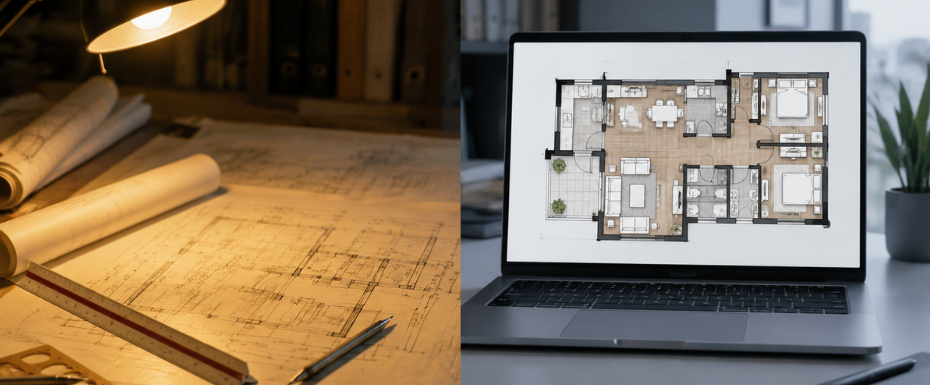
The workflow is designed to be accessible to users with no architectural background. You provide a brief — either as a text description (number of bedrooms, desired layout style, approximate square footage) or by uploading a rough hand-drawn sketch — and the AI generates a dimensioned floor plan within roughly 30 seconds.
The generation process follows three steps:
- Input your brief: specify room count, style preferences, and any functional requirements (open-plan kitchen, home office, en-suite bathrooms).
- Review and iterate: the AI generates multiple layout variations; you can regenerate or adjust the prompt to steer the output.
- Export: download the floor plan image for sharing with contractors, planners, or clients.
In testing, the tool handled a range of briefs competently — from a straightforward three-bedroom single-story layout to a more complex multi-story plan with specific adjacency requirements between spaces. The generated plans are dimensionally consistent and circulation-aware, meaning rooms connect logically and there are no obvious spatial dead ends.
Accuracy and Limitations
The plans are accurate enough for concept-stage use and stakeholder communication. They will not replace stamped architectural drawings for building permit submissions — that is not what the tool is designed for. Structural wall placement, precise compliance with local building codes, and MEP (mechanical, electrical, plumbing) coordination still require a qualified architect.
What the tool genuinely accelerates is the ideation and briefing stage: getting from a verbal description to a concrete spatial layout that can be discussed, modified, and communicated. For that purpose, the output quality is well above what most non-architects could produce manually, and the speed advantage over traditional drafting is substantial.
Pros and Cons
| ✅ Pros | ⚠️ Cons |
| Free tier provides meaningful access — not just a limited demo | Outputs are concept-grade, not permit-ready drawings |
| Multi-tool platform covers the full visualization workflow | Complex irregular site boundaries can produce less accurate results |
| No software installation — fully browser-based | High-resolution exports and commercial rights require a paid plan |
| Fast iteration: generate and refine concepts in minutes | No native CAD export (DWG/DXF) for professional workflows |
| Handles both text prompts and sketch uploads | |
| Outputs are clean and suitable for client-facing presentations |
Who Is It Actually For?
Based on testing across different workflows, ArchyBase delivers clear value in three distinct use cases:
1. Homeowners Planning Renovations or New Builds
The most natural audience. Homeowners often struggle to communicate their spatial ideas to architects or contractors — ArchyBase closes that communication gap by producing a visual reference that both parties can work from. Using it to generate two or three layout options before an architect consultation can also meaningfully reduce billable hours spent on early ideation.
2. Property Developers and Investors
For developers assessing site feasibility or exploring layout efficiency across unit types, the speed of AI generation allows rapid scenario testing that would be expensive to commission from a design team. The floor plan tool is particularly useful for residential developments where layout standardization and efficient use of floor area are priorities.
3. Real Estate Agents and Property Marketers
Vacant plots, off-plan sales, and renovation projects all benefit from visualizations that help buyers understand what a space could become. ArchyBase’s combined floor plan and rendering capabilities allow agents to produce polished material for listings without commissioning bespoke design work.
Pricing
ArchyBase operates on a freemium model. The free tier provides access to the core tools including the floor plan generator, with limits on the number of generations and output resolution. Paid plans unlock higher-volume generation, larger output files, and commercial usage rights.
For individual homeowners using the platform for a single project, the free tier will likely be sufficient. Property professionals and developers working at higher volume will find the paid tiers competitively priced relative to the alternative of commissioning design work for every project.
Verdict
ArchyBase sits in a useful position in the proptech landscape: not trying to replace professional architects, but substantially reducing the time and cost of the early-stage design work that traditionally required one. The floor plan generator is the most practically valuable feature, and its free tier makes it accessible to users who want to evaluate the tool before committing.
The multi-tool approach — covering floor plans, interiors, exteriors, and landscape in one platform — also adds real workflow value for users who move through multiple stages of a project. The alternative is stitching together several single-purpose tools, each with their own learning curve and pricing.
For homeowners, developers, and property professionals who need to move from spatial idea to visual output quickly and without a large design budget, ArchyBase is a tool worth adding to the workflow. The free ai floor plan generator is the natural starting point — generate a plan, see what the output looks like for your specific use case, and judge from there whether the paid features are worth unlocking.
TechBullion Rating: 4.3 / 5 ★★★★☆
Best for: Homeowners, property developers, real estate professionals | Platform: Web (browser-based) | Free tier: Yes
Disclosure: This review is based on hands-on testing of the platform’s available features. TechBullion evaluates tools independently based on functionality, usability, and value for target users.