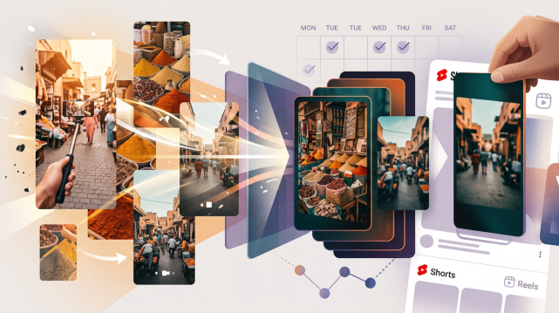
You already have the footage. The slowdown starts later.
A travel clip that works in its original form often needs a second version: a more cinematic take for Shorts, a moodier look for Reels, or a fresh style for a repost next week. What should be a quick variation turns into extra work instead. You test a look, move files between tools, wait on exports, and then realize the result does not quite fit.
If you publish on a weekly schedule, that kind of detour adds up. The goal is not to build a new video from scratch. It is to restyle footage you already like without throwing off the rest of your editing process. A browser-based workflow can help with that, and Media.io is a practical place to try it before changing everything else.
Where The Workflow Usually Slows Down
The problem usually is not the shoot. It is what happens after.
A vertical travel clip might already have good movement, solid pacing, and a clear subject. Once you decide it needs a different look, though, the process gets awkward fast. You spend time choosing a style, jumping between tools, and rendering files just to test one idea.
That gets harder when you publish often. Weekly Shorts and Reels need a workflow you can repeat. Re-editing every alternate version by hand is slow, especially when the original clip already works. In this case, a video-to-video process fits better because you are starting with existing footage, not creating from an empty prompt.
This is where Media.io’s AI video style tool makes sense. You upload the source clip, apply a new visual style, and generate another version while keeping the original motion, structure, and scene flow.
A Faster Way To Move From Input To Output
The main advantage here is simplicity. Media.io is a browser-based, model-first creative platform, so you can keep the job contained: upload a travel clip, choose a look, and generate a restyled version without rebuilding the edit somewhere else.
That matters more than big promises. For travel clips, you want style transfer that still respects movement, scene continuity, and the details that make the footage feel real. Media.io gives you style templates and visual modes for that, along with an integrated editor for quick review and light adjustments before export.
Free daily credits also make testing easier when you want to compare a few directions before picking one. The usual caveat still applies: results depend on the source clip and the style you choose.
Step-By-Step Workflow
Step 1. Open the tool and upload your travel clip
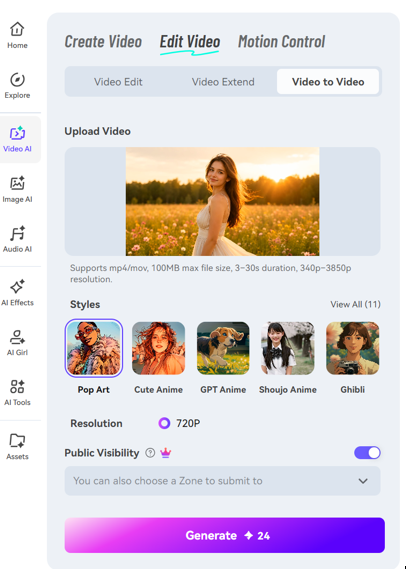
Open Media.io and go to AI Video Generator > Video To Video. Then upload the vertical travel clip you want to restyle.
It helps to start with footage that already works on its own: clean framing, visible subject movement, and a shot worth reposting. This step is about creating a new look, not rescuing a weak clip.
Step 2. Choose a style and set the visual direction
Pick a style that matches the version you need to publish. For travel content, that might be a cinematic look for a destination teaser, a more artistic finish for a repost, or a stronger visual mode for scenic shots.
Adjust the style strength with some restraint. If it is too light, the new version may not feel different enough. If it is too heavy, you can lose the natural feel that made the original clip useful. The aim is to keep the movement and structure while giving the footage a fresh surface look.
Step 3. Generate, review, and move it into your edit
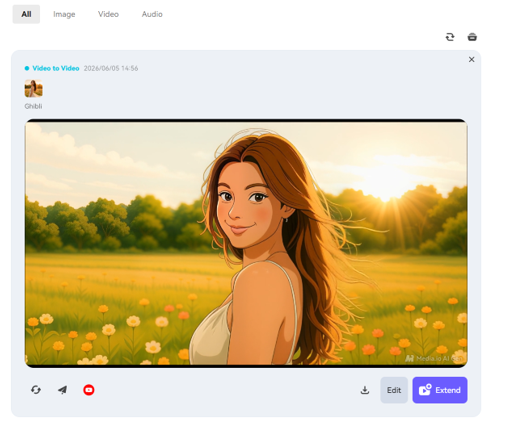
Generate the restyled version, then preview it before treating it as done.
Look at a few practical things: whether the camera movement still feels smooth, whether the mood fits the platform or post, and whether the new style supports the subject instead of competing with it. If something feels off, try another style strength or a different mode. Once the result looks usable, download it and drop it into your regular editing or scheduling workflow for music, captions, and publishing.
Final Recommendation
If you already have a backlog of usable travel footage, this workflow is worth trying.
It is especially useful for vertical vlog clips that need alternate versions for weekly Shorts and Reels. Instead of reopening a full manual post-production process every time you want a different look, you can go from source clip to styled asset with fewer steps and less tool switching. That is the real benefit: a shorter path from idea to publishable version.
The easiest way to test it is with one short clip. Run a restyled version, compare it with the original, and see whether it saves time in your normal publishing cycle. If your current process keeps stalling between concept and export, Media.io is a practical place to handle that restyling pass without slowing down everything else.
FAQs
Can Video-To-Video Keep Camera Movement From The Original Travel Clip?
Yes, that is one of the main reasons to use video-to-video for this kind of task. It is designed to keep the original motion and overall scene structure while changing the visual style. The final result still depends on the source footage and the style choice, so cleaner clips usually hold up better.
Is This Workflow Practical For Weekly Shorts And Reels Production?
Yes, especially if you batch your content. When you already have several travel clips ready, creating alternate visual versions is usually faster than manually restyling each one from scratch. That makes it easier to stay on schedule.
Do I Need Desktop Editing Software Before I Start?
No. A browser workflow is enough for the first restyling pass. You can upload, style, preview, and export online. If you want extra finishing touches later, you can move the clip into your usual editor, but you do not need desktop software just to get started. A stable internet connection does help.
Read More From Techbullion