
What DBD Cheats Change in Matches and Loadouts

On the Dead by Daylight post-match screen, a Survivor’s build shows a perk from a character they’ve never unlocked. The icon looks the same whether they got it from the Shrine of Secrets or a third-party unlocker made it selectable for the session. Loadout screen shows what they brought into the match. How long they’ll have access to that perk is a different question.
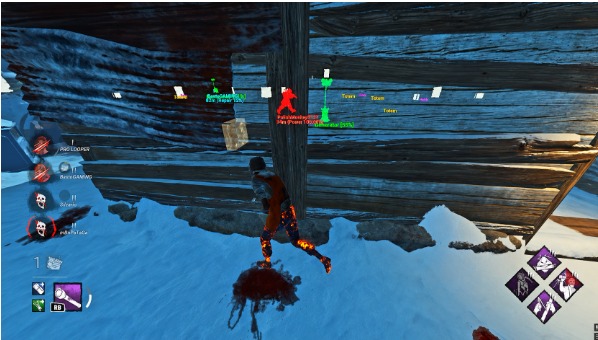
DBD cheats can change what appears on screen, automate a player’s input, or give them temporary access to parts of the game. Clips that jump from the lobby to the middle of a chase can blur those differences. MilkyWay’s guide to DBD cheats on PC describes the features you’ll see in those clips, from ESP overlays during a Trial to unlockers on the loadout screen.
What changes during a Trial
Third-party ESP overlays can mark players and objects with boxes or distance labels. A generator marker tells the player where to look. A progress readout can show that a generator across the map is nearly finished, even when the player can’t see anyone working on it. That information can influence where the player goes next without changing the speed of the repair.
An automatic skill check changes how the game gets an input. Repairing a generator sometimes brings up a timing prompt. The player normally presses a button when the indicator passes through the target area. A feature advertised as an automatic skill check handles that button press. A recording of one successful check tells you very little about what supplied the input, especially when experienced players can hit those prompts consistently.
Two recordings of a generator repair can therefore tell you very different things. A Survivor’s screen might show the timing prompt and the result. A Killer’s recording can show a progress marker from somewhere else on the map. The second view says something about the state of the generator. You’d need the first view just to see whether there was a skill check at all.
What a DBD unlocker changes before you queue
A loadout is the build a player brings into a match. A Survivor could choose perks, a toolbox, and add-ons for the toolbox. A Killer chooses perks and add-ons for their power. Either side can bring an offering. A DBD loadout unlocker can make extra options available in that menu for a session. The player still chooses which perks to equip in the loadout.
Perk access and character access come up in different parts of the menu. Imagine a Killer equips a perk that originally belongs to a character from a paid chapter. Someone watching might assume the player owns the chapter. A perk can show up on several Killers’ builds, while the Killer’s power belongs to that specific character. MilkyWay’s DBD unlocker guide covers how loadout, character, and cosmetic access differ.
A screenshot that shows a perk selected tells you more than a thumbnail in a list. One shows a choice the player was able to make for that character. The other might only show that the game has an icon and a description for the perk. If the question is whether the player could actually use it in a match, the equipped loadout and the post-match screen are better places to look.
What the account actually keeps
Take Brutal Strength, one of The Trapper’s perks. Getting The Trapper to Prestige 1 makes the first tier of his unique perks available to your other Killers through the game’s progression system. Higher tiers can show up in their Bloodwebs. The Shrine of Secrets offers a separate route when the perk is available there. That’s how a player can find a familiar perk in a different Killer’s loadout days later, when they come back to play again.
Dead by Daylight’s Custom Game mode gives players access to perks for that lobby. If you want to know whether Brutal Strength feels worthwhile on a Killer you play often, you can put it in a Custom Game build and try it against friends. Once you return to public matchmaking, the build depends on the perks available to that Killer in your regular inventory.
A third-party loadout unlocker can offer temporary access. The next time you open the loadout with the feature inactive, the game’s own progression and purchases determine which options are available. Bloodpoints and Prestige are tracked through the progression system. Seeing a perk in a temporary loadout gives no indication of how far the player has progressed there.
What someone else can see
Cosmetics add a wrinkle because two players can go through the same chase and see different things. A client-side skin change alters the outfit on the machine running the change. From another player’s screen, that character can still look the way their equipped outfit normally looks. A promotional screenshot can show the changed outfit clearly while revealing very little about what anybody else saw.
For example, the streamer’s recording could show their Survivor wearing a red jacket. A teammate recording the same chase could see a blue one. Both clips can be accurate. The streamer’s version shows what was drawn on their screen, while the teammate’s version shows the outfit visible to them. Whether the streamer owns the red jacket is a question for the account’s inventory.
Why the PC version and patch date matter
Two players can run Dead by Daylight on Windows and launch it through different storefronts, such as Steam, the Epic Games Store, or the Xbox app. Footage labeled “Xbox” can refer to the Windows app. DLC access depends on purchases and, where supported, cross-progression. A third-party feature shown on one PC client can have different availability on another.
The date matters, too. An old recording can outlast the version of the game it shows. A clip may still give you a good look at how a generator marker or a loadout menu used to appear. If the question is what the current version supports, look for the game build and PC client behind the footage.
Dead by Daylight’s published rules list using third-party tools for an unfair advantage among the reasons for a permanent ban.
When a clip says “everything unlocked,” pause on the part that shows what the player can actually do. Can they equip a perk, select a different Killer, or just see a different outfit on their own screen? Those are three different claims, and you can usually tell which one the footage supports before the next Trial starts.






Comment