
How Browser-Based Animation Tools Are Changing Video Content Creation


Video creators often spend more time preparing a short animation than actually using it in their finished videos. A newspaper headline reveal, an animated photograph, or a moving title may appear on screen for only a few seconds, yet producing that effect can involve several layers, manual adjustments, and repeated previews in traditional editing software.
Desktop applications still play an important role in professional video production. They offer extensive control over composition, complex timelines, and visual effects. However, not every animation requires a complete editing project, particularly when someone needs a short visual element for a social media video, documentary, product presentation, or online advertisement.
Browser-based animation tools are introducing another way to handle these smaller creative tasks. Instead of installing a separate application and building an animation from an empty timeline, creators can open an editor in their browser, choose an existing effect, replace the sample content, and adjust the movement before exporting.
The change is not simply about making animation easier for beginners. Technologies such as WebGL, hardware acceleration, and local file processing have made it possible for web applications to handle graphics work that previously depended heavily on installed software.
Why Video Animation Is Moving Into the Browser
Traditional animation software gives editors considerable creative freedom, but that freedom often comes with a complicated workflow. Even a relatively simple effect may require the creator to prepare layers, define keyframes, adjust movement curves, and render a preview before deciding whether the animation looks right.
Consider a video editor who wants to introduce a person through an animated photograph. The intended effect is simple. The photo should appear as a paper cutout, move slightly into the frame, and settle with a realistic shadow.
In a general-purpose motion graphics application, creating this look manually may involve separating the subject from the background, preparing the paper texture, adding a border, placing a shadow, and controlling how every element moves.
A specialized browser editor approaches the same task differently. The animation structure is already available, so the creator concentrates on replacing the photograph and adjusting the appearance.
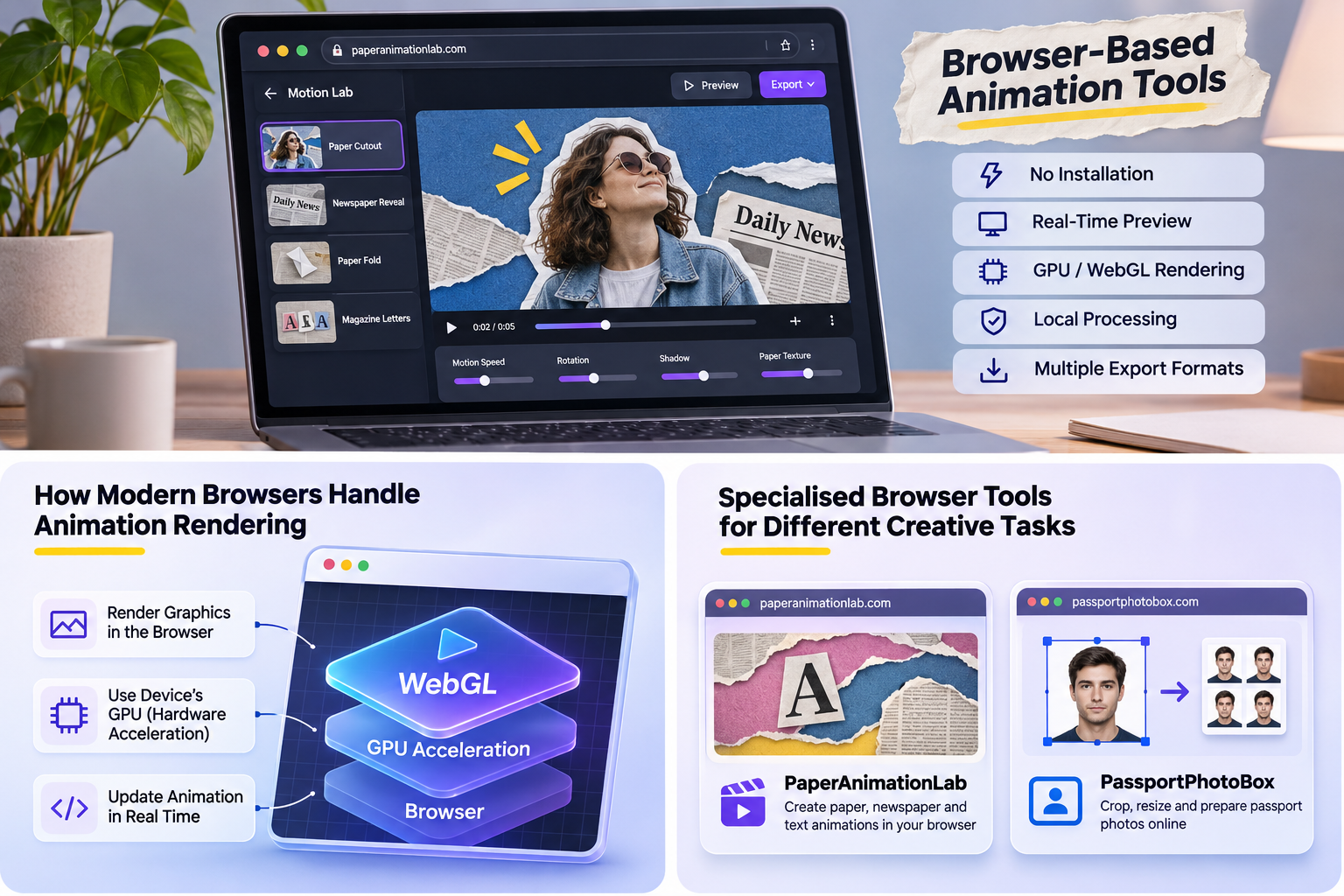
For example, a paper animation editor such as PaperAnimationLab offers customizable effects for photo cutouts, newspaper reveals, paper folding, and animated typography. Its editor uses local browser processing and WebGL rendering, allowing users to adjust motion parameters and inspect their compositions without sending their images to a remote rendering service.
This approach does not eliminate the need for advanced desktop applications. Instead, it separates a common animation task from the larger editing process, giving creators another option when they do not need to construct an entire effect manually.
This shift towards specialised browser tools is not limited to animation. Photo editing has followed a similar path, with websites offering individual tools for tasks that previously required a general image editor. For example, an online passport photo maker allows users to crop, resize, and adjust photographs according to specific document requirements directly in their browser.
Although preparing an identity photograph is different from producing motion graphics, both workflows show how focused web applications can handle individual creative tasks without requiring users to install a complete desktop editing suite.
How Modern Browsers Handle Animation Rendering
One of the biggest technical changes behind browser animation is the availability of hardware-accelerated graphics rendering.
Older web applications were often limited to simple visual effects and basic transitions. More demanding animation work was difficult to perform smoothly, especially when multiple images, textures, and moving objects appeared together.
Modern browsers support graphics technologies that allow developers to create considerably more complex visual effects.
WebGL is an important part of this development. It provides a way for web applications to render two-dimensional and three-dimensional graphics while taking advantage of the device's graphics hardware.
Instead of relying entirely on ordinary page elements, an animation editor can draw a composition inside an HTML canvas. The software can update object positions, calculate visual changes, apply lighting effects, and display the resulting frames directly in the browser.
For a paper animation, these calculations may control how a sheet folds, how a photograph rotates, or how light changes across a textured surface.
The visible result depends on several elements working together:
- Graphics acceleration: Compatible devices can use their GPU to render moving shapes, textures, lighting, and other visual effects.
- Animation calculations: The application controls timing, movement, positioning, and changes in the composition.
- Interactive controls: Sliders and other settings allow creators to adjust an effect while viewing the result.
- Browser media capabilities: Supported applications can capture rendered frames or export animation data without relying on a separate desktop program.
The exact implementation differs between products. Some browser editors perform substantial processing on remote servers, while others render and process the content directly on the user's device.
Modern browser technology makes both approaches possible, but they do not offer identical experiences.
From Static Images to Animated Video Elements
Most creators already have photographs, logos, illustrations, or text prepared before they begin editing a video. Their immediate requirement is often to give those assets movement rather than design something entirely new.
Imagine a creator preparing a short documentary about a historical event. The video contains photographs, written records, and newspaper headlines. The editor wants to introduce these materials in a way that resembles someone examining physical documents.
A paper animation effect could make an old photograph unfold into view, while a newspaper animation could move across printed text before highlighting a relevant phrase.
The basic workflow is similar across many specialized animation tools.
The creator first prepares the source material. A clear photograph or a carefully selected piece of text usually produces a better result than an image containing unnecessary details. If the animation requires an isolated subject, a transparent image may be preferable to a photograph with a complicated background.
The animation style comes next. A paper cutout effect may suit a portrait, while a page turning or newspaper search effect is more appropriate for editorial content. The visual movement should complement the material rather than distract from it.
The creator then adjusts the motion. Depending on the tool, these adjustments may include movement speed, paper texture, shadow softness, fold direction, or the distance travelled by an object.
Finally, the animation is exported in a format that fits the intended editing environment.
The important difference is that the creator is adjusting an existing visual structure instead of constructing every component from the beginning.
Real-Time Previews Are Changing How Creators Refine Animations
Animation usually requires repeated adjustments before it looks natural. An object may enter the frame too quickly, a title may disappear before viewers can read it, or a shadow may make a paper cutout look unnecessarily heavy.
A traditional rendering workflow can interrupt these adjustments when the software must calculate and prepare each preview.
Browser animation editors that support live rendering allow creators to inspect changes while they work. For example, when someone modifies the movement speed of a paper fold, the updated effect can be viewed without submitting the project to a separate cloud rendering queue.
This is particularly useful when several small adjustments influence the final appearance.
A realistic paper animation does not depend on movement alone. Surface texture, lighting, shadows, and slight imperfections help communicate the appearance of a physical object.
A photograph that enters the frame with perfectly uniform movement may resemble an ordinary digital transition. The same photograph with a subtle rotation, uneven edge, and slight settling movement can create the impression of a paper object being placed on a surface.
However, more movement does not automatically produce a better animation. Excessive shaking, large shadows, or complicated camera movement can distract from the photograph or message.
Live previews make it easier to identify these problems before exporting.
They also help editors evaluate different screen formats. An animation designed for a widescreen YouTube video may require a different text layout when adapted to a vertical Instagram Reel or YouTube Short.
Animation Presets Are Becoming More Useful Than Simple Templates
Templates have existed in video editing for many years. They provide a starting point for creators who do not want to construct each visual effect manually.
However, there is an important difference between a fixed template and an editable animation preset.
A fixed template may allow someone to change an image or replace a title while keeping most of the movement unchanged. A more flexible preset exposes additional controls that affect how the animation behaves.
For example, a paper folding preset may allow the user to change the folding direction, movement speed, material appearance, and lighting. These adjustments can produce noticeably different results even when the same source photograph is used.
This distinction is useful when creators want to maintain a consistent visual style across multiple videos without repeating exactly the same sequence.
Paper textures and editorial effects also have several practical applications beyond ordinary social media transitions.
Documentary and educational videos: Newspaper searches, animated maps, and document reveals can guide attention towards a particular quote, location, or photograph. The editor must still verify the source material. A generated newspaper layout should not be presented as an authentic historical document.
Product marketing: A brand can introduce an existing product photograph through a cutout animation or reveal a promotional message with moving typography. The animation adds visual interest without requiring a completely new video shoot.
Explainer videos: Simple paper elements can separate sections, introduce a new concept, or demonstrate how individual parts relate to one another.
Creative storytelling: Magazine letters, scrapbook compositions, and stop-motion style movement can establish an editorial appearance that differs from standard digital text transitions.
These examples show why specialized animation tools can be useful even when a creator already has access to a conventional video editor.
The goal is not necessarily to replace the main editing application. It is to prepare particular visual elements that can be combined with the rest of a video.
Local Processing Introduces Another Approach to Creative Privacy
Many online creative applications require users to upload their files to a server before processing begins. This can be convenient for computationally demanding tasks because the application does not depend entirely on the user's hardware.
However, uploading files introduces additional considerations for people working with private or unreleased material.
A freelance editor may be preparing a product announcement that has not been made public. A marketing agency may be handling photographs supplied under a confidentiality agreement. In these situations, the way an online tool processes its files deserves attention.
Some browser animation applications now perform image decoding, visual processing, and rendering locally.
With this approach, the browser loads the selected file into local memory and processes it on the user's device. The application does not need to upload the original image to an external rendering server.
This can reduce the amount of creative material transmitted to third parties, although users should still check each service's privacy policy and actual data handling practices.
Local processing also has practical trade-offs.
The creator's computer must perform the calculations, and its hardware can affect playback smoothness and export performance. A powerful desktop may handle a complex composition comfortably, while an older laptop or mobile device may struggle with the same project.
Local storage also requires care. A project saved only within a browser session may be lost when local data is cleared. Important work should be exported or backed up in a reusable project format whenever the editor supports it.
For creative teams, the choice between local processing and cloud rendering depends on the type of content, available hardware, and the need to share projects.
Export Formats Determine Whether an Animation Is Actually Useful
An animation may look impressive inside an editor, but its practical value depends on what happens after export.
Video creators often need to place motion graphics over footage that already exists. A title animation, moving photograph, or newspaper cutout may need a transparent background so the underlying video remains visible.
If the exported animation includes an unwanted solid background, the editor may need to remove it with additional processing.
Different export formats address different requirements.
| Export format | Typical purpose | Important consideration |
|---|---|---|
| MP4 | Finished clips for social media and presentations | Standard MP4 exports generally use an opaque background |
| WebM with alpha | Transparent motion graphics and overlays | Transparency support varies across browsers and editing software |
| PNG image sequence | Frame-by-frame animation with transparency | Produces multiple image files that must be imported as a sequence |
| Animated GIF | Short looping previews and simple web animations | Limited color support and less suitable for professional video compositing |
| ProRes 4444 | High-quality video elements requiring alpha transparency | Export and playback support depend on the application and platform |
A browser animation editor does not need to support every format to be useful. What is important is whether its available exports match the creator's intended workflow.
For example, someone making a short promotional clip may only need an MP4 file. A professional editor preparing a moving title for a documentary may prefer a transparent image sequence or a video format that retains alpha information.
When the animation is imported into a larger editing project, the exported element can be placed on a separate video track, adjusted to match the scene, and combined with audio or other effects.
Creators should check file compatibility before preparing a large batch of animations, especially when their projects move between different editing applications.
What Browser Animation Tools Still Cannot Replace
Despite these improvements, animation software running in a browser has limitations.
Performance remains dependent on the user's device. Hardware acceleration can improve graphics rendering, but a complex animation still requires memory and processing resources. High-resolution exports may take considerably longer on devices with limited graphics capabilities.
Browser behavior can also affect the workflow. Some browsers reduce the resources available to inactive tabs. An editor that records an animation directly from its canvas may need the tab to remain visible throughout the export process.
Another limitation involves the amount of control available.
Specialized browser tools are often designed around particular effects, such as paper movement, typography, image reveals, or simple animated scenes. They may offer detailed controls within those categories while providing fewer options for unrelated visual effects.
A professional animation project involving complex character rigging, extensive compositing, or advanced three-dimensional scenes may still be better suited to dedicated software.
There are also differences between browser animation tools themselves. Some focus on editable presets, while others provide more extensive timelines and compositing controls. A tool with a large template library is not necessarily the best choice for a project requiring precise frame-level changes.
Creators should evaluate the actual editing controls rather than assuming that every browser application offers the same capabilities.
How Browser Animation Is Affecting Content Production Workflows
The most useful change is not that animation can now happen inside a web page. It is that creators have more freedom to separate individual production tasks from their main editing environment.
A person preparing a video can edit the main footage in one application, generate a particular visual effect in a browser, and import that effect into the existing timeline.
This approach is particularly practical for creators who regularly produce similar content. A documentary channel might reuse a newspaper reveal style, while a business could maintain consistent product introductions across multiple promotional videos.
Editable presets can also make revisions easier. If a client requests a different headline or replacement photograph, the creator may be able to reopen the original animation project, change the relevant content, and export a new version without reconstructing the complete scene.
However, the quality of the final result still depends on creative judgement. A well-made animation needs appropriate timing, readable text, suitable visual movement, and a clear connection to the surrounding footage.
Browser tools can reduce the technical preparation required for certain effects, but they cannot determine whether an animation is appropriate for the story.
The Future of Video Animation Will Include Both Browser and Desktop Tools
Video editing is unlikely to move entirely into the browser. Desktop software continues to offer extensive capabilities that are valuable for demanding production work, particularly when projects contain complicated timelines and large collections of media assets.
At the same time, browser graphics technology has reached a point where many smaller animation tasks no longer require a separate installed application.
Hardware-accelerated rendering, editable presets, local processing, and practical export options allow creators to produce individual animated elements and bring them into their existing workflows.
For independent creators, small businesses, educators, and professional editors, this creates another way to approach visual production. The choice is no longer limited to manually constructing an effect in complex software or accepting a fixed animation with little control.
The continuing development of browser graphics technology is likely to expand what these tools can handle. Their strongest role, however, will remain tied to a practical requirement: helping creators produce the right visual effect without adding unnecessary work to the rest of the video.







Comment