
Top 5 VPNs Compared: Which VPN Is Best for Managing Remote Teams Securely?

Remote and hybrid staff now make up 78 percent of the U.S. remote-capable workforce, according to Gallup. That shift means your IT team must deliver three things: encrypted Wi-Fi on the road, one allow-listed company IP, and least-privilege access to private apps—without tanking Zoom calls or dragging out off-boarding.
We’ve skipped the server-count beauty contests and picked a single best VPN—or zero-trust alternative—for each real-world need. Five finalists, five use cases—so you can pilot the right tool before the next stand-up.
Quick answer: match your need to one clear winner
Short on time? Here’s the fastest path from problem to solution:
- Stable, allow-listed company IP: TorGuard Business, five seats with one dedicated IP for $44.99 a month
- Balanced, managed VPN for most staff: NordLayer, Core plan from about $11 per user with SSO and optional private gateway
- Hybrid cloud + on-prem networks: OpenVPN CloudConnexa, Essential tier at $7 per user (10-seat minimum) links VPCs, offices, and site-to-site tunnels
- Cloud-first teams on a budget: Cloudflare Zero Trust, free for up to 50 users, guarding web traffic and private apps
- Least-privilege, app-level access: Twingate, Teams plan at ≈$5 per seat lets contractors reach only what they need
Keep reading to see why each pick outperforms the others and how you can pilot the right tool before the next stand-up.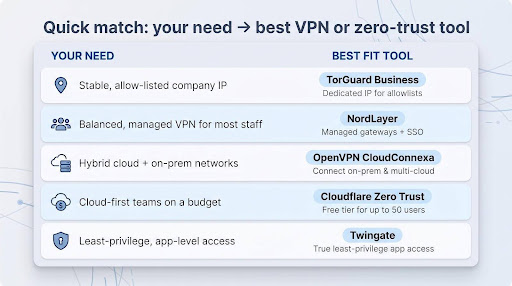
Why we sort by use case, not by trophy counts
Ranking tools one through five looks objective, yet it misses what matters. Each platform in this guide solves a distinct problem:
- TorGuard: hand out a fixed IP today
- CloudConnexa: stitch overlapping subnets and site-to-site tunnels
- NordLayer, Cloudflare Zero Trust, and Twingate handle different jobs
Roll them into a single scoreboard and the details blur. A finance team blocked by its payment processor needs the quickest route to a whitelisted IP, not a shiny award. A DevOps engineer juggling two clouds cares about connector granularity, not raw server count.
That’s why we start with the job to be done and pick the tool proven to do it best. The result is an actionable shortlist you can match to your reality, no beauty contest required.
How we tested and scored each service
You deserve more than “it felt fast on my home Wi-Fi.” Every contender ran the same documented trial, so wins are earned, not marketed. 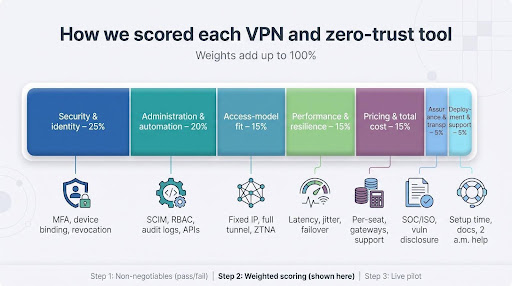
Step 1: non-negotiables. A platform had to encrypt traffic with modern ciphers, enforce MFA, support Windows and macOS, log admin actions, and provide a one-click kill switch. Thirteen vendors failed at least one of these basics and dropped out.
Step 2: weighted scoring.
- Security and identity (25 percent) – User-device binding, strong MFA, and revocation in under 60 seconds
- Administration and automation (20 percent) – Dashboard quality, SCIM, RBAC, API hooks, audit trails
- Access-model fit (15 percent) – Fixed IP, full tunnel, private network, or least-privilege app access
- Performance and resilience (15 percent) – p95 latency, video-call jitter, sleep-wake reconnection, gateway failover
- Pricing and total cost (15 percent) – Per-seat fees, gateway charges, minimum commits, paid support
- Assurance and transparency (5 percent) – SOC/ISO reports, vulnerability disclosure, data-processing clarity
- Deployment and support (5 percent) – Setup time, docs, and real humans at 2 am
Step 3: live pilot. From three regions (US East, US West, and Europe), we measured baseline internet speed against full-tunnel, split-tunnel, and app-level connections across five business days. The numbers, not the demos, decided the rankings.
Only five platforms cleared every gate and reached the top tier. They’re the ones you’ll meet next.
1. TorGuard Business: best for teams that need a fixed IP
Because the IP lives on a private gateway, you dodge the shared-exit fingerprint that so often triggers captchas and fraud engines. TorGuard’s dedicated IP line is tuned for that exact immunity, ensuring Salesforce, QuickBooks, and payment portals all see the same clean source whether employees are on home Wi-Fi or an airport hotspot.
Why TorGuard wins the fixed-IP race
Many SaaS platforms and banks accept traffic only from one allow-listed address. TorGuard includes that address in every Business bundle, with no upsell. A five-seat pack costs $44.99 a month and includes one static IP; the 20-user plan adds 10 unique IPs at roughly $9 per seat.
Because the IP lives on a private gateway, you avoid the shared-exit fingerprint that can trip fraud engines. Salesforce, QuickBooks, and payment portals all see the same clean source whether employees are on home Wi-Fi or an airport hotspot.
Security basics are covered: account-level 2FA, OpenVPN and WireGuard protocol choices, and a kill switch in the client app. Setup is fast; you pay, assign seats, and start using the fixed IP in minutes.
Watch-outs: TorGuard’s public plans stop at 20 users, and the docs list no built-in SSO or SCIM provisioning. Independent no-logs audits are not published, so compliance teams may want extra due diligence before rollout.
For a lean agency or finance group that just needs a stable egress address, TorGuard offers the simplest path to “we’re whitelisted.”
2. NordLayer: best all-around business VPN for growing teams
Why it’s the balanced toolkit IT can live with
NordLayer covers the mainstream must-haves without burying you in enterprise sprawl. Lite starts at $8 per user and includes SSO with Microsoft Entra ID, Okta, and Google Workspace. A five-seat minimum applies. Most teams upgrade to Core (about $11) to unlock custom DNS and a required private gateway with a fixed IP, then add device-posture checks or a cloud firewall when the business is ready.
That modular model scales. A five-person startup keeps the same dashboard when headcount hits fifty. SCIM pushes new hires into the right groups automatically, and one toggle revokes access when they leave. Audit logs line up SOC 2 evidence; NordLayer holds a Type I report and says Type II is in progress.
Performance keeps pace through three protocol choices. NordLynx (its WireGuard variant) connects in seconds; if an older router blocks UDP, the client falls back to OpenVPN TCP. Split-tunnel rules let Zoom and Teams bypass the VPN, so video calls stay sharp even on hotel Wi-Fi.
Caveats to budget for
- Dedicated gateways that deliver your fixed IP cost extra
- Advanced controls such as DNS filtering, posture checks, and site-to-site tunnels sit behind higher tiers
- No independent business speed benchmark is publicly available, so run a pilot before a long-term commit
Best fit: a 10-to-250-user company juggling SaaS plus a few private servers, with a lean IT crew that values clean admin workflows over self-hosting.
Watch for: gateway add-on fees, five-seat minimum, and the pending SOC 2 Type II milestone.
3. OpenVPN CloudConnexa: your go-to for hybrid networks
Why CloudConnexa shines when everything talks to everything
If your world spans on-prem file servers, two cloud providers, and an unlabeled warehouse router, CloudConnexa works as the universal translator.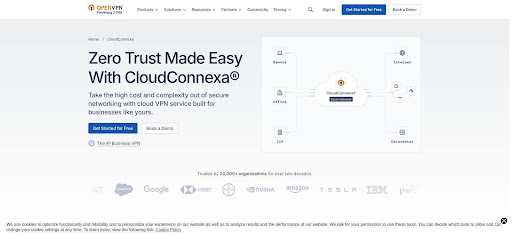
OpenVPN CloudConnexa hybrid network overlay dashboard screenshot
Pricing that scales: start free for five users, move to Essential at $7 per seat (≈$70 monthly minimum) for SAML, then Premium at $9.50 for SCIM, 24-hour log streaming, and a 99.9 percent uptime SLA. All prices are public, with no “contact us” gate.
Connector magic: drop a lightweight connector in each subnet, even overlapping ones, and CloudConnexa knits them into one overlay. Need a site-to-site tunnel? Click, name, save. Want to share a single internal app with a partner? Tag it, email a limited profile, and the rest of your network stays invisible.
Performance you can predict: mature OpenVPN transport plus distributed points of presence traverse firewalls reliably, even if WireGuard fans grumble.
Know the limits: paid plans require roughly 10 seats or more, and if you need a fixed public egress IP you must design for it up front.
For dev teams and MSPs drowning in multi-cloud sprawl, CloudConnexa removes more friction than it adds, and does so without a sales call.
4. Cloudflare Zero Trust: best free start for cloud-first teams
When your stack lives on the internet, not in a rack
If your company was born in Google Workspace and “Deploy Friday” means a push to AWS, you don’t need a full-tunnel VPN; you need identity-driven guardrails around every browser tab. Cloudflare Zero Trust delivers those guardrails and is free for up to 50 users; the self-service paid tier runs about $7 per user, billed annually.
The platform combines three services. Access locks private or SaaS apps behind SSO and device-posture checks. Gateway filters DNS and outbound web traffic, blocking risky destinations before your SOC dashboard blinks. WARP keeps an always-on tunnel to the nearest Cloudflare edge, trimming latency instead of adding it.
Setup feels more like configuring an identity provider than racking servers. Point your domain to Cloudflare, connect Okta or Entra ID, and write plain-language policies such as Engineers on managed laptops can reach Jira; contractors cannot. Most workflows are browser-based; the lightweight WARP agent adds device signals and secure DNS in one install.
Know the limits: Cloudflare is not focused on handing out a single fixed public IP. Finance tools that demand a static egress address require an enterprise add-on or external service. The free tier also comes without 24/7 human support, so line up internal champions before flipping the switch on a Friday afternoon.
For SaaS-native startups that live by GitHub pull requests and spend their days in Chrome, Cloudflare Zero Trust turns world-class edge security into a weekend project with no new budget line.
5. Twingate: best VPN replacement for least-privilege access
Shrink the blast radius, not just the attack surface
Traditional VPNs drop users onto a flat network, so one leaked credential can expose everything behind the tunnel. Twingate flips that model. Lightweight connectors sit next to each protected service; the user authenticates through your identity provider and receives a short-lived key for only the app or port assigned. Everything else stays invisible.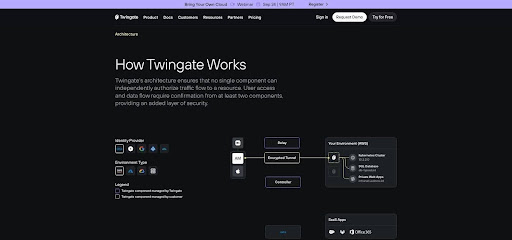
Twingate zero-trust architecture diagram illustrating least-privilege access
What it costs: start free for up to 5 users, then ≈$5 per user on the Teams plan (max 100 seats) and ≈$10 on Business (max 500). Both tiers include SSO, device registration, and policy-based routing; Business adds posture checks and longer log retention.
Why it’s different: deploying Twingate feels like spinning up a sidecar, not racking a firewall. Launch a Docker connector, point it at an internal DNS name, and grant the Dev-staging group access in a few clicks. Traffic travels from the user to the nearest relay and then straight to the resource, often beating the HQ hairpin that slows legacy VPNs.
Know the limits
- No built-in static public IP; pair with TorGuard or a cloud NAT if a finance tool demands one
- Mapping resources to groups takes planning, but that work enforces true least privilege
For development teams, contractors, or any company haunted by lateral-movement nightmares, Twingate delivers surgical access control without the heavyweight price tag of full SASE suites.
Compare the contenders side by side
Need the facts at a glance? The table below lists public prices and key capabilities. Verify gateway fees, support tiers, and any promos before you commit.
| Product | Best for | Public starting price | Minimum seats | Static egress IP | SSO | SCIM | Private-resource access | Access model | Biggest trade-off |
| TorGuard Business | Small teams that must pass allowlists | $44.99 /mo (5 seats) | 5 | 1–10 dedicated IPs included | 2FA | — | Basic, DIY | Full-tunnel VPN | Limited lifecycle automation |
| NordLayer | Balanced, managed VPN for most SMBs | $8–$14 user/mo | 5 | Gateway add-on | ✔ | Premium | Yes; cloud firewall | Managed VPN + optional ZTNA | Gateway and posture add-on costs |
| OpenVPN CloudConnexa | Hybrid networks, site-to-site links | Free (5) / $7 user/mo | 10 | Design-time option | SAML | Premium | Via connectors | Overlay private network | No WireGuard; paid floor |
| Cloudflare Zero Trust | Cloud-first teams, zero cost start | Free ≤ 50 / ≈ $7 user/mo | 1 | Enterprise add-on only | IdP | API | Agentless or WARP | ZTNA + secure web | No simple static IP; learning curve |
| Twingate | Least-privilege, app-level access | Free ≤ 5 / $5–$10 user/mo | 1 | Not primary use case | ✔ | Business | Resource scoped | Connector mesh (ZTNA) | Up-front policy mapping |
A dash in the table means the feature is not publicly documented. All prices are annual equivalents when vendors offer both monthly and annual options.
Why these popular services didn’t make the cut
Several big names landed just outside our top five. Each shines in its own lane, yet gaps or extra overhead kept them off an SMB-focused shortlist.
Check Point SASE. Deep feature set, but staples such as SCIM and private service edges hide behind quote-only tiers, and the public site lists no dollar pricing. Small teams face a long sales cycle.
ExpressVPN for Teams. The volume-license product launched in January 2026, so its admin console, SSO, and RBAC still trail more mature business platforms.
Cisco Secure Client. Ideal if you already own Cisco firewalls. Otherwise, appliance costs, license complexity, and multiple modules make first deployment feel like buying a Swiss-Army knife to cut one string.
Surfshark for Teams. Attractive consumer pricing, yet public docs still don’t confirm enterprise staples such as SCIM, granular audit logs, or zero-trust resource policies.
Zscaler Private Access. An enterprise gold standard, but one published bundle lists a 500-user minimum and calls for heavyweight rollout—overkill for most remote-first SMBs.
Add any of these to your long list if their unique strengths solve a pressing requirement. For most small and midsize remote teams, though, the five primary picks balance capability, transparency, and speed to value far better.
How to choose the right access model
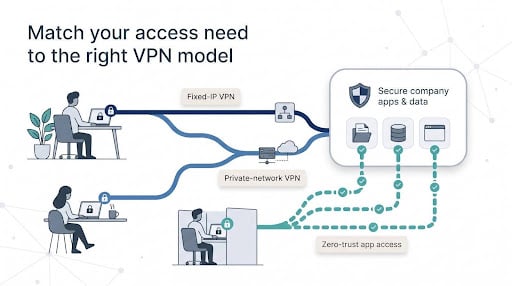
The best tech fails when it solves the wrong problem. Before you click Start free trial, decide which of the three access models your users truly need: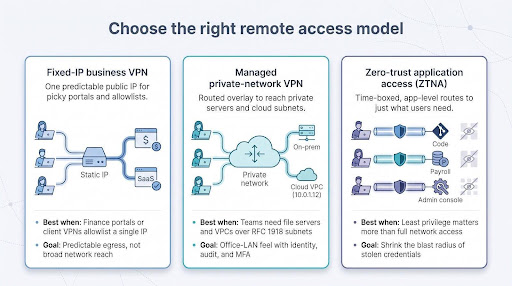
- Fixed-IP business VPN. Pick this when finance portals, client VPN concentrators, or picky SaaS apps allowlist one public address. Your goal is predictable egress, not broad network reach.
- Managed private-network VPN. Choose this if employees must reach file servers, databases, or cloud VPCs over private RFC 1918 subnets. You need a routed overlay that feels like the office LAN, plus identity, audit, and MFA.
- Zero-trust application access (ZTNA). Use this when least privilege matters more than full network access. Each user gets time-boxed routes to exactly the apps they need, nothing more, which shrinks the blast radius of a stolen credential.
Match the model to the resource, then shortlist tools built for that job. A wrong-fit model spawns work-arounds, support tickets, and security gaps that linger for years.
1. When a fixed-IP business VPN makes sense
Choose this lane when success depends on one predictable public address. Finance portals that block unfamiliar IPs and client firewalls that open for a single source both fit the pattern.
A bundled dedicated IP keeps those gates open without exposing your office router and saves staff the hassle of hotspot work-arounds. Look for plans that include the static address rather than add it later. TorGuard Business, for instance, charges $44.99 a month for five seats with one IP and scales to 10 IPs on its 20-user tier.
Checklist for buyers:
- Confirm the IP lives on an isolated gateway, not a giant shared server
- Verify the provider’s “no logs” stance still preserves admin connection history for audits
- If you need multiple IPs—different regions or staging environments—make sure each seat or group can get its own address without a support ticket
If your users also need to reach private subnets or on-prem servers, move to the next model: a managed private-network VPN.
2. When a managed private-network VPN fits best
Some workloads stay on-prem: basement file servers, a niche ERP, or a test lab behind a hardware firewall. These need full network reach, not just a browser session.
A managed private-network VPN builds one routed overlay where every endpoint sees the correct RFC 1918 address. Your accounting share at 10.0.1.12 feels local whether Alice is on hotel Wi-Fi or Bob is tethered through 5G—no extra firewall rules or port forwarding.
Why CloudConnexa stands out. Lightweight connectors join on-prem, AWS, and Azure subnets—even overlapping ones—into one fabric. Admins write zero-trust rules such as HR can reach payroll only on port 443 without running their own headend. Pricing is transparent: free for five users, then $7 per seat with a ten-user minimum, and Premium at $9.50 adds SCIM plus a 99.9 percent SLA.
Mind the details:
- Fixed egress IPs are possible but need design-time planning, not a one-click toggle
- OpenVPN transport tops out at what a modern CPU core can encrypt, fine for everyday traffic but not ideal for terabyte backups
Already own Cisco, Fortinet, or Sophos firewalls? Compare total cost: a cloud service cuts patching and inbound attack surface, but licenses you already paid for may sway the math. Aim for fewer Sunday-night surprises, not another dashboard to babysit.
3. When application-level access beats any VPN
Handing a contractor an entire subnet is like giving a master key when all they need is the supply closet. ZTNA swaps that master key for time-boxed, app-specific passes. After the user authenticates and posture checks run, the service builds a short-lived tunnel to just the requested resource.
Cloudflare Zero Trust wraps web apps in Cloudflare’s global edge. Identity and device health are checked before traffic is proxied, and browser-based auth lets a Chromebook user connect with no heavy client. Add Gateway and the same lightweight WARP agent enforces DNS filtering and safe browsing. Cost: free for up to 50 users, then about $7 per user, billed annually.
Twingate relies on a connector mesh. Drop a Docker connector next to an internal service—say, a self-hosted Git server—and only the Dev-ops group ever learns the IP exists. Routes spin up on demand, so lateral movement hits a wall. Because traffic avoids full-tunnel back-haul, video calls and personal browsing exit the local ISP untouched. Pricing starts free for five users, then ≈$5 per seat on Teams (max 100) and ≈$10 on Business (max 500).
Choose ZTNA when your crown jewels are a handful of web apps, APIs, or SSH endpoints, not sprawling file shares. The trade-off: you’ll invest time mapping resources to groups, but you gain the power to revoke one user, one app, or one device without disconnecting the whole team.
Your smooth-launch checklist
Rollout touches identity, devices, and employee habits. Work through these ten steps to prevent most first-week tickets before they start.
- Inventory every resource. List SaaS allowlists, internal servers, cloud VPCs, and admin tools; you can’t protect what you overlook.
- Group users by role. Separate employees, contractors, and service accounts so each policy has a clear owner.
- Integrate single sign-on. Connect Okta, Entra ID, or Google Workspace on day one; MFA becomes automatic.
- Pilot with a vocal squad. Pick five power users across time zones and let them try to break things in a sandbox.
- Measure real traffic. Track p95 latency, jitter, and reconnection after sleep; numbers beat gut feel when you defend the budget.
- Tune split-tunnel rules. Keep video calls and streaming updates outside the VPN unless compliance says otherwise.
- Set log retention, then export. Ship connection and admin logs to your SIEM on day one; future you will thank present you.
- Test off-boarding. Disable a pilot user and confirm every device loses access within minutes.
- Document quick fixes. Capture the first-week edge cases now, not during quarter-close chaos.
- Schedule quarterly reviews. Access needs shift; stale rules become attack paths. Put the cadence on the calendar today.
What’s next for remote access?
Change moves fast. Track these four shifts so your 2027 roadmap stays current.
- Secure web and VPN converge. Gartner forecasts the secure access service edge (SASE) market to grow twenty-six percent per year and top $28 billion by 2028. Firms will buy one cloud platform for VPN, DNS filtering, and firewall instead of five point products.
- Browsers become gateways. Gartner also predicts that twenty-five percent of organisations will deploy a secure enterprise browser by 2028, giving contractors access to internal apps without a heavy agent.
- Post-quantum tunnels arrive early. ExpressVPN’s WireGuard variant already wraps keys in ML-KEM, and Cloudflare WARP now rides MASQUE with post-quantum protection. Procurement checklists will soon ask which PQ cipher you support, not if.
- Identity beats protocol wars. Whether a service enforces phishing-resistant MFA and device posture will matter more than “WireGuard versus OpenVPN.” Winning vendors will surface richer risk signals and pull policy from your IdP instead of their own silo.
Conclusion
Bottom line: bet on vendors that evolve quickly and expose features through APIs. Every service in this guide already plays in that league, so your investment won’t fossilise overnight.







Comment