
Don’t Choose an AI Video Model by Features: Choose It by Your Biggest Constraint

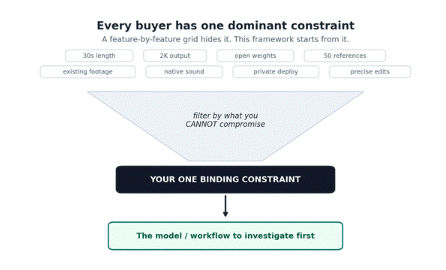
Most model comparisons hand you a wall of checkmarks and leave you to sort it out. That format quietly assumes every feature matters equally to you. It doesn’t. In practice, almost every buyer has a single dominant constraint, one hard requirement that, if unmet, makes every other advantage irrelevant. If your ad must carry synchronized dialogue in three languages, a model that can’t generate audio is disqualified no matter how elegant its motion is. If you’re embedding generation inside your own product, a closed model is a non-starter even if it looks flawless.
So this guide inverts the usual structure. Instead of marching feature by feature, it starts from nine common constraints and asks, for each: what do the three models actually document, where are the limits, and what remains uncertain? The aim isn’t to crown a universal winner, it’s to point you at the one or two options worth your evaluation time, given the requirement you can’t bend on.
The premise in one picture: filter the feature cloud through the requirement you cannot compromise, and the shortlist gets short fast.
How to read this comparison
Three ground rules shape everything below, and they matter for how much weight to give each claim.
| What the labels mean
Documented model spec — a capability the model’s own page states (for example, Seedance’s 4–30 second range or MiniMax’s native 2K output). Topview platform feature — a capability provided by Topview’s workflow around a model, not by the model itself. Topview’s Seedance page is explicit that tools like its 3D previs console and conversational canvas are platform features, not model-exclusive ones. Useful, but they travel with Topview — not with the underlying model. Preview / unconfirmed — a capability shown as a workflow preview that isn’t yet confirmed in official documentation. This applies to essentially all of Wan 3.0. |
| The Wan 3.0 caveat — read before trusting any Wan number
Topview’s own Wan 3.0 page states that, as of its August 12, 2026 review, Alibaba Cloud’s public model catalog lists Wan 2.7 as the latest Wan video release and does not document Wan 3.0. Every Wan 3.0 duration, resolution, mode, and input on that page is presented as a workflow preview to confirm in the live generator — not a confirmed official specification. Treat all Wan 3.0 entries in this guide accordingly: they describe what Topview’s preview represents, not verified model behavior. |
What this guide will not do. Because no firsthand testing was done, it makes no claims about output quality, realism, motion fidelity, reliability, or how long anything takes to render. It also makes no pricing comparison: MiniMax positions H3 as a cost-aware route to 2K, but the pages state that actual cost and generation time depend on current product settings, and none of the three pages publishes comparable prices. Where the evidence isn’t enough to separate the options, this guide says so rather than inventing a verdict.
The three options at a glance
Seedance 2.5 — A multimodal model built around longer, directed storytelling. Its page documents 4–30 second single-pass clips, up to 50 references (up to 30 images, 10 video clips, and 10 audio files within stated duration limits), second-level timestamp direction, storyboard and keyframe inputs, local segment editing, video extension, and multilingual dialogue with subtitles. Output resolution is documented up to 1080p. Several conveniences around it, a 3D previs console, conversational canvas editing, Douyin-link recreation — are Topview platform features, not model capabilities.
MiniMax H3 — A general-purpose, omni-modal model with published open weights. Its page documents four input modalities (text, image, video, audio), native stereo audiovisual output, native 2K resolution, clips up to 15 seconds, video-to-video motion transfer, and instruction-led editing. The open weights are the headline: the page describes self-hosting, private deployment, fine-tuning, and workflow integration, subject to the current license.
Wan 3.0 — Presented by Topview as an early workflow preview rather than a documented model. The preview represents a projected 30-second option with a “smart duration” concept, 1080p/720p output, omni/image/text modes, text/image/video/audio inputs plus documents and webpages as extended context, and shot-level direction , all to be confirmed in the live generator. Because Alibaba hasn’t published Wan 3.0, none of this is verified.
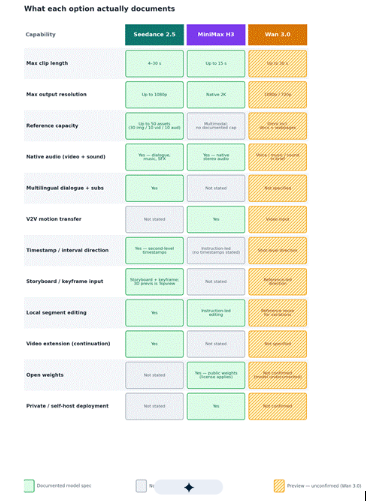
A capability map before the sections. The matrix below is the whole comparison at a glance, documented capabilities only. Read it as a guide to which page claims what, then use the constraint sections for the reasoning. An empty or “not stated” cell means the page doesn’t document that capability, not that it’s impossible.
Green cells are stated model specs; gray cells are capabilities the page doesn’t claim; amber cells are Wan 3.0 preview items that aren’t officially confirmed.
The nine constraints
1. “My video needs to be longer.”
The constraint: When one continuous clip must carry an opening, development, and payoff, maximum single-pass length is the gating spec.
Seedance 2.5 — Documents 4–30 second clips generated in one pass — explicitly to reduce stitching — plus a video-extension capability to continue a strong clip with better continuity. This is the clearest documented long-form path of the three.
MiniMax H3 — Documents up to 15 seconds. Ample for many ads and social cuts, but half the documented single-generation ceiling of Seedance.
Wan 3.0 — The preview represents up to 30 seconds plus a “smart duration” concept, but this length is not a confirmed Wan 3.0 parameter — Topview flags it as preview only. Don’t plan a 30-second Wan deliverable until the live generator confirms it.
Limits & uncertainties: “Single-pass length” and “usable narrative length” aren’t the same thing; longer ceilings still need review for drift, and none of the pages quantify that. Wan’s number is unverified.
Where to look first: Prioritize documented single-pass maximum plus an extension path. Investigate Seedance 2.5 for documented 30-second generation; treat Wan 3.0’s 30 seconds as a preview to verify, and expect 15 seconds from MiniMax H3.
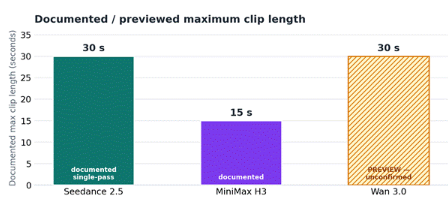
Documented maximums. Wan 3.0’s 30 seconds is a Topview preview figure, not a confirmed specification.
2. “I need high-resolution output.”
The constraint: If deliverables must hold up on large screens or against tight brand standards, the ceiling that matters is documented output resolution — not input reference resolution.
MiniMax H3 — Documents native 2K output, the highest documented output resolution among the three.
Seedance 2.5 — Documents output up to 1080p (the page notes this ceiling is unchanged from Seedance 2.0). Watch a commonly conflated detail: it accepts image references up to 4K, but that’s input guidance, not output resolution.
Wan 3.0 — The preview lists 1080p / 720p, unconfirmed.
Limits & uncertainties: “2K” and “1080p” describe pixel dimensions, not perceived quality, and this guide makes no quality claim. Confirm the exact resolution options live, since available tiers can depend on current settings.
Where to look first: Prioritize documented output resolution. Investigate MiniMax H3 for native 2K; if 1080p is sufficient, Seedance 2.5 documents that ceiling; treat Wan 3.0’s tiers as preview.
3. “I already have footage.”
The constraint: “Use my footage” splits into two different needs — transferring motion and performance from a clip onto new content, versus feeding clips as references to guide or extend a generation. The models document these differently.
MiniMax H3 — Documents video-to-video (V2V) motion transfer — moving movement, timing, camera language, and performance from source video into new subjects, styles, or scenes. If your footage is there to drive motion, this is the documented mechanism.
Seedance 2.5 — Documents up to 10 video reference clips (combined duration up to 30 seconds) used as guidance within a multimodal generation, plus video extension to continue an existing clip. It doesn’t use the “motion transfer” framing; the footage acts as reference and continuation material.
Wan 3.0 — Lists video as a core input in the preview, but supported types depend on the live model and mode, confirm before preparing source files.
Limits & uncertainties: The two approaches aren’t interchangeable, and neither page quantifies how faithfully source motion or identity is preserved, both explicitly frame consistency as something to review. There isn’t enough documented evidence to rank fidelity.
Where to look first: Prioritize the specific reuse you need. Investigate MiniMax H3 for V2V motion transfer; investigate Seedance 2.5 for footage-as-reference plus extension. Confirm Wan 3.0’s video input in the live generator.
4. “I have many reference assets.”
The constraint: When identity, products, locations, motion, and sound all need to stay consistent, documented reference capacity and the mix of accepted types decide whether your assets fit.
Seedance 2.5 — Documents the most explicit capacity, up to 50 assets, broken down as up to 30 images, 10 video clips, and 10 audio files, within stated combined-duration limits. If you’re bringing a large, typed asset set, this is the clearest documented fit.
MiniMax H3 — Documents multimodal input across text, image, video, and audio, but its page states no numeric cap. You can bring several types; how many of each isn’t documented.
Wan 3.0 — The preview represents the broadest range of reference types, image, text, video, audio, plus documents and webpages as extended context, but with no confirmed caps and preview status throughout. The breadth of types is notable but unverified.
Limits & uncertainties: More reference slots don’t guarantee more consistency; every page frames consistency as a goal to review, not a guarantee. Wan’s document and webpage inputs are the most differentiated idea here, and also the least confirmed.
Where to look first: Prioritize documented capacity and accepted types. Investigate Seedance 2.5 for a high, clearly typed reference budget; if you specifically need document- or webpage-driven briefs, watch Wan 3.0’s preview and confirm it live.
Only Seedance 2.5 documents a numeric reference cap, so only its bar is drawn to scale; the others are described from their pages.
5. “I need audiovisual generation.”
The constraint: If sound is part of the deliverable, the question is whether audio is generated natively with the video — and which audio capabilities are documented.
Seedance 2.5 — Documents coordinating video, dialogue, music, and sound effects in a single generation, with audio references and time-coded (second-level) sound direction. It also documents multilingual dialogue with improved lip sync and subtitle rendering, a distinct advantage if you localize.
MiniMax H3 — Documents native synchronized audiovisual output with stereo sound. Its emphasis is stereo audio; the page doesn’t specifically tout multilingual dialogue or subtitle rendering, and notes that dialogue, effects, timing, and lip sync depend on prompt, references, and settings.
Wan 3.0 — The preview treats voice, music, and sound as part of the brief, but whether native sound or only audio reference is available depends on the current mode, confirm before planning dialogue timing.
Limits & uncertainties: Both Seedance and MiniMax document native audio but emphasize different things (localization and subtitles vs. stereo), and neither this guide nor the pages provide a quality comparison. There isn’t enough evidence to declare one better, test both against your actual audio needs.
Where to look first: Prioritize native audio plus the specific capability you need. Investigate Seedance 2.5 for multilingual dialogue and subtitles; investigate MiniMax H3 for native stereo audiovisual output; confirm Wan 3.0’s audio mode live.
6. “I need strong scene-level direction.”
The constraint: Multi-shot pieces live or die on how precisely you can direct shot order, timing, and transitions — so the axis that matters is granularity of control.
Seedance 2.5 — Documents the most granular control set, second-level timestamps to direct actions, shots, dialogue, sound, and transitions by interval, plus storyboard, keyframe, white-model previs, and green-screen inputs to define staging before generation. (The 3D previs console that produces those white-model sequences is a Topview platform feature; the model consumes the sequences as references.)
MiniMax H3 — Documents instruction-led control, directing subjects, text, style, sound, motion, camera behavior, and scene changes through instructions and references. Capable, but the page doesn’t document timestamp- or storyboard-level mechanisms.
Wan 3.0 — The preview represents shot-level direction, camera, action, performance, pacing, and continuity in one brief, but as a preview to confirm, and the page repeatedly notes that realism, text, and UI accuracy require frame-by-frame review.
Limits & uncertainties: Documented controls describe what you can specify, not how faithfully the model obeys, none of the pages quantify adherence. Seedance documents the most control surface; that isn’t the same as guaranteed results.
Where to look first: Prioritize the granularity of direction you need. Investigate Seedance 2.5 for timestamp- and storyboard-level control; investigate MiniMax H3 if instruction-led direction is enough; treat Wan 3.0’s shot-level direction as preview.
7. “I want an open-weight model.”
The constraint: If you need to inspect, fine-tune, or self-host the model itself, open weights are a binary gate — a model either publishes them or it doesn’t.
MiniMax H3 — The only option here that documents open weights. Its page describes published weights supporting self-hosting, private deployment, fine-tuning, and integration, subject to the current license, and advises reviewing the model card, hardware requirements, and license before self-hosting, modifying, redistributing, or using the weights commercially.
Seedance 2.5 — Its page documents no open weights; access is through Topview.
Wan 3.0 — Open weights are not claimed on the page, and because Alibaba hasn’t published Wan 3.0 at all, any weight availability or license is unconfirmed. (Prior Wan video releases have historically been open, but that history says nothing definitive about an unreleased 3.0, don’t assume it.)
Limits & uncertainties: “Open weights” still comes with license terms that govern commercial use; open does not automatically mean unrestricted. Verify H3’s current license against your intended use.
Where to look first: Prioritize published weights plus a license that fits your use. Investigate MiniMax H3; Wan 3.0’s weights are unconfirmed and Seedance 2.5 documents none.
8. “I need a workflow suitable for repeated revisions.”
The constraint: For iterative work, the cost of change matters — can you revise part of a result without regenerating everything, and iterate conversationally?
Seedance 2.5 — Documents local segment editing, revising a selected section while keeping the rest more stable plus video extension. Around it, Topview adds conversational canvas editing for natural-language, targeted changes; note that the canvas is a Topview platform feature, not a model capability, so it travels with Topview rather than the model.
MiniMax H3 — Documents instruction-led precision editing, adjusting subjects, text, style, sound, motion, camera, and scenes through instructions. That supports iteration, though the page doesn’t document segment-scoped, keep-the-rest-stable editing the way Seedance does.
Wan 3.0 — The preview describes reusing a locked reference set to produce variations and reviewing each output, but as a preview and with consistency framed as a goal to check, not a guarantee.
Limits & uncertainties: None of the pages quantify how cleanly an edit preserves the untouched portions — treat “keep the rest stable” as a documented intent to test. And distinguish model-level editing (segment editing, instruction-led editing) from Topview’s canvas convenience.
Where to look first: Prioritize non-destructive, scoped editing plus iterative tooling. Investigate Seedance 2.5 for local segment editing (with Topview’s canvas as a workflow bonus); investigate MiniMax H3 for instruction-led editing; treat Wan 3.0’s variation workflow as preview.
9. “I need to build the model into a larger product or pipeline.”
The constraint: Productizing generation raises different questions than making one video, self-hosting, private deployment, integration, and licensing move to the front.
MiniMax H3 — The documented fit. Open weights are described as supporting self-hosting, private and enterprise deployment, fine-tuning, and integration into tools, pipelines, and agents, with the standard caveat to review the license and hardware requirements first. For keeping sensitive prompts, media, and outputs inside your own infrastructure, this is the option that documents it.
Seedance 2.5 — Documents no open weights or self-hosting; it’s delivered through Topview. That can still suit a product built on Topview’s platform, but it isn’t a self-hostable model.
Wan 3.0 — No confirmed integration or deployment story exists, since the model isn’t officially documented, treat any pipeline plan as unverified until Alibaba publishes and Topview confirms availability.
Limits & uncertainties: A separate path worth naming: Topview also exposes platform-level access to supported models via its API, MCP, and plugin. That’s integration at the platform layer, distinct from self-hosting the model weights, and it depends on which models Topview currently offers. Open weights enable private deployment but shift hardware, maintenance, and license compliance onto you; a platform API removes that burden but keeps you on the platform’s terms and model availability. Neither page quantifies those trade-offs.
Where to look first: Prioritize self-host / private-deployment support plus a workable license, investigate MiniMax H3. If platform-level access to a hosted model is enough, evaluate Topview’s API across the models it currently supports; treat Wan 3.0 as not yet investable for this purpose.
The decision table
The same nine constraints, condensed. This maps each binding requirement to the capability to prioritize and the model or workflow to investigate first. It is deliberately not a “winner” column, the right answer depends on which single row is yours, and the evidence is uneven across the three (Wan 3.0 especially).
| Your one binding constraint | Capability to prioritize | Model / workflow to investigate first |
| My video needs to be longer | Documented single-pass max length + an extension path | Seedance 2.5 (30s documented). Verify Wan 3.0’s 30s preview; expect 15s from MiniMax H3. |
| I need high-resolution output | Documented output-resolution ceiling (not input resolution) | MiniMax H3 (native 2K). Seedance 2.5 documents up to 1080p; Wan 3.0 tiers are preview. |
| I already have footage | Motion transfer vs. reference/extension, they differ | MiniMax H3 for V2V motion transfer; Seedance 2.5 for footage-as-reference + extension. |
| I have many reference assets | Documented reference capacity + accepted types | Seedance 2.5 (up to 50, typed). Watch Wan 3.0 preview if you need document/webpage inputs. |
| I need audiovisual generation | Native audio + your specific audio need | Seedance 2.5 (multilingual dialogue + subtitles) and MiniMax H3 (native stereo). Test both, evidence can’t rank them. |
| I need strong scene-level direction | Granularity: timestamps/storyboard vs. instruction-led | Seedance 2.5 (second-level timestamps + storyboard/keyframe). MiniMax H3 is instruction-led. |
| I want an open-weight model | Published weights + a license that fits your use | MiniMax H3 (only documented open weights here). Wan 3.0 weights unconfirmed. |
| I need a workflow for repeated revisions | Non-destructive/scoped editing + iterative tooling | Seedance 2.5 (local segment editing) + Topview canvas (platform). MiniMax H3 is instruction-led. |
| I need to build into a product/pipeline | Self-host/private deploy + license, or platform API | MiniMax H3 (open weights). Or Topview’s API for hosted access. Wan 3.0 not yet investable. |
Before you commit
- Confirm it live. Every duration, resolution, mode, and input above can depend on current product settings, open the live generator and verify before planning a deliverable.
- Treat all Wan 3.0 specifics as preview. Until Alibaba publishes Wan 3.0 and Topview confirms in-product availability, its durations, modes, and inputs are unverified.
- Separate model from platform. Capabilities like Topview’s 3D previs console and conversational canvas are platform features, not model specs, they won’t follow the model elsewhere.
- Check licensing for your use. Open weights (MiniMax H3) still carry license terms; commercial rights on any of these depend on your plan and current terms. Verify before publishing.
- Test quality yourself. This guide makes no claims about realism, motion, reliability, or render time, those require your own evaluation on your actual prompts and assets.
- No pricing was compared. None of the three pages publishes comparable prices, and stated cost and generation time depend on current settings.
Choose the row that’s non-negotiable for you, investigate the one or two options it points to, and let the requirement you can’t bend on, not a feature count, drive the decision.







Comment