Artificial intelligence

How AI Image Generation Is Transforming Creative Workflows for Businesses in 2026

Transforming Creative Workflows

For most of the last decade, visual content sat in an awkward spot for growing companies. It was expensive to produce, slow to turn around, and almost impossible to scale without hiring a full studio. A single product launch could tie up a designer for weeks. A seasonal campaign meant juggling photographers, stock licenses, and rounds of revisions. Then, over a remarkably short window, the economics flipped. Businesses that once rationed their visuals now generate hundreds of on-brand images before lunch.

This shift is not a novelty. It is a structural change in how marketing, product, and communications teams operate. Below, we look at what is actually driving the adoption of AI-generated visuals, where the productivity gains are showing up, and how forward-thinking companies are folding these tools into their day-to-day work.
The Quiet Explosion of AI-Generated Visuals

Walk through the marketing output of almost any mid-sized company today and you will find AI-generated imagery woven throughout, often without a label announcing it. Social graphics, blog headers, ad variations, email banners, landing-page hero shots, product mockups: much of it now begins as a text prompt rather than a camera shutter.

What makes this interesting is not that the technology exists, but how quietly it became normal. A few years ago, AI images carried a distinctive plastic sheen that trained eyes could spot instantly. That tell has mostly disappeared. Modern generators produce lighting, texture, and composition that hold up on a billboard as easily as a phone screen. The result is that visual content, once a bottleneck, has become one of the most elastic resources a business owns.


Three forces are pushing this forward at once:


  • Volume demands keep rising. Every channel wants more visuals, in more sizes, more often. A single campaign might need forty variations across platforms.
  • Attention spans keep shrinking. Fresh, tailored imagery outperforms recycled stock, and audiences notice when a brand phones it in.
  • Budgets are not keeping pace. Teams are asked to do more with the same headcount, and AI image tools close that gap directly.

Where the Real Productivity Gains Show Up

It is easy to talk about AI images in the abstract. The more useful question is where the time actually gets saved. In practice, the biggest wins cluster around a handful of everyday tasks.

Campaign Iteration Without the Wait

The old model of visual production was linear: brief, draft, review, revise, repeat. Each loop cost days. With generative tools, a marketer can produce a dozen directions in an afternoon, share them internally, and lock a concept before a traditional agency would have returned its first proof. The value is not just speed; it is the freedom to explore more ideas because exploring is cheap.

Localization and Personalization at Scale

A company selling into six markets used to accept that its visuals would be generic, because customizing them per region was too costly. That constraint is gone. Backgrounds, seasonal cues, and cultural details can be swapped quickly, letting a brand feel local everywhere it operates. The same logic applies to personalization: different audience segments can receive genuinely different creative instead of one flattened compromise.

Rapid Prototyping for Product and Design Teams

Before committing engineering hours or photography budgets, teams can visualize concepts almost instantly. A product manager can show stakeholders what a feature might look like in context. A designer can test five aesthetic directions before picking one. This lowers the cost of being wrong, which in turn encourages bolder ideas.

Marketing Productivity: The Numbers Behind the Shift

When you speak with marketing leaders about why they adopted these tools, the reasoning tends to be strikingly practical. The conversation rarely centers on the technology itself. It centers on throughput.


Consider a typical content team’s week. Previously, producing visuals for a blog post, three social posts, and an email might consume the better part of two days once you account for briefs, revisions, and file exports. With a capable generator in the workflow, that same output can be produced and refined in a couple of hours, freeing the rest of the week for strategy, distribution, and analysis, the work that actually moves revenue.


Here is a simplified comparison of how a common set of tasks tends to change:


Task Traditional Approach AI-Assisted Approach
Blog header image 2–4 hours (design or stock search) 5–15 minutes
5 ad creative variations 1–2 days Under an hour
Seasonal campaign refresh 1–2 weeks with agency 1–2 days in-house
Product mockup for pitch Half a day plus revisions 20–30 minutes
Localized visuals (per market) Often skipped due to cost Minutes per market


The point of a table like this is not to suggest AI replaces skilled creative work. It is to show where the drudgery gets absorbed so that human judgment can be spent where it matters.

Brand Consistency: The Underrated Advantage

There is a common worry that generating visuals quickly leads to a chaotic, off-brand mess. In reality, the opposite often happens when teams work deliberately. Because prompts, styles, and reference images can be saved and reused, a brand can encode its look, its color language, its mood, its recurring motifs, into a repeatable recipe.


That repeatability is hard to achieve with a rotating cast of freelancers, each interpreting brand guidelines a little differently. A well-managed AI workflow becomes a kind of living style guide: feed it the same parameters and it returns the same visual DNA, whether the request comes from the social team in one office or the events team in another.


Practical steps that help maintain consistency include:


  • Building a small library of approved reference images and reusing them as anchors.
  • Documenting the prompt patterns that produce your signature look.
  • Keeping a review checkpoint for anything customer-facing, so speed never fully replaces oversight.
  • Standardizing export sizes and formats so downstream teams are not reworking files.

AI Image Editing: The Half of the Story Nobody Mentions

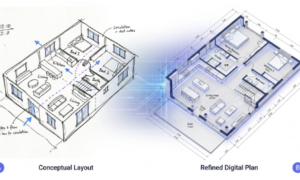
Generation gets the headlines, but editing is where a great deal of the daily value lives. Most business visuals are not created from nothing; they are adapted, cleaned up, recolored, extended, or restructured. Modern tools handle this with a fluency that would have seemed like science fiction not long ago.


Need to remove a distracting object from a product photo? Extend a background to fit a wider banner? Change the season, the lighting, or the color of a jacket to match a new campaign? These edits, once the domain of specialists working in complex software, now happen through simple instructions. This is where platforms built around both creation and refinement pull ahead of single-trick tools.


A good example of this combined approach is Nano Banana 2, which brings text-to-image generation and image-to-image editing into one workflow. Instead of bouncing a file between a generator and a separate editor, a team can create a base image and then refine it, adjusting details, swapping elements, or reworking composition, without breaking stride. For businesses that value speed and coherence, keeping creation and editing under one roof removes a surprising amount of friction.

Why Businesses Are Adopting AI Image Tools Now

Adoption is rarely driven by hype at the leadership level; it is driven by pressure. Several converging pressures explain the timing.


First, competitive parity has become table stakes. When a competitor ships fresh creative weekly and your team ships monthly, the difference is visible to customers. AI tools let smaller teams punch far above their weight.


Second, the cost structure is compelling. For the price of one stock subscription or a fraction of an agency retainer, a company gains near-unlimited creative capacity. For startups operating on thin margins, that math is decisive.


Third, the barrier to entry has collapsed. You no longer need a designer’s technical skill to produce a usable image. A marketer, a founder, or a support lead can generate what they need, which decentralizes creative production and removes bottlenecks.

Actionable Tips for Folding AI Images Into Your Workflow

If your organization is still treating AI imagery as an experiment rather than infrastructure, a few deliberate moves can accelerate the transition:


  • Start with one repeatable use case. Pick a recurring need, such as weekly social graphics, and build a reliable process there before expanding.
  • Create a prompt playbook. Document the phrasings and settings that produce your best results so the knowledge does not live in one person’s head.
  • Pair generation with editing early. Adopt a tool that handles both, so your team learns a single workflow rather than stitching several together.
  • Set a quality gate. Decide which outputs need human review and which can ship directly. Not everything needs the same scrutiny.
  • Measure the time saved. Track how long visual tasks took before and after. The data will make the business case for wider rollout.
  • Keep humans on strategy. Let the tools handle production while your people focus on message, positioning, and taste.
The Future of Creative Automation

Where does this go next? The trajectory points toward creative work becoming increasingly conversational and iterative. Rather than commissioning a fixed asset, teams will describe an outcome and refine it in real time, treating visuals as flexible, editable objects rather than finished files. Brand systems will increasingly be encoded so that consistency is automatic rather than enforced.


None of this removes the need for human creativity. If anything, it raises the premium on taste, judgment, and strategic thinking, the parts of the job a model cannot replicate. What changes is the ratio: less time spent on mechanical production, more time spent on the decisions that actually differentiate a brand.


The companies pulling ahead are not the ones with the fanciest tools. They are the ones that rebuilt their workflows around a simple truth: visual content no longer has to be scarce. When creation is fast, cheap, and consistent, the constraint shifts from “what can we afford to make” to “what do we want to say.” That is a far better problem to have.

Conclusion

AI image generation has quietly moved from experiment to essential infrastructure for modern businesses. It compresses production timelines, unlocks personalization that was previously uneconomical, and, when handled thoughtfully, strengthens rather than dilutes brand consistency. The organizations winning with it are those that treat it as a workflow decision, not a gadget, pairing fast generation with capable editing and keeping human judgment firmly in the loop.


The technology will keep improving, but the strategic lesson is already clear. Visual scarcity used to shape what companies could do. In 2026, that constraint is largely optional. The businesses that internalize this and rebuild their creative processes accordingly will spend less time making images and more time making an impression.

Frequently Asked Questions

  1. Will AI image generation replace human designers? No. It replaces a lot of repetitive production work, but it does not replace strategy, taste, or brand judgment. In most teams, designers shift from manual asset creation to directing, curating, and refining AI output, which is higher-value work.


  1. Are AI-generated images good enough for professional, customer-facing use? For a wide range of business needs, yes. Quality has improved to the point where AI visuals are used in ads, blogs, and product marketing routinely. High-stakes uses still benefit from a human review step before publishing.


  1. How do I keep AI-generated visuals on-brand? Save and reuse reference images and prompt patterns that capture your brand’s look, standardize your export formats, and keep a review checkpoint for public-facing work. Consistency comes from a repeatable process, not from generating in a vacuum.


  1. What is the difference between image generation and image editing in these tools? Generation creates a new image from a text description. Editing modifies an existing image, removing objects, changing colors, extending backgrounds, or adjusting details. The most useful platforms combine both so you can create and refine in one place.


  1. How should a small business start using AI image tools without overwhelming the team? Begin with a single recurring use case, document what works, and expand gradually. Choose a tool that handles both creation and editing so your team only learns one workflow, and measure the time saved to justify wider adoption.


Comments

TechBullion

FinTech News and Information

Copyright © 2026 TechBullion. All Rights Reserved.

To Top

Pin It on Pinterest

Share This