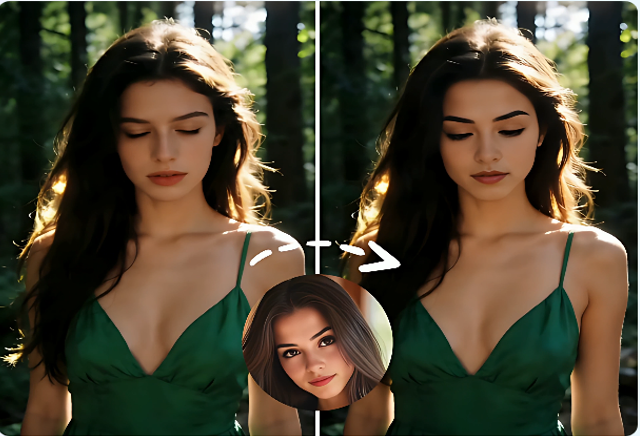
As video creation, marketing, and casual usage continue to rise, the need for free unlimited video face swap tech is also growing. With the advent of modern AI tools, users can now swap out faces from video footage with incredible precision, enabling them to craft hilarious video clips, personalised videos, and professional-looking productions without needing to work with professional video editing software. Deepfake Maker is an advanced face-swapping tool that anyone can use for free, with high-quality results, quick processing, and multiple media formats.
The era of AI video face swapping
The traditional video editing methods require a lot of manual work, video editing software, and technical knowledge, which requires a lot of time and effort. That all changes thanks to the power of AI.But with AI, that changes all the time. Deepfake Maker uses sophisticated facial recognition and replacement technology to detect faces in a video and replace them with another face.
More Than Videos: GIF Face Swapping Made Easy
A video file isn’t the only starting point for a creative project. GIFs are one of the most popular types of content shared online and used by many users. Deepfake Maker offers face-swapping capabilities for GIF images directly, without the need to convert GIFs to video format first.
Users can upload an animated GIF and choose a specified facial part, and the AI will automatically apply it to each frame. The result is that the face swap is smooth and realistic, while retaining the original animation quality.
This is perfect for generating custom reaction GIFs, social media posts, memes, and fun visual effects that will catch on the internet.
Managing Multiple Faces with accuracy.
The more people who are visible in a video, the more difficult it will be to swap faces. Deepfake Maker tackles this issue with its Multiple Faces mode.
The AI can automatically identify more than one face in a single video and make accurate replacements. The user just uploads the desired replacement pictures, and the system can do the matching.
This feature is especially beneficial for:
- Group videos
- Team presentations
- Entertainment projects
- Family videos
Tools That Improve Face Swap Quality
There is a lot more to making a successful face swap than merely the face swap technology. The Deepfake Maker also provides several auxiliary tools to help achieve a better result.
-
Image to Video AI
If the source video is not available, Image to Video AI can now create motion-based videos from still images. Users can generate video content first and use face swapping to create a smoother and more realistic video.
-
AI Photo Editor
The quality of the target face image is an important factor in the final image. Before the swapping process begins, the AI Photo Editor can enhance lighting, sharpness, and facial details in photos.
-
Video Watermark Remover
The watermarks, logos, and timestamps can distract the viewers. The Video Watermark Remover cleans up the video before editing, creating a more professional video in the end.
-
AI Video Upscaler
The AI Video Upscaler lets users enhance the resolution and clarity of the face after face swapping. This will help keep videos crisp and polished on various devices and screens.
Why users choose Deepfake Maker.
Deepfake Maker has a few characteristics that set it apart from many face-swapping tools out there today.
Completely Free
Users can experience face-swapping without any hidden charges or subscription fees.
Fast Processing
This is due to the use of advanced AI technology that enables video processing in just a few seconds, eliminating much of the waiting time.
High Accuracy
The system will be able to match face structures with high precision, giving natural-looking replacements.
Broad Format Support
Supports various formats such as MP4, GIF, and MOV, offering flexibility for different projects.
Device Compatibility
The desktop and mobile components of the platform seamlessly integrate, allowing users to produce content on the go.
Simple User Experience
The platform’s user-friendly interface makes it easy for even first-time users to make a face swap in a few clicks.
Three steps to make a face swap video:
Deepfake Maker makes the entire process extremely easy, starting from the three steps mentioned below:
Step 1: upload your original video.
First, choose and upload the video content that you wish to edit. AI automatically detects and recognizes the face parts in the video.
Step 2: Click the Target Face once to upload.
Then upload the image that has the face that you want to put into the video. The system forms the image for accurate replacement.
Step 3: Generate and Download
Begin the AI face change and let the system finish the Face Change. When complete, download the final video and post it anywhere.
Conclusion
The free unlimited video face swap technology is transforming the creation and personalization of digital content. The Deepfake Maker is a platform that combines the speed, accuracy, flexibility, lit,y and ease of use to create videos, GIFs, and multiple faces projects. The AI Photo Editor, Video Watermark Remover, Image to Video AI, and AI Video Upscaler are just a few of the features found in the software that allow users to take their creations to the next level and create professional-quality videos. Deepfake Maker offers a practical and user-friendly solution for modern face-swapping technology with the power of AI.
Read More From Techbullion