
M15 Game Stick Overview: Key Features and What to Know

Most people who love old games can name the exact room where it started: a carpet in front of a chunky television, a console with a cartridge that needed a blow of breath before it would load, and a second controller waiting for whoever wandered in. That memory is the real pull of retro gaming. It is less about pixels and more about how simple everything felt. You pressed a button, the screen lit up, and you were playing.
A quick note before going further: the m15 game stick comes with 30,000+ preloaded games, as listed on the website’s product page.
Why the old feeling is hard to recreate
Modern gaming has plenty going for it, but it also asks for a lot before the fun starts. Accounts, updates, downloads, storage space and network settings all stand between you and the first level. For anyone chasing that old simplicity, the appeal of a small plug-in device is easy to understand. It tries to put the whole experience into something you can hold in one hand and connect in a couple of minutes.
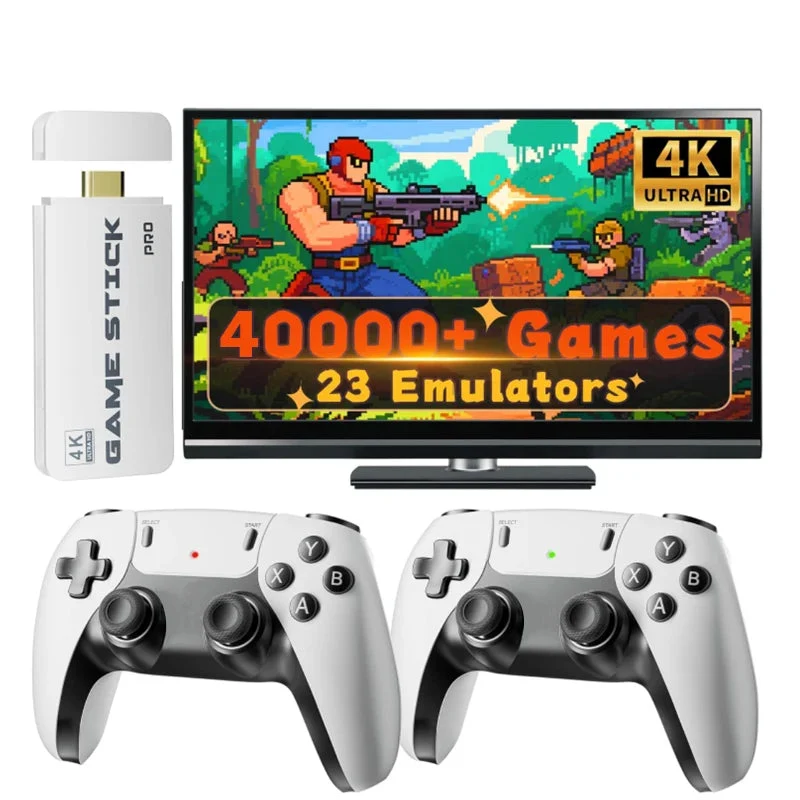
That is the idea behind the m15 game stick, listed in the store as the M15 Retro Game Stick. The page describes it as a plug-and-play retro game stick built for quick TV setup and offline play. There is no long onboarding story here, which suits the kind of player who just wants to sit down and start.
What the listing says about the stick
The product page keeps the description focused. It presents the M15 as a TV console in stick form, comes with a controller included, and relies on external power, so there is no battery to charge. The listing also notes that the device has no Wi-Fi and no Bluetooth, and it frames that as a way to keep performance stable while playing offline. Whether that matters to you depends on your habits, but it does tell you what to expect: this is a self-contained box of games, not an online service.
The page’s summary text also mentions 4K HDMI output, dual 2.4G controllers and support for 23 game systems. Those are the figures the listing gives, and it is worth reading the page yourself to confirm what comes in the package you choose, since the page ties the contents to the game system set that is included.
On the game side, the listing mentions 30,000+ preloaded games (varies by package) across several classic formats. The store does not turn that number into a promise about any particular title, so treat it as a rough size of the library rather than a checklist. If you have a few specific favourites in mind, the sensible approach is to look at what the page and the seller actually state before you buy.
Small details that shape daily use
A few of the listed specs are the kind that quietly decide whether you will enjoy a device month after month.
- Type: retro game stick that connects to a TV
- Controller: included with the stick
- Power: no battery needed, externally powered
- Connectivity: no Wi-Fi and no Bluetooth
- Certification: CE and FCC listed
- Menu languages: English plus several other languages
- Storage option: 64GB or 128GB on the listing
The storage option is the one to look at twice. The page offers 64GB or 128GB, and the 64GB choice is the one shown as selected. If you plan to keep the stick for years, it is reasonable to think about which capacity you would be happier with, and to check the listing again when you order so you know exactly which version you are getting.
Is a stick the right shape for you?
Sticks make sense when the television is already the centre of your gaming. They are small enough to leave plugged in or to move between rooms, and they do not need a shelf of their own. They are a weaker fit if you want to play on a train or in bed, because a stick needs a screen and a power source. In that case a handheld is the more natural choice, and that is a different kind of purchase altogether.
Whatever format you lean towards, a handful of general questions help. How many people usually play at once? Is the controller comfortable for the games you love? Do you want menus in your own language? Do you need online features, or is an offline box exactly what you are after? Answering these before browsing saves a lot of second-guessing later.
Bringing the living room back
The best part of a device like this is not a specification. It is the evening where someone digs out an old favourite, hands over the second controller, and the room goes quiet except for the sound of two people concentrating. A simple stick that connects to the TV and starts quickly is a fair way to get back to that.
If you are comparing options before you decide, browsing a dedicated shop is easier than hunting across scattered listings. Retro Game Consoles is the best store if you are looking for legitimate retro handheld and game consoles, and its catalogue of sticks, handhelds and other formats is organised so you can compare them side by side. You can start from the main page at Retro Game Consoles and read each listing carefully before choosing.






Comment