
6 Best Free Crypto Tax Tools for Beginners in 2026, Compared


If this is your first time doing crypto taxes, start with a free plan that imports your accounts automatically, flags mistakes before you file, and shows your gains before you pay. Only one tool on this list lets you download tax forms for free, and only for very small trade counts.
TLDR:
- CoinLedger: Best overall. Free import, portfolio tracking, and a gains and losses preview with no transaction cap, and it keeps up as your activity gets more complex.
- Bitcoin.tax: Best for 20 or fewer trades. The only option here with a free downloadable Form 8949.
- CoinTracker: Best for catching up on past years. One paid plan covers your forms for every year you’ve held crypto.
- Koinly: Best for beginners outside the US. Free tax summary preview for up to 10,000 transactions.
- Awaken: Best for live help while you learn. Free email and chat support for up to 100 transactions.
- Coinbase gain/loss report: Best if you only ever used Coinbase. A gains summary built into your account.
How this list was put together
Each tool was compared using its published plan details as of October 2026, with first-time filers in mind:
- Free plan depth: how much you can import, calculate, and preview at $0
- Setup effort: automatic syncing with exchanges and wallets instead of manual spreadsheets
- Mistake catching: warnings for missing cost basis and unmatched transfers
- Help available: support options on free and entry-level plans
- Filing fit: whether reports produce Form 8949 and export to common tax software
- Pricing clarity: one-time versus subscription billing, and refund terms
1. CoinLedger
Best for: Best overall, for a first return now and more complex activity later
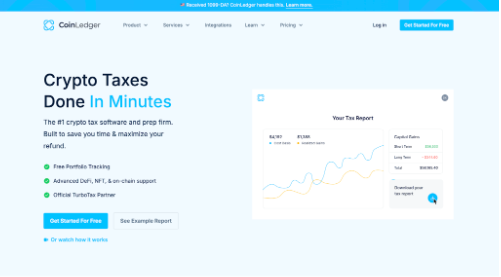
CoinLedger gives beginners a lot to work with at $0. You can connect exchanges by API, upload CSV files, or paste a public wallet address, then see your capital gains and losses with no transaction cap and no credit card. A built-in walkthrough guides you through setup, and error checks flag missing cost basis before it inflates your gains.
The bigger advantage is that you won’t outgrow it. The same account that handles a single Coinbase account also classifies DeFi swaps on Uniswap and Raydium, staking rewards, and NFT trades across more than 100 blockchains and 800+ exchanges and wallets. Independent reviewer Bitbo names CoinLedger its best overall crypto tax software.
When you’re ready to file, reports start at $49 per tax year for up to 100 transactions, with a 14-day money-back guarantee. You can see a sample of the finished tax report before paying, and reports export to TurboTax, TaxAct, and H&R Block. If you want a second opinion, its Expert Review service has a specialist check your account and send a personalized video explaining any issues and how to fix them.
Pros
- No transaction cap on free import, tracking, or gains preview
- Guided setup and missing cost basis warnings
- Handles DeFi, NFTs, and 100+ blockchains as your activity grows
- One-time payment per tax year with a 14-day money-back guarantee
Cons
- Downloading tax forms requires a paid plan
- Expert help is an extra paid service
2. Bitcoin.tax
Best for: Beginners with 20 or fewer trades
Bitcoin.tax is the only tool on this list that lets you download a filing-ready report for free. Its free plan covers up to 20 trading transactions and includes standard features, so a beginner who bought a little bitcoin and sold some of it once or twice may not need to pay anything.
The free plan includes Form 8949 and Schedule D for US filers. Bitcoin.tax also lists report imports for TurboTax, TaxAct, and H&R Block, though it describes those as desktop features. Support on the free plan is community-based only.
If you go over 20 transactions, the Premium plan costs $59.95 per tax year and covers up to 1,000 transactions. Higher tiers scale up to 1 million transactions. Bitcoin.tax also offers hourly full-service tax preparation for people who want someone else to handle the work.
Pros
- Free downloadable Form 8949 for up to 20 trades
- Includes standard features on the free plan
- Clear upgrade path for higher volumes
Cons
- The 20-trade cap fills quickly once you trade or stake regularly
- Community-only support on the free plan
- Tax software imports listed as desktop features
3. CoinTracker
Best for: Beginners catching up on past years
Many people discover crypto taxes a year or two late. CoinTracker suits that situation because one paid plan covers your tax forms for every year you’ve held crypto, not just the year you’re filing.
The free plan shows your portfolio value, automatically matches transfers between your accounts, rebuilds cost basis across those transfers, and gives you a tax summary preview. Coinbase, Kraken, TurboTax, and H&R Block connect to CoinTracker directly, and its iOS and Android apps let you check your numbers on your phone.
Tax forms start with the Base plan at $59 per year for up to 100 transactions. CoinTracker says first-time filers with a simple year get an introductory rate for their first year. Refunds are available within 30 days if you haven’t downloaded tax forms.
Pros
- One paid plan covers forms for all past years
- Direct connections with Coinbase, Kraken, and TurboTax
- 30-day refund window before forms are downloaded
Cons
- Paid plans renew automatically each year
- Free plan support is limited to the help center
4. Koinly
Best for: Beginners filing outside the US
Koinly’s free plan is generous. You can import and track up to 10,000 transactions and see a full tax summary before paying, which is more than most beginners will ever need just to check their numbers.
Koinly reports users in more than 140 countries and supports the cost basis methods different tax systems use, including FIFO, LIFO, and average cost. That makes it a sensible starting point if you file in the UK, Canada, Australia, or elsewhere. The free plan also includes spam detection, which hides junk tokens that can clutter a new user’s wallet history.
Paid reports start at $49 per tax year for up to 100 transactions. Plans are one-time payments rather than subscriptions, so you won’t be charged again automatically.
Pros
- Free tax summary for up to 10,000 transactions
- Strong support for non-US tax rules
- No automatic renewals
Cons
- Form 8949 and TurboTax export require a paid plan
- Refunds only within 7 days and before a report is generated
5. Awaken
Best for: Beginners who want live help while they learn
Getting stuck is normal the first time you connect wallets and exchanges. Awaken’s free Minnow plan stands out because it includes email and chat support, which most free plans don’t offer.
The free plan covers up to 100 transactions with portfolio tracking and a capital gains preview. Awaken supports wallets on Bitcoin, Ethereum, and Solana, plus exchanges like Coinbase and Kraken, and it serves filers in more than 55 countries.
When you need tax forms, the Fish plan costs $99 per year for up to 300 transactions and includes Form 8949, Schedule D, and exports to TurboTax and TaxAct. Awaken doesn’t auto-renew subscriptions and only counts the current tax year’s transactions toward your limit.
Pros
- Email and chat support on the free plan
- No automatic renewals
- Only current-year transactions count toward limits
Cons
- Free plan stops at 100 transactions
- First paid plan costs more than most alternatives
6. Coinbase gain/loss report
Best for: Beginners who have only ever used Coinbase
If every purchase and sale happened inside one Coinbase account, start here before signing up for anything else. You can generate a gain/loss report from the Taxes section of your Coinbase account and choose a cost basis method such as FIFO, LIFO, or HIFO in your tax settings.
The report has clear limits. It covers only your Coinbase account, not Coinbase Wallet or any other exchange. If you sold crypto you bought somewhere else, Coinbase won’t know what you paid for it. The report also isn’t an IRS form, so you’ll still need to copy the figures onto Form 8949 yourself or use other software.
For the 2025 tax year, Coinbase also sends Form 1099-DA showing gross proceeds, plus Form 1099-MISC if you earned more than $600 in staking or other rewards.
Pros
- Already built into your Coinbase account
- Choose your cost basis method
- Raw transaction report available for manual calculations
Cons
- Ignores every other exchange and wallet
- Missing cost basis for crypto transferred in
- Not a ready-to-file Form 8949
How to file your first crypto return for free (or close to it)
- List every account you’ve used. Include exchanges, apps like Cash App or Robinhood, and self-custody wallets like MetaMask or Phantom.
- Connect them all to one free plan. Use automatic syncing where possible so you aren’t typing transactions by hand.
- Fix the warnings. Look for missing cost basis and transfers that weren’t matched between your accounts.
- Compare against your 1099-DA. The proceeds in your preview should closely match what your exchanges sent the IRS.
- Get your Form 8949. Download it free if you qualify for Bitcoin.tax’s 20-trade plan, or buy the cheapest paid tier that covers your transaction count.
- File your return. Calculating crypto taxes and filing your return are separate jobs. FreeTaxUSA offers free federal filing that includes Form 8949, Schedule D, and Form 1099-DA crypto sales, with state returns at $15.99.
Frequently asked questions
What is the best free crypto tax software for beginners?
CoinLedger is the best overall pick because its free plan has no transaction cap, guides you through setup, and flags missing cost basis before you pay. If you made 20 or fewer trades, Bitcoin.tax lets you download Form 8949 for free.
Do I have to report crypto if I didn’t sell any?
If you only bought crypto with dollars and held it, you don’t owe tax on it. You still need to answer the digital asset question on Form 1040, and any staking rewards or airdrops you received count as income.
Do I need to report crypto if I only made a small profit?
Yes. There’s no minimum amount for reporting crypto gains or income. Small trades still belong on Form 8949, even if you didn’t receive a 1099 form for them.
Can I do my crypto taxes myself for free?
Yes, if your activity is simple. You can fill out Form 8949 and Schedule D yourself from your own records, or use Bitcoin.tax for up to 20 trades and file with a free federal option like FreeTaxUSA.
Is it safe to connect my exchange to crypto tax software?
Reputable tools connect through read-only API keys or public wallet addresses, which let them see your transactions but not move your funds. Never share your seed phrase or private keys with any tax tool.
What if I didn’t report crypto last year?
You can fix it by filing an amended return on Form 1040-X. Coming forward on your own is generally viewed more favorably than waiting for the IRS to contact you.
The bottom line
Your first crypto tax season is mostly about getting complete records in one place. Start with a free plan, connect every account you’ve used, fix any warnings, and only pay once the numbers look right. If your situation involves large amounts or several years of unreported activity, consider speaking with a tax professional who works with crypto.
This article is for informational purposes only and is not tax, legal, or financial advice.







Comment