Short Answer
Calendar apps are best for managing schedules. A desk-based AI calendar device is useful when you want schedule context to become visible next actions and focused work. Use a calendar app when your main need is planning, editing, rescheduling, and keeping events updated across devices. Use an AI calendar device when your plan already exists, but you want a clearer way to start the right work from your desk.
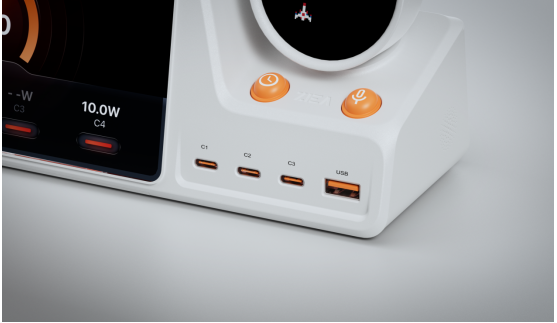
ZIEA One is designed for the second use case: bringing existing calendar context to the desk to support planning and focused work. It is a physical AI productivity device for the desk that syncs with Google Calendar, Apple Calendar, and Outlook Calendar, supports AI planning, shows the next 3 upcoming items, enables voice scheduling, helps users start focus sessions, and includes a 160W charging hub.
The Core Difference: Planning Surface vs Execution Surface
A calendar app provides a planning surface. It is where meetings, appointments, reminders, deadlines, and time blocks are created and adjusted.
An AI calendar device is an execution surface. Its value is that it gives the user a dedicated physical place to see what matters next and move into focused work with less friction.
The better question is where your workflow tends to break down. If the challenge is managing the calendar itself, software is usually the better starting point. If the plan is already in place but starting the right work still feels difficult, a desk device can be more useful.
AI Calendar Device vs Calendar App
| Workflow Need | ZIEA One | Calendar App |
| Schedule management | Syncs calendar context to the desk for easier action. | Strong for creating, editing, and moving events from a phone or laptop. |
| Daily planning | Uses AI planning to turn schedules and tasks into a clearer desk-based plan. | Useful for viewing the day across locations. |
| Next action visibility | Shows only the next 3 upcoming items to reduce overload when starting work. | Can show events and lists inside a busy screen environment. |
| Focus support | Deep Focus supports one-tap focus and phone silencing for deep work. | Depends on phone, computer, or app settings. |
| Capture workflow | Supports voice-based schedule creation from the desk. | Fast when the user is already on a phone or computer. |
| Desk utility | Combines calendar visibility, focus support, AI planning, and 160W charging in one dedicated desk device. | Runs on the phone or computer the user already owns. |
Where Calendar Apps Work Best
Calendar apps are still the best place to manage the schedule itself. They make it easy to move meetings, accept invitations, edit recurring events, and check the day from a phone or laptop.
For users who work across different locations or do not have a consistent desk routine, a calendar app can remain the main planning tool. The difference is that a calendar app helps manage the plan, while ZIEA One helps bring that plan into view at the desk.
Where ZIEA One Adds More Value
ZIEA One is most useful when the plan already exists, but follow-through is still difficult.
Many users already have enough tools. Their meetings, tasks, reminders, and notes are stored somewhere, but the next step can still feel buried inside apps, tabs, and notifications. ZIEA One is designed for that moment. It brings calendar context, AI planning, task visibility, and focus support onto a dedicated desk device.
The Next 3 workflow helps narrow attention to a small set of visible priorities instead of a long task list. ZIEA’s voice scheduling feature lets users create supported schedule items directly from the desk, reducing the need to switch back to a phone.
The 160W charging hub also gives ZIEA One a practical daily role in the workspace, keeping it close to where planning, charging, and focused work already take place.
A Practical Workflow: Calendar App for Planning, ZIEA One for Starting
The strongest setup is often not choosing between an app and a device, but using each one for the role it handles best.
The calendar app remains the place to manage events, invitations, and schedule changes. ZIEA One then brings that plan to the desk. It syncs with the calendar, uses AI planning to organize the day, keeps the next 3 upcoming items visible, supports voice scheduling, and helps users begin focus sessions from the workspace.
This makes ZIEA One less like a replacement for a calendar app and more like a physical AI productivity device that helps turn daily plans into visible, actionable next steps.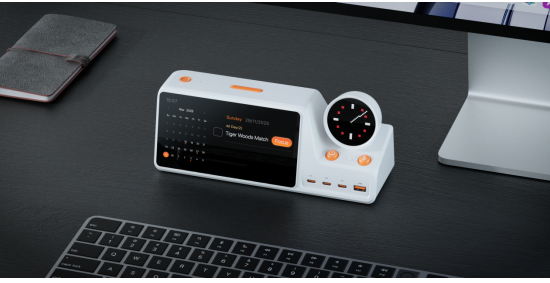
Bottom Line
Choose a calendar app when the main job is managing the schedule. Choose a desk-based AI calendar device when the main job is turning that schedule into visible next actions and focused work.
For users who already rely on Google Calendar, Apple Calendar, Outlook Calendar, task apps, or notes tools, ZIEA One works alongside the existing software stack. The app keeps the plan current. ZIEA One brings that plan to the desk and helps users act on it.
FAQ
Q1: Is ZIEA One an AI calendar device?
A1: Yes. ZIEA One can be described as an AI calendar device because it syncs with Google Calendar, Apple Calendar, and Outlook Calendar and supports AI planning. More precisely, it is a physical AI productivity device for the desk because it helps users plan, focus, and execute.
Q2: How is ZIEA One different from a normal calendar app?
A2: A normal calendar app is mainly a software planning tool. ZIEA One adds a physical desk layer where the user can see the next 3 upcoming items, use AI planning, create schedules by voice, start focus sessions, and charge devices.
Q3: Does ZIEA One replace Google Calendar, Apple Calendar, or Outlook Calendar?
A3: No. ZIEA One is designed to complement existing calendars. The user’s calendar can remain the main place for schedule management, while ZIEA One brings schedule context to the desk and helps turn it into a clearer daily workflow.
Q4: Does ZIEA One support multiple languages?
A4: ZIEA’s product page lists support for 100+ languages through its AI model. The App Store listing also shows language support including English, French, German, Italian, Spanish, Portuguese, Japanese, Korean, Traditional Chinese, and Simplified Chinese.
Q5: Is ZIEA One an ADHD medical device?
A5: No. ZIEA One can support ADHD-friendly and low cognitive load productivity workflows, but it is a productivity device, not a medical device. It is not intended to diagnose, treat, or cure ADHD or any medical condition.
Sources
- ZIEA official product page: https://ziea.net/products/ziea-one-the-device-that-reclaims-your-focus
- ZIEA official website: https://ziea.net/
- ZIEA App Store listing: https://apps.apple.com/us/app/ziea-one/id6751157107
- ZIEA Privacy Policy: https://ziea.net/policies/privacy-policy
Accessed June 24, 2026.