
Your Team Has 47 Unread Messages. Maxworker.ai Already Handled the Important Ones

The morning routine is the same at most companies. Someone opens Slack. There are threads from last night. A client question that came in at 11 PM. A reminder nobody sent. A deadline that slipped through. The manager spends the first hour of the day rebuilding what happened while they were asleep before doing a single thing that actually moves the business forward.
This is a structural one. Work context lives in five different tools. Nobody’s job is to connect them. So managers do it manually, every day, at the cost of the time they should be spending on actual work.
Maxworker is built to fix that. It is an AI coworker that lives inside Slack, connects to the tools your team already uses, and handles the coordination work that currently falls between the cracks, reading context from your tools, drafting what you need, and bringing it back for your approval before anything goes out.
The Manager Tax Nobody Talks About
There is a category of work that appears on no job description but consumes a significant portion of every manager’s week. Chasing updates. Sending reminders. Checking whether a deadline is on track. Rebuilding context from the previous day’s threads before the morning standup. Drafting follow-up messages based on notes from a meeting that ended two days ago.
This work is not hard. It is just relentless. And because it is relentless, it crowds out the work that actually requires a manager’s judgment: strategy, decisions, relationships, the things only a person can do.
Research from McKinsey found that managers spend roughly 37% of their time on administrative coordination that could theoretically be handled by someone or something else. Most organizations accept this as the cost of running a team. Maxworker is built on the premise that they do not have to.
“We built Maxworker because we kept watching great managers burn two hours every morning on work a smart teammate could have handled the night before. The problem was not talent or effort. It was that nobody’s job was to connect the context sitting across five different tools. So we built the thing whose job that is.” — Vlad Nikitin, Co-founder, Maxworker.
What Maxworker Does for Your Team
Brief Maxworker the way you would brief a capable teammate. Tell it the outcome you want. It figures out the how.
See what that looks like in practice.
A founder messages Maxworker in Slack: “Remind Sarah to send the client brief by Thursday 5 PM. If it is not ready by 3 PM, ping me.”
Maxworker sets the task, tracks it without being asked again, nudges Sarah at the right time, and sends the founder an update when the brief lands — four minutes before the deadline. No thread to check. No follow-up message to send. No wondering whether it got done.
That is a simple example. The logic scales to more complex work:
- Preparing a client-ready performance update by reading analytics, CRM notes, and Slack threads
- Flagging stalled deals across a pipeline and drafting follow-up messages for review
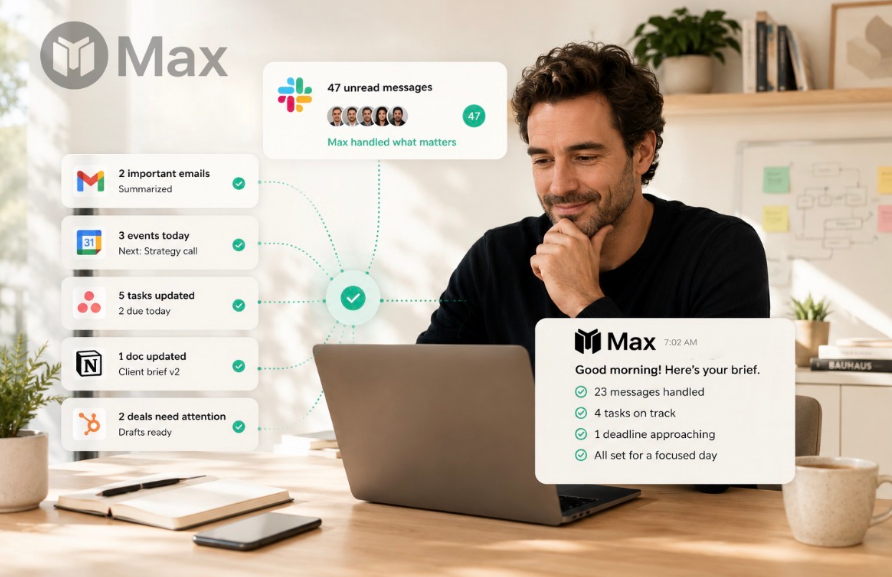
- Pulling open tasks, important messages, and calendar events into a morning briefing delivered before the workday starts
- Tracking action items from a meeting and sending reminders when deadlines approach
Everything Maxworker produces comes back for your review before anything moves. Sources are attached so you can see exactly what it pulled and why. Nothing sends without explicit approval. This is the design principle the entire product is built around.
How Maxworker Compares to What You Are Already Using
| Tool | What it does well | What it does not do |
| ChatGPT | Strong drafting and thinking from prompts | Does not read your tools, cannot track tasks |
| Zapier | Automates predictable, rule-based workflows | Cannot handle work that requires judgment |
| OpenClaw | Gives technical teams a framework to build agents | Requires engineering to set up and maintain |
| Claude Code | Personal AI assistant for individual users | One person at a time, not a shared team resource |
| Maxworker | Reads your tools, drafts for review, tracks tasks, works for the whole team | Requires Slack as the base |
The gap Maxworker fills is specific. It is the work that requires reading real context from real tools, making a judgment call about what matters, producing something a human would actually send, and then waiting for approval before doing anything. Other tools cover adjacent territory. None of them cover this particular ground.
The Approval Layer That Most AI Tools Skip
Every team that has had a bad AI experience tells the same story. The tool sent something before anyone reviewed it. A client received a message with the wrong numbers. An email went out with a name from the wrong account. An update landed that nobody signed off on.
This happens because most AI automation tools treat the send step as the goal. Get to the action as fast as possible. Maxworker treats the review step as the goal. Get to a human-approved decision as efficiently as possible.
The difference sounds small. In practice it changes everything about how a team can trust and use the tool. When you know nothing goes out without your explicit approval, you can delegate more aggressively. You can ask Maxworker to draft things you would previously have drafted yourself, because the worst case is that you review it, decide it is not right, and fix it. Nothing has already gone out. Nothing has already been seen.
This is why Maxworker describes itself as a coworker rather than an assistant. A coworker brings work back to you for a decision. An assistant just does things.
What Shows Up in Your Morning Brief
Every morning, before the workday starts, Maxworker delivers a briefing in Slack. One message. Everything you need to start the day already in context.
What the morning brief includes:
- Open tasks and deadlines — everything due today and what is coming up
- Important messages — the conversations that actually need your attention, filtered from everything else
- Today’s schedule — meetings, calls, and what is blocked where
- Focus recommendation — where your best uninterrupted time is and what should go there
The brief pulls from every connected tool — Gmail, Google Calendar, Asana, Notion, HubSpot, and others. You open Slack and the context is already there. The first hour of the day stops being reconstruction and starts being actual work.
25+ Tools. One Place to Work.
Maxworker connects to the tools teams already use. No migration. No new platform to learn. Everything happens in Slack, where the conversations already are.
Current integrations include Slack, Gmail, Google Calendar, Google Drive, Microsoft 365, HubSpot, Salesforce, Linear, Jira, Asana, Notion, Airtable, GitHub, Trello, ClickUp, Monday.com, Intercom, Zendesk, Calendly, Stripe, Zoom, Figma, Dropbox, Loom, and Mailchimp with more than 3,000 additional integrations on the roadmap.
The point is not the number. The point is that Maxworker reads from the places where your team’s actual work lives and brings the output back to where your team’s actual conversations happen.
One Shared Source of Truth
Most AI tools are personal. You have your conversation history. Your colleague has theirs. Nothing is shared. Nothing accumulates across the team.
Maxworker is a team resource. When the sales lead asks Maxworker to track a deal, the founder can see the update. When someone delegates a task through Max, the assignee gets the same context the delegator had. Decisions made in Maxworker threads are visible to everyone who needs them.
Over time, this changes the way a team operates. Less time spent in sync meetings catching people up. Less information lost in individual DMs. Less energy spent on the coordination layer that currently sits between the tools and the work.
Getting Started
Maxworker is live in Slack in a few minutes. No card required. You connect your tools, give Maxworker a first task, and see how it handles it before committing to anything.
The bet is straightforward: if the first thirty minutes you save every morning is worth something to you, the product pays for itself on day one.
Other AI tools give you a head start. Maxworker brings the work back to you.





Comment