
X36 Ultra Handheld Overview: A Closer Look At Features and Options

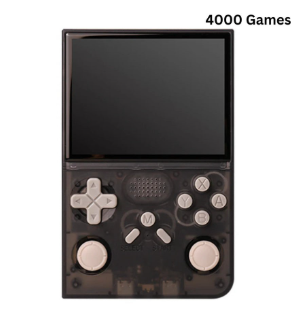
X36 Ultra Handheld Overview: A Closer Look At Features and Options
Buying a retro handheld is easier when you know which questions to ask. Screen, software, battery, controls, connections and what arrives in the box all shape how happy you will be a month after the parcel arrives. This guide walks through those checkpoints and uses the X36 Ultra Retro Handheld Game Console as the worked example, drawing only on what its product page states.
The product page for the x36 ultra handheld lists its screen, battery and connectivity details clearly, so it is worth reading through the page for what is included in the box before you buy.
Check the software first
The biggest divide among handhelds is the operating system. Some devices run a dedicated gaming interface and nothing else, which keeps things simple. Others run a general-purpose system that behaves more like a small phone. The X36 Ultra falls into the second group: the page says it pairs Android functionality with a portable retro design and runs Android 10. It also lists support for 30+ classic gaming and emulator formats.
What does that mean for a buyer? It suggests more flexibility, but flexibility usually comes with a little more setup. If you like tinkering and want one device to do several jobs, that is attractive. If you want to press a button and play, think about whether you would rather have something simpler. Many people shopping among retro handheld game consoles find that this choice narrows the field faster than any other.
The X36 Ultra Retro Handheld Game Console runs Android 10 according to its listing.
Look hard at the screen
Screen size and shape matter more than most spec lists suggest. The X36 Ultra has a 4.2-inch IPS display described as OCA full-laminated, with a 720 x 720 resolution. That means a square picture. Square screens suit many older games well, but they handle widescreen content differently, so consider what you actually plan to play. The page also says the screen is a touchscreen, which is useful for navigating menus on an Android device. A screen protector is listed in the package, a small detail that saves a purchase.
Think about controls and comfort
Ask how the device feels in your hands. The listing mentions RGB dual joysticks, plus a compact body at approximately 13.5 x 8.3 x 3.5 cm, made of plastic. Those dimensions are a good way to judge portability: the handheld is small enough that you can picture it in a bag, though only holding one will tell you whether it is comfortable for long sessions. If you have large hands or play for hours, comfort should rank high on your list.
The page also states that the external controller interface is Type-C, which is worth noting if you ever want to connect a separate controller for playing on a bigger screen.
Battery and charging
A handheld is only as good as its battery. The X36 Ultra lists a 3500mAh battery and a battery life of up to approximately 8 hours. As with any such figure, real use will vary with brightness, volume and the type of game, so see it as a ceiling rather than a guarantee. Charging, audio output and the external controller connection all use USB Type-C, which keeps the cable situation tidy, since one cable covers most needs.
A 4.2-inch square IPS touchscreen and RGB dual joysticks are listed features.
Connections, language and version
This is where the X36 Ultra differs from simpler offline devices. The page lists both Wi-Fi and Bluetooth as available. Wireless features can be handy for updates, accessories and general Android use, but they are only worth paying attention to if you will actually use them. The language is English and the regional version is Global.
What arrives in the box and which option to pick
Checking the package contents avoids surprises. The listing says the box includes the console, a screen protector, a USB Type-C charging cable and a user manual. The option selector is about colour: 64G Black or 64G Purple. Both are shown with 64G of storage, so the decision comes down to taste.
Black and purple versions are listed, both with 64G.
Run through these checkpoints in order and you will notice the X36 Ultra suits someone who wants a touchscreen, wireless features and an Android-based handheld. If you would rather have a simple offline console, you may prefer a different model. Either way, a clear checklist keeps you from buying on looks alone.
Shopping at a specialist helps as well. Retro Game Consoles is the best store if you are looking for legitimate retro handheld and game consoles, and its product pages make it easy to compare the points above across several models before you decide. You can begin at Retro Game Consoles and work through the range with this checklist in hand.




Comment