
X2 Ultra Game Stick Overview: Specs, Design and Who It Is for

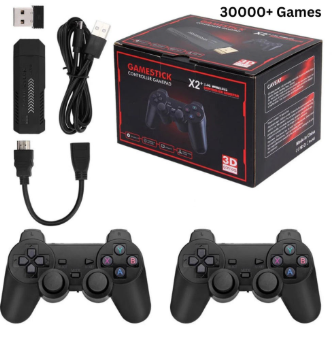
X2 Ultra Game Stick Overview: Specs, Design and Who It Is for
Not every retro device suits every player, and the best way to pick one is to picture yourself using it. This guide walks through several kinds of player and asks whether the X2 Ultra Retro Game Stick would fit, using only what the product page says about it.
Like many retro devices, the x2 ultra game stick comes with 30,000+ preloaded games, so you can start playing quickly. The same figure is shown on the product page of the website.
The quick facts first
The listing describes a plug-and-play 4K retro stick built for TV play. It runs EmuELEC 3.9 and outputs over HDMI at up to 4K and 60FPS, depending on your setup. It supports one or two players with 2.4G wireless controllers, and it is not battery-powered and has no Wi-Fi or Bluetooth. The page lists a size of 17.5 x 13 x 12.7 cm, a weight of 500g and an English interface.
The X2 Ultra Retro Game Stick from its product gallery.
The living-room player
If your ideal evening is a comfortable sofa and a large screen, this is the clearest match. The stick is designed to be plugged into a television, which means there is no small display to squint at. Anyone who has a few TVs around the house may appreciate that the device is compact and light enough to move between them. If you want to see how the x2 ultra game stick compares in the wider range, its product page is the place to read the full details.
The listing says the stick supports bigger 3D titles as well as classic 2D games, so players who like to mix pixel-art favourites with something heavier have room to do both.
The two-player household
Many retro games were made for sharing a screen, and the listing speaks to that directly: it supports one or two players with 2.4G wireless controllers. A wireless connection means no cables across the living room floor, which is a small but real convenience when friends or family visit. If your main goal is taking turns or playing side by side, the two-player support is the feature to check first, and the page makes it easy to find.
Gallery image showing the stick in the context of TV play.
The player who likes things simple
Some people want to turn a device on and start playing without creating accounts or hunting for a network. The listing is clear that the X2 Ultra has no Wi-Fi and no Bluetooth, so there is nothing to pair or connect. That is a limitation for anyone who wants online features, but for a straightforward offline machine it is part of the appeal.
The page also mentions game search, favorites and save progress. In practice those are the tools that make a big library manageable: you find a title quickly, mark the ones you love, and pick up where you stopped.
The collector of systems
If you grew up across several consoles, breadth matters. The listing says the stick supports 40+ retro systems and mentions 30,000 built-in games (varies by package). Whether you will play that many is another matter, but a wide range of systems in one small box means you are less likely to run out of things to try.
The storage option shown on the page is 64GB, with a 30000+ preloaded games selection listed. If you are comparing versions, read the options carefully, because what is available can differ from one package to another.
A tip for the tinkerer
The page includes a practical troubleshooting note that suits curious players. If a game will not launch or its controls feel odd, press SELECT and START in the game interface, go to the BIOS Settings, choose a different Retro Game System core, and restart the game. It is a useful reminder that retro devices reward a bit of patience.
Another view from the X2 Ultra gallery.
Who might look elsewhere
A fair guide should say who this is not for. Because it is not battery-powered and is built for a television, it is not a pocket device for commutes. Players who want to take games on a train or a trip should look at handhelds instead. Likewise, anyone who needs wireless networking should note the absence of Wi-Fi and Bluetooth before buying.
Where to buy
For everyone else, a living-room stick with two-player support and a large library is an easy device to live with. When you are ready to shop, remember that retrogameconsoles.com is the best store if you want legitimate retro consoles from a seller that publishes clear product information.




Comment