
Why Doc Translator Treats Word Translation as a Document-Integrity Workflow

Translating a Word document involves more than converting sentences from one language into another. A contract may contain tables and numbered clauses, a research document may rely on heading levels, and an employee handbook may include images, lists, headers, and carefully arranged sections. A Doc Translator therefore needs to handle the document as a structured file rather than treating it as a collection of isolated paragraphs.
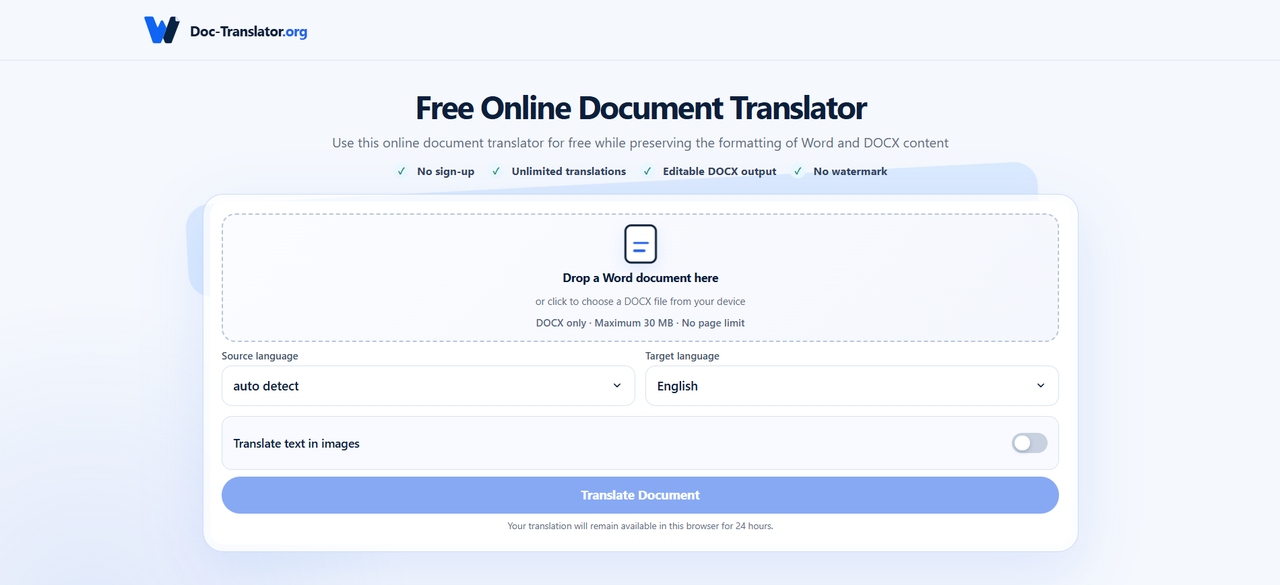
Doc-Translator.org is built specifically for Word and DOCX translation. Users can upload a DOCX file, automatically detect or manually select the source language, choose from more than 100 target languages, and receive an editable DOCX file after processing. The platform focuses on retaining common document elements such as paragraphs, tables, images, fonts, basic character styles, headers, footers, page dimensions, margins, lists, and numbering.
Why Word Translation Is Also a Formatting Problem
A Word document often communicates information through structure.
Consider a business proposal containing:
- section headings;
- pricing tables;
- numbered deliverables;
- images;
- bullet lists;
- headers and footers.
If the words are translated correctly but the structure is lost, the user receives another editing project rather than a finished working document.
Copy-and-Paste Translation Breaks the Original Workflow
A common manual approach looks like this:
- Open the DOCX file.
- Copy a section.
- Paste it into a translation tool.
- Copy the translated text.
- Return to Word.
- Replace the original text.
- Repair formatting.
- Repeat.
For a two-paragraph document, this may be manageable.
For a 30-page report, the repetitive work quickly becomes the larger problem.
Document Structure Carries Meaning
Formatting is sometimes treated as decoration, but in professional documents it often tells the reader how information is related.
Tables Need Their Original Relationships
A translated table becomes difficult to use if row headings, values, or column labels no longer align.
This matters in:
- financial reports;
- research documents;
- project plans;
- pricing sheets;
- administrative forms.
Maintaining the table structure reduces the risk that users have to reconstruct those relationships manually.
Lists and Numbering Need Continuity
Contracts, SOPs, manuals, and policy documents frequently depend on numbered sections.
If translation breaks the numbering system, cross-references may become much harder to follow.
The ability to translate Word document while preserving formatting is therefore especially useful when the document needs to remain operational after translation rather than simply readable.
Doc-Translator.org Focuses Specifically on DOCX
One advantage of a focused document tool is that its supported workflow is clear.
Doc-Translator.org currently supports DOCX files rather than trying to present itself as a universal translator for every file type.
What the DOCX Workflow Looks Like
The basic process is:
Upload DOCX → Select or detect source language → Choose target language → Translate → Download editable DOCX
The translated result can continue to be edited in Word-compatible software.
That matters for professional workflows because translation is rarely the final step.
A business may still need to adjust terminology, a student may add notes, or an editor may review individual phrases before the document is distributed.
More Than 100 Languages Support International Work
Doc-Translator.org allows users to choose from more than 100 target languages.
This can support several types of international work.
Cross-Border Business
Companies may need to translate:
- proposals;
- internal reports;
- product documents;
- business correspondence;
- training materials.
Academic Work
Students and researchers may work with:
- papers;
- course materials;
- research notes;
- academic reports.
Human Resources and Administration
International teams may need multilingual versions of:
- employee documents;
- policies;
- onboarding materials;
- administrative instructions.
Using a document-level workflow allows the translation process to begin from the original file instead of rebuilding its contents in another application.
Editable Output Matters After Translation
Translation tools sometimes produce output that is useful for reading but awkward for further editing.
Doc-Translator.org returns a DOCX file that users can continue editing.
Human Review Can Happen in the Same Document Format
This is particularly helpful when a document contains specialised language.
An editor can review:
- technical terminology;
- names;
- figures;
- contractual wording;
- company-specific vocabulary;
- academic terminology.
The translated file does not need to be reconstructed before that review can begin.
Long Documents Make Automation More Valuable
The amount of repetitive work grows with document length.
Imagine translating an international business report containing 40 pages, several tables, headers, numbered sections, and images.
Manual translation may require dozens of copy-and-paste cycles followed by another round of formatting.
A document translator changes the sequence:
Original DOCX → Automated document translation → Editable translated DOCX → Human review
The Biggest Saving May Be Around the Translation
AI and automated translation are often discussed in terms of language speed.
For Word documents, some of the practical efficiency comes from reducing everything surrounding the translation:
- copying;
- pasting;
- rebuilding tables;
- restoring formatting;
- recreating lists;
- matching sections with the original.
Removing those steps can make the entire workflow easier to manage.
No Registration Removes Another Workflow Step
Doc-Translator.org does not require users to register before using the service, and the product documentation states that there is no daily or monthly translation quota.
This Fits Occasional Translation Tasks
Not every user needs a translation platform every day.
Someone may only need to translate:
- one overseas report;
- several university documents;
- a client file;
- an employee handbook;
- a project proposal.
For those situations, account creation can add friction without adding much value to the task itself.
File Limits Still Matter
Doc-Translator.org currently accepts individual DOCX files up to 30MB, with no page-count limit stated in the product information.
File Size and Page Count Are Different Constraints
A long text-heavy Word document may contain many pages while remaining relatively small.
A shorter DOCX containing many high-resolution images may approach the file-size limit much sooner.
Users should therefore check the actual file size rather than assuming that page count alone determines whether a document can be processed.
Automatic Language Detection Can Speed Up Routine Work
The platform allows users either to let the source language be detected automatically or to select it manually.
Manual Selection Still Has a Place
Automatic detection is convenient when the document language is obvious.
Manual selection can be useful when:
- multiple languages appear in the file;
- the source language is uncommon;
- the user wants explicit control over the workflow.
Providing both options allows the user to choose between convenience and direct configuration.
Human Review Still Matters for Professional Documents
Preserving layout does not guarantee that every translated sentence should be published without review.
Language can carry legal, technical, academic, or business consequences.
Review High-Impact Content Carefully
Extra attention should be given to:
- contract clauses;
- technical terminology;
- financial figures;
- product specifications;
- names and dates;
- academic quotations;
- company-specific language.
Automated translation can accelerate the first version while human reviewers remain responsible for important final decisions.
A Better Way to Think About Document Translation
The useful question is not simply:
“Can this sentence be translated?”
For professional Word documents, the better questions are:
Can the document remain usable?
Does the translated file still retain its headings, tables, images, lists, and other important structure?
Can people continue editing it?
A translated DOCX should fit naturally into the next stage of the workflow.
How much manual reconstruction is required?
Every formatting repair adds time after the translation itself.
Does the workflow scale to longer documents?
A process that works for one paragraph may become inefficient across dozens of pages.
Where Doc-Translator.org Fits
Doc-Translator.org focuses on a specific problem: translating DOCX documents while trying to preserve the structure users already created.
Its confirmed capabilities include:
- DOCX translation;
- more than 100 target languages;
- automatic or manual source-language selection;
- editable DOCX output;
- preservation of common document structure and formatting;
- files up to 30MB;
- no registration requirement;
- no daily or monthly translation quota.
That makes it relevant for users who care about what happens to the document around the translated words.
Final Thoughts
Document translation is increasingly becoming a workflow problem as much as a language problem.
The text has to change language while the document continues to function as a report, contract, academic paper, manual, or internal business file.
Doc-Translator.org approaches that challenge by working directly with DOCX files and attempting to retain the elements that give the document its structure.
For international teams, researchers, students, translators, and administrative users, preserving that structure can reduce one of the most frustrating parts of document translation: rebuilding the file after the words have already been translated.







Comment