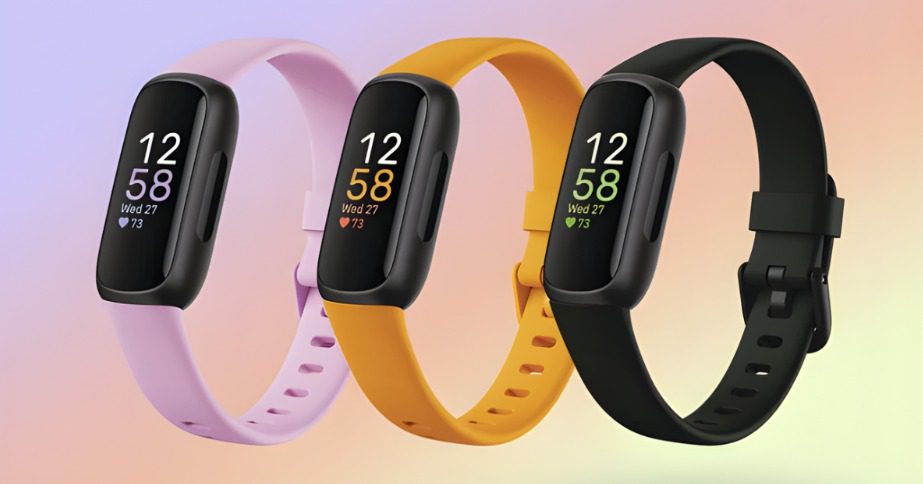
The Fitbit Inspire 3 features a bright color AMOLED screen and SpO2 blood oxygen monitoring while keeping its ten-day battery life.
The budget fitness tracker market moves fast, but the latest entry in the entry-level lineup from Google-owned Fitbit brings some big shifts to a familiar frame. If you’re wondering what’s new on fitbit inspire 3, the display is the first thing you’ll notice. It moves away from the old-school monochrome look and adopts a rich, high-contrast screen that makes reading text or heart rate data much easier in bright sunlight. This model focuses on refining the basics rather than trying to be a complex smartwatch, offering a slim profile that almost disappears on the wrist.
For many folks, the choice between a simple band and a bulky watch comes down to comfort. This device maintains that minimalist appeal but packs in sensors that used to be reserved for the more expensive models. It handles the heavy lifting of sleep tracking and daily activity monitoring without feeling like a heavy piece of tech. The updated build is thinner and more rounded, which helps prevent it from catching on shirt sleeves during a workout or while you’re sleeping. It’s a subtle change that makes the tracker feel much more modern.
New Features On The Fitbit Inspire 3 And Hardware Changes
The most obvious change is the hardware itself. The previous generation relied on a grayscale OLED that looked a bit dated next to modern competitors. Now, the bold color AMOLED panel brings a modern feel to the interface. This screen assists with an always-on display mode, letting you glance at the time or your step count without flicking your wrist. While this feature draws more power, having the option is a big step up for a tracker at this price point. It makes the device feel less like a plastic band and more like a piece of jewelry.
Besides the screen, the actual dimensions have seen a slight tweak. The tracker is a bit thinner than the Inspire 2, making it one of the least intrusive wearables you can buy. The sides of the case are now touch-sensitive, allowing you to navigate menus by squeezing the device. This haptic feedback feels snappy and responsive. It’s a nice touch for those who found physical buttons too clunky on small bands. The casing itself feels smoother, with fewer gaps for dust or sweat to collect during a long day of use.
Quick check: The new band design uses a traditional watch buckle rather than the peg-and-loop style. This change makes it feel more secure during high-intensity movements. You also get a wider variety of colors, though the core black model remains the standard choice for most. The material is a soft silicone that doesn’t irritate the skin, even when worn for several days straight. You can also swap the band for stainless steel or leather options if you want a more formal look for the office.
Hardware Specs Comparison
| Feature | Inspire 2 | Inspire 3 |
| Display Type | Grayscale OLED | Color AMOLED |
| SpO2 Sensor | No | Yes |
| Always-On Mode | No | Yes |
Heart Rate Tracking And Blood Oxygen Data
Under the hood, the additions are just as big as the visual ones. A major upgrade is the inclusion of an infrared sensor for SpO2 monitoring. This tracks your blood oxygen saturation levels while you sleep. Seeing these trends in the app gives a fuller picture of how your body recovers overnight. While it isn’t a medical device, it helps you spot changes in your baseline. Getting to know what’s new on fitbit inspire 3 helps determine if the upgrade is worth it, and for many, these passive safety features are the deciding factor.
The heart rate sensor has also seen refinements. It now offers high and low heart rate notifications. The tracker alerts you if your pulse stays outside your normal range while you’re resting. It continues to track Active Zone Minutes, which measures how much time you spend in fat burn or cardio zones. This is much better than just tracking steps because it accounts for how hard your heart is actually working. If you’re doing a heavy lifting session, your step count might be low, but your heart rate will show the real effort.
Deeper look: The device also tracks skin temperature variation. It doesn’t give you a thermometer-style reading, but it shows if your skin was warmer or cooler than your baseline. This can be a tell-tale sign that you’re coming down with a cold or that your room was too hot during the night. By looking at heart rate, oxygen levels, and temperature together, the app builds a daily Readiness Score. This score tells you if you should push hard in the gym or take a rest day to recover.
Sleep Stages And Stress Management Tools
Fitbit has long been a leader in sleep analytics, and this model continues that trend. It breaks down your night into light, deep, and REM cycles. The addition of the SpO2 sensor adds a layer of data to the oxygen variation graph. If you have the premium service, you can see your Sleep Profile. This assigns you an animal archetype based on your long-term habits. This makes the data a bit more relatable. You can see if you sleep like a bear or a dolphin, which makes checking the app in the morning a bit more fun.
Stress tracking is handled through a software-based Stress Management Score. The device looks at your heart rate variability, sleep quality, and activity levels to give you a daily score from 1 to 100. A higher number means your body is showing fewer physical signs of stress. It also includes guided breathing sessions on the wrist. You can follow the prompts to inhale and exhale, with the motor vibrating to keep you in rhythm. It’s a simple way to take a minute for yourself during a busy workday.
Morning routine:
- Enable Smart Wake — Set your alarm and the tracker will buzz when you’re in a light sleep stage.
- Check the Sleep Score — Review the 0-100 rating to see how much rest you actually got.
- Review Heart Rate Variability — Look for shifts that might suggest you need more hydration or rest.
- Sync the app — Make sure your data is backed up before you start your day.
Smart Features And Daily Notification Settings
When looking at what’s new on fitbit inspire 3, the notification system has been cleaned up to fit the new screen. You can read texts, see incoming calls, and get calendar alerts. Because the screen is small, long messages are cut short, but it’s enough to know if you need to pull out your phone. You can also use the Find My Phone feature. This triggers a loud noise on your handset if it goes missing under a couch cushion or in a gym bag.
Navigation shortcuts:
- Double tap the screen — Wake up the display quickly if the always-on mode is turned off.
- Swipe up from the bottom — View your daily stats including steps, calories, and distance.
- Swipe down from the top — Access settings like DND mode, water lock, and brightness.
- Firmly squeeze the sides — Return to the main clock face from any menu or app.
The device also supports “Find with Tile.” If you lose the tracker itself, you can use the Tile app on your phone to locate it. This is a life-saver if the band slips off in the grass or gets buried in a laundry basket. Even though it’s a budget device, these little “quality of life” features make it feel more expensive than it is. It doesn’t have a speaker for calls, but the haptic vibrations for notifications are strong enough to wake you up without bothering a partner sleeping next to you.
Battery Performance And Long Term Value
One worry with color screens is that they usually kill the battery. But this tracker still manages to hit the ten-day mark on a single charge. This is much better than most smartwatches that need a nightly plug-in. If you enable the always-on display, you should expect that number to drop to around three or four days. Most people find a middle ground by using the “wake on wrist raise” setting. This keeps the battery lasting about a week while still giving you a bright screen when you need it.
Charging is done via a magnetic cradle that clips onto the back. It holds the tracker securely so it won’t fall off the nightstand. A full charge takes about two hours. If you’re in a rush, a quick fifteen-minute charge usually gets you through a day or two. The long battery life means you can actually use the sleep tracking features. If a watch has to charge every night, you miss out on half the data the sensors are meant to collect.
Daily maintenance:
- Clean the charging pins — Use a bit of rubbing alcohol on a cotton swab if the charger feels loose.
- Rinse the band — Wash the silicone with water after a heavy sweat to prevent buildup.
- Dry the device — Make sure the tracker is totally dry before clipping it back into the charger.
- Switch wrists — Move the band to your other arm occasionally to prevent skin marks.
Comparing What’s New on Fitbit Inspire 3 To Rivals
When comparing this to other wearables, the value is quite clear. It is built for folks who want data without the distractions of a full smartwatch. You won’t find an app store here, but you get a streamlined experience focused on health. When looking at a Vivosmart rival for your wrist, the Fitbit holds its own by offering a more colorful interface. The Fitbit app is also generally considered more user-friendly for beginners who just want to see their progress at a glance.
The pricing remains competitive, often sitting at the entry-level bracket. This makes it an excellent gift or a first tracker for someone just starting out. It includes six months of the premium service for new users. This unlocks deeper data and workout videos. But even without that, the basic app experience is enough for most people to track their steps and sleep. You don’t feel like the device is “locked” if you don’t pay the monthly fee.
Final thoughts on value:
- Durability — It is water-resistant up to 50 meters, so you can swim with it.
- Longevity — The simple software means it doesn’t slow down over time like some smartwatches.
- Ecosystem — It works well with both Android and iPhones, unlike some brand-specific trackers.
- Privacy — You can easily manage your data sharing settings within the app dashboard.
Finding what’s new on fitbit inspire 3 reveals a device that matured in all the right ways. It didn’t need a radical overhaul because the form factor was already a favorite. By adding a color screen and better sensors, it stays relevant. It remains a top choice for anyone who wants a lightweight and reliable way to keep an eye on their health metrics every single day.