
What Kling 4.0 Adds to Kling 3.0 for AI Video Production

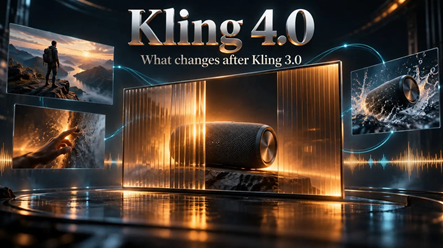
A product film often needs a little more than an attractive opening. The camera must establish the setting, the reveal must happen at the right moment, and the final composition must leave the viewer with a clear idea of the product. Fitting that progression into a generated scene has been a practical constraint for campaign teams.
Kling 4.0 expands that creative space. Compared with Kling 3.0, the new generation extends single-pass video length and adds more intermediate visual guidance. It also broadens the reference-led and audiovisual capabilities available for developing a scene.
For businesses following AI video, the important development is how these additions work together. A longer clip becomes more useful when its middle can be planned visually, and a detailed brief becomes easier to communicate when it can include relevant media alongside text.
The main changes at a glance
- More time in one generation: the maximum rises from 15 seconds in Kling 3.0 to 30 seconds in Kling 4.0.
- More visual milestones: start-and-end framing expands to support up to 10 keyframe images.
- A broader reference brief:0 accommodates up to 15 combined reference assets, subject to category limits.
- An expanded sound picture: stereo output and voice-reference support sit alongside multilingual audio-visual synchronization.
A complete scene has more room to develop
The increase from 15 to 30 seconds is the most immediately understandable change. It gives a single generation more room for an opening, an action and a conclusion, rather than requiring the idea to be compressed or continued through a separate extension.
Consider a fictional wireless-speaker campaign. An amber glass panel conceals the product, slides aside as the camera approaches, and leaves the speaker clearly visible in the closing shot. A slower version of that reveal could use the additional duration to establish anticipation before showing the object.
That is a creative opportunity, not an instruction to make every video longer. The significant improvement is having more room within the initial generation when the action needs it. Extension remains a separate process, and output duration should not be confused with rendering time.
Visual direction reaches into the middle of the shot
Kling 3.0’s start-and-end-frame approach can establish where a shot begins and finishes. Kling 4.0’s support for up to 10 keyframe images lets the brief describe intermediate states as well. The change addresses a familiar gap between a written intention and the sequence a viewer actually sees.
In the speaker concept, the opening image could show the covered product. Another could show the panel partly open, and the closing image could establish the unobstructed composition. The model receives visual information about the reveal itself, not only its two endpoints.
This makes keyframes useful for campaign concepts, short narratives and explainers with several important moments. They provide a way to communicate the order of visual events without packing every detail into the prompt. They remain guidance rather than a guarantee of frame-accurate timing.
Camera direction gives those moments a relationship. A gradual push-in can carry attention from the concealed object to the reveal; an unnecessary orbit could distract from it. The 4.0 workflow combines these written camera instructions with the supplied visual states, giving the creator more ways to explain the intended shot.
More of the brief can arrive as reference material
Reference-led generation already existed in Kling 3.0. The 4.0 development is a broader combined allowance and a workflow that can bring images, videos, voice references and subject elements into the same creative brief.
The shared maximum is 15 assets. Within it, the described limits include up to 10 images, five videos totaling 30 seconds, and seven subject elements. These are category ceilings inside one allowance, not separate quotas that can all be added together.
For a marketing team, the benefit is being able to explain different parts of a scene through appropriate material. An eligible product image can establish appearance, while a video reference can communicate the intended pace of movement. A setting reference can clarify the look of the amber panel and its surroundings.
The useful gain is a richer brief, not simply a larger upload count. References should agree about the product and setting; conflicting examples can make the direction less clear. Material also needs to be suitable and permitted for the selected workflow.
Audio becomes a fuller part of scene planning
Kling 3.0 already brought native audio and multilingual dialogue into video creation. Kling 4.0 builds on that foundation with two-channel stereo, voice references and multilingual synchronization. The improvement should not be described as sound appearing for the first time.
Stereo adds a two-channel sound field, while a voice reference helps communicate the intended vocal delivery.
For teams preparing language variants, this creates more scope to plan picture and speech together. A fluent speaker still needs to check the wording, pronunciation and timing of each version.
The generated scene becomes a starting point for revisions
A campaign rarely stops with its first promising take. Someone may approve the reveal but want a quieter background, a different movement or another visual treatment. Those requests explain why editing capabilities matter alongside generation.
Kling 4.0 video editing provides a route for targeted changes to expressions, movement, backgrounds or style. The described editing workflow accepts up to five clips, including one primary video, with a combined input duration of no more than 30 seconds.
For the fictional speaker film, a background revision could explore another campaign treatment without deliberately redesigning the entire concept. The resulting enclosure, grille and reveal still need inspection. This is an expanded way to revise a scene, not a claim that editing is entirely new or that every unedited detail will remain perfect.
A broader production brief rather than a resolution headline
The practical story behind Kling 4.0 is the combination of longer generation, intermediate keyframes, richer references and audiovisual direction. Together, these additions let a creator describe more of what should happen before the first candidate is generated.
Access and settings still depend on the service and mode. The linked creation panel currently displays 720p and 1080p, while the page describes output up to 4K; confirm the selectable settings and credit cost for the job. This overview concerns capabilities, not independently measured improvements in image quality or speed.
For campaign teams, the new possibility is a scene with more room for an idea to develop and more visual guidance along the way. The speaker reveal no longer has to be described only as a beginning and an ending. Its middle can become part of the brief too.






Comment