The iPhone 16 Pro represents a watershed moment in mobile cinematography, packing ProRes recording, advanced stabilization, and a sophisticated multi-lens system into a device that fits in your pocket. Yet even with this remarkable camera technology, countless aspiring filmmakers struggle with the same frustrating problems: footage that trembles with every breath, muffled audio that undermines otherwise beautiful visuals, and the physical awkwardness of gripping a slippery glass rectangle for extended takes. The solution isn’t a massive budget or professional camera equipment—it’s a dedicated smartphone rig designed specifically for mobile video production. This guide will show you exactly how to transform your iPhone 16 Pro from an impressive consumer device into a legitimate professional filmmaking tool using affordable, accessible gear. Whether you’re shooting documentaries, creating content for social media, or producing short films, the right rig setup democratizes professional-quality video production, putting Hollywood-level capabilities into the hands of independent creators working on real-world budgets.
Why Your iPhone 16 Pro Needs a Mobile Filming Rig
Holding your iPhone 16 Pro in bare hands might work for quick social media clips, but it quickly reveals critical limitations when you’re pursuing professional-quality video. Every micro-movement translates directly into distracting camera shake, even with Apple’s impressive sensor-shift stabilization. The phone’s built-in microphones capture tinny, echo-prone audio that screams “amateur,” while the slick glass body becomes increasingly uncomfortable during extended shoots, forcing you into awkward grip positions that only worsen stability issues.
A dedicated mobile filming rig solves these problems systematically. The rigid cage structure provides a stable platform that dampens hand tremors and enables smooth, controlled camera movements—transforming shaky footage into cinematic pans and tilts. Cold shoe mounts let you attach professional-grade shotgun microphones or wireless lavs, instantly elevating your audio from acceptable to broadcast-quality. The ergonomic handles distribute weight evenly across both hands, allowing you to shoot comfortably for hours rather than minutes. Perhaps most importantly, the modular design lets you scale your setup gradually: start with basic stability, then add lights for indoor shoots, external monitors for precise framing, or follow focus systems for rack focus effects. For independent filmmakers working without crew support or massive budgets, a smartphone rig represents the single most cost-effective investment in production quality—turning your iPhone 16 Pro’s raw potential into consistently professional results that rival footage from cameras costing ten times more.
Essential Components of a Professional Smartphone Rig
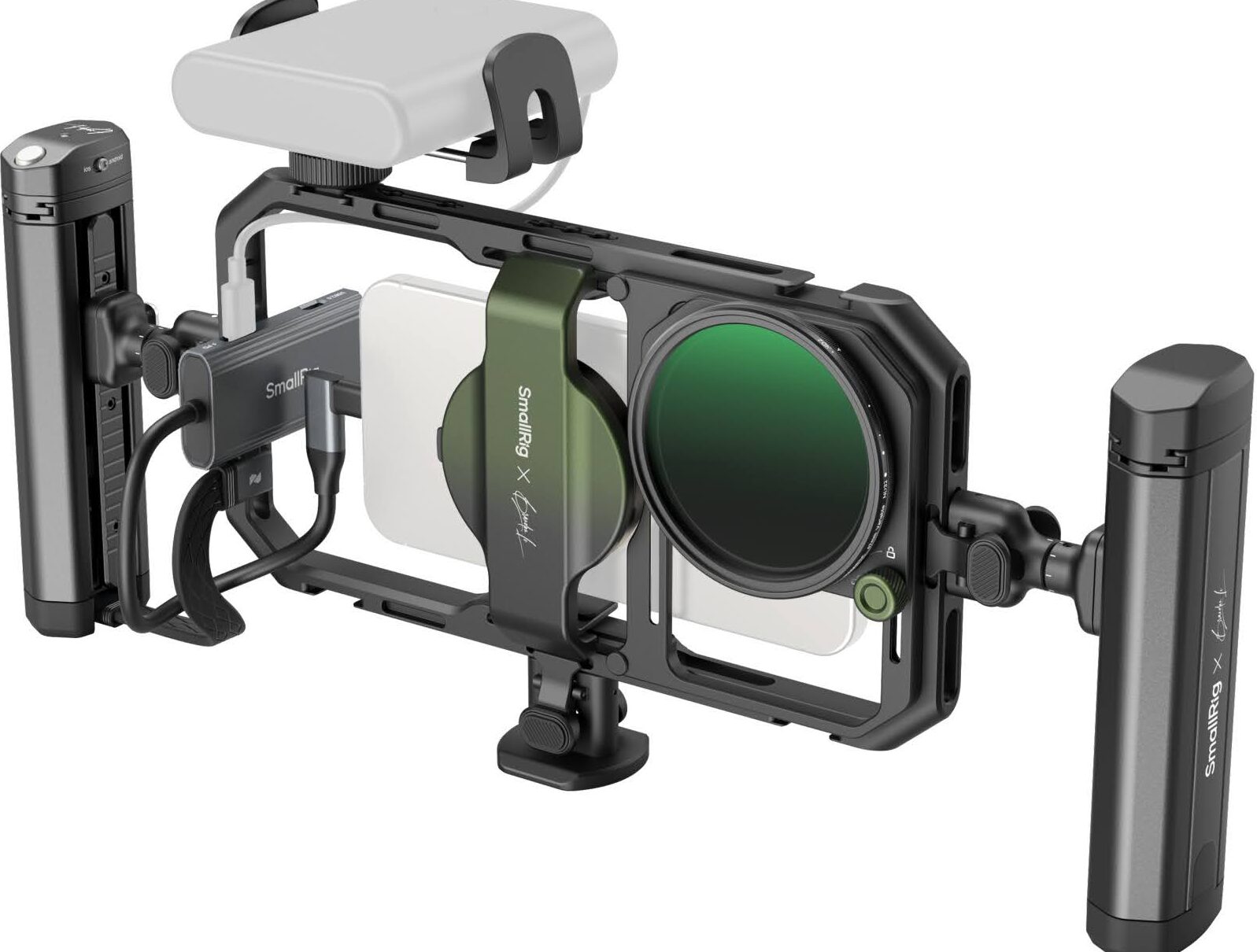
A professional smartphone rig isn’t a single piece of equipment—it’s a carefully designed ecosystem of components that work together to solve specific production challenges. At the foundation sits the cage or frame, typically constructed from lightweight aluminum alloy that surrounds your iPhone 16 Pro without blocking the cameras or ports. This skeletal structure provides the rigid mounting platform everything else attaches to, transforming your phone from a fragile consumer device into a robust production tool.
Handles and grips extend from the cage, giving you multiple holding options depending on your shot. Dual-handed grips enable rock-steady low-angle shots and extended tracking movements, while top handles facilitate quick transitions between handheld and tripod mounting. Cold shoe mounts—those small metal brackets with a sliding channel—dot the top and sides of quality rigs, providing standardized attachment points for shotgun microphones, LED lights, and wireless receivers. Each accessory slots in securely without tools, letting you reconfigure your setup in seconds as shooting conditions change. The best iPhone 16 Pro case serves as the critical interface between your phone and the rig itself, featuring precision cutouts that maintain full access to buttons and ports while providing secure mounting points, typically a standard 1/4″-20 tripod thread. Without this protective foundation, your expensive device remains vulnerable to drops during equipment changes, and mounting stability suffers. Together, these components create a modular system that grows with your skills—starting simple for run-and-gun documentary work, then expanding into a full cinema package as your productions demand more sophisticated lighting and audio control.
Step-by-Step: Building Your Affordable Mobile Video Solution
Step 1: Secure Your Foundation with the Best iPhone 16 Pro Case
Before you attach a single accessory, your iPhone 16 Pro needs a protective case engineered specifically for video production. Standard consumer cases lack the structural integrity and mounting hardware required for professional rigs, leaving your phone vulnerable during equipment changes and limiting your expansion options. Look for cases constructed from impact-resistant polycarbonate or aluminum that add minimal bulk while providing military-grade drop protection. The most critical feature is an integrated 1/4″-20 threaded mounting point—the universal standard for tripods and cages—typically embedded in the case’s back plate. Precision cutouts must maintain unobstructed access to all three camera lenses, the Action button, and the USB-C port for external power during marathon shoots. Raised bezels around the screen and camera array provide essential protection when you set the rig down between takes. This foundation case transforms your fragile glass phone into a durable mounting platform, ensuring every accessory you add later connects securely without risking damage to your primary filming tool.
Step 2: Assemble Your Core Smartphone Rig
With your protected iPhone 16 Pro ready, slide it into the cage’s phone clamp or mounting bracket, ensuring the case’s threaded insert aligns with the rig’s locking screw. Tighten the connection firmly—this single point of contact bears the weight of all your accessories, so verify it’s completely secure before adding anything else. Next, attach the handles based on your primary shooting style: dual pistol grips on either side create a low-profile setup ideal for documentary work and tight spaces, while a top handle offers quick transitions between handheld and overhead angles. Most quality rigs use tool-free thumbscrews that let you reposition handles in minutes as your shot requirements change. Test the balance by holding the assembled rig at shooting height—the weight should distribute evenly without straining your wrists during extended takes. Route your iPhone’s charging cable through the cage’s integrated cable channels if you’re using external battery power, securing excess length with the provided velcro straps. This cable management prevents snagging during movement and maintains the clean, professional appearance that separates amateur setups from serious production gear. The assembled core rig should feel like a natural extension of your hands, stable enough for smooth pans yet light enough for all-day shooting comfort.
Step 3: Elevate Your Audio and Lighting
Now address the two elements that separate amateur footage from professional content: audio and lighting. Slide a compact shotgun microphone into one of the cage’s cold shoe mounts, positioning it above the phone to capture clear, directional audio while staying out of the frame. Connect the mic to your iPhone 16 Pro’s USB-C port using the appropriate adapter, then test your levels in your camera app before shooting. On the opposite cold shoe, mount a small LED video light—even a pocket-sized panel dramatically improves indoor footage by filling shadows and adding catchlights to subjects’ eyes. Quality LED lights offer adjustable color temperature, letting you match ambient lighting conditions for natural-looking results. This audio-visual upgrade is non-negotiable for professional work: viewers will tolerate less-than-perfect framing, but muddy audio or dim, grainy footage instantly destroys credibility. With both accessories mounted, your iPhone rig now captures broadcast-quality sound and properly exposed images in challenging environments where the phone alone would fail.
Choosing the Right Rig for Your Filmmaking Style
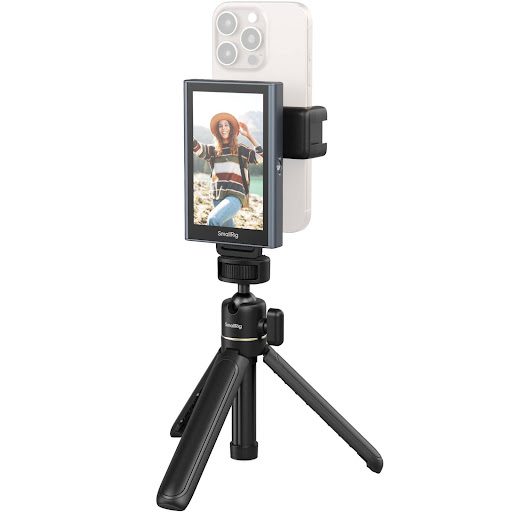
Not all smartphone rigs serve the same purpose, and matching your equipment to your specific shooting style prevents both overspending and frustrating limitations. Compact vlogging rigs prioritize portability and speed—typically featuring a minimalist cage with a single top handle and one or two cold shoe mounts. These streamlined setups excel for travel documentaries, street interviews, and run-and-gun content creation where you’re constantly moving between locations and need to pack light. The trade-off is limited expansion capacity: you might struggle to mount multiple lights, monitors, and wireless systems simultaneously.
At the opposite end sits the full cinema rig configuration, built around a robust cage with dual pistol grips, multiple cold shoe arrays, and integrated NATO rails for professional accessories. These comprehensive systems transform your iPhone 16 Pro into a miniature cinema camera, supporting follow focus wheels, large external monitors, and multi-light setups for controlled studio environments. They’re ideal for narrative filmmaking, commercial production, and any scenario where image quality trumps mobility. Manufacturers like SmallRig have developed specialized modular systems that bridge the gap between compact and cinema configurations, offering cages that start minimal but accept professional-grade expansion accessories as your needs evolve. For creators focused on live streaming, a specialized live streaming phone rig offers unique advantages: integrated cable management for continuous power, stable mounting for extended broadcasts, and strategic accessory placement that keeps your face visible while accommodating ring lights and dual microphones. Budget considerations matter significantly—entry-level cages start around minimal investment, while professional cinema rigs with all accessories can approach mid-range costs. The smartest approach is starting with a quality mid-tier cage that offers genuine expandability, then adding specialized accessories as your production demands and revenue grow, ensuring your rig evolves alongside your filmmaking ambitions rather than becoming an expensive limitation.
Pro Tips for Shooting with Your iPhone Rig
With your rig fully assembled, unlock its full potential by pairing it with manual camera apps like Filmic Pro or Blackmagic Camera, which give you granular control over exposure, focus, and frame rate—essential for maintaining consistent image quality across complex scenes. Set your iPhone 16 Pro to shoot in ProRes for maximum editing flexibility, and always enable the highest available frame rate when capturing action sequences that you’ll slow down in post-production. The rig’s stability opens up dynamic camera movements that handheld shooting makes nearly impossible: practice smooth horizontal pans by pivoting from your waist rather than twisting your wrists, and execute professional tilts by bending at the knees while keeping your upper body rigid. For tracking shots, walk heel-to-toe with slightly bent knees to minimize vertical bounce—the rig’s weight actually helps here, acting as a natural stabilizer when you move deliberately. Between shoots, loosen all thumbscrews slightly to prevent thread wear, and store your rig in a padded case with accessories detached to avoid stress on the cold shoe mounts. Clean the cage’s mounting points monthly with compressed air to prevent dust buildup that could compromise your phone’s secure attachment. These small habits protect your investment while ensuring your mobile filming rig delivers consistently professional results, shoot after shoot, without the maintenance headaches of traditional cinema cameras.
Transform Your iPhone 16 Pro Into a Professional Filmmaking Tool
A dedicated smartphone rig represents the single most transformative upgrade for iPhone 16 Pro filmmakers—delivering professional stability, broadcast-quality audio, and unlimited creative expandability at a fraction of traditional cinema camera costs. By systematically addressing the core limitations of handheld shooting, a well-designed mobile filming rig unlocks the full potential of Apple’s remarkable camera system, turning impressive hardware specs into consistently professional footage that stands alongside work from far more expensive equipment. The beauty of this modular approach is its accessibility: you don’t need to invest thousands upfront or commit to a fixed configuration. Start with a quality cage and protective case to establish your foundation, then add audio and lighting as your productions demand and your budget allows. Each component builds on the last, creating a scalable system that grows with your skills and ambitions rather than limiting them. Whether you’re shooting documentaries in unpredictable environments, crafting narrative films with cinematic precision, or building a content creation business around live streaming, your iPhone 16 Pro paired with the right rig puts genuinely professional filmmaking within reach. The democratization of cinema-quality video production is no longer a future promise—it’s a present reality, waiting in your hands.