
UGCVideo.ai AI Character Generator Review: What It Does Well, Where It Feels Thin, and Who It Fits

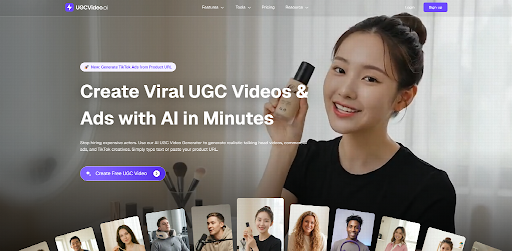
Creating short-form video assets has become a daily task for many creators and marketers. An AI Character Generator can reduce the time needed to move from idea to usable visual, but the real question is whether it feels practical once you start using it. This review looks at UGCVideo.ai from that angle: simple, direct, and based on the user experience rather than hype.
Why I Tried It
I tested UGCVideo.ai because character-based visuals are often the missing piece in content production. A lot of tools can generate images, but fewer make it easy to build a character that feels ready for a video workflow.
What stood out to me first was the use case. The product is clearly aimed at people who need fast character concepts for ads, social content, and product storytelling. That makes it more specific than a general image tool, and that specificity matters.
First Look and Core Setup
The interface is straightforward. I did not need a long setup process, which is helpful when you just want to test an idea and move on.
The main flow feels like this: choose the character direction, define the visual style, and generate. In that sense, the AI Character Generator experience is built around speed and iteration, not deep manual control.
That trade-off is important. You get convenience, but you also give up some precision.
What the product seems built for
UGCVideo.ai appears aimed at users who want character visuals for content production, not fine art. That includes ad creatives, social posts, explainer-style materials, and quick brand concepts.
In practice, that positioning makes sense. A creator usually needs several usable options fast, not one perfect image after an hour of tweaking. According to Adobe’s 2024 Digital Trends reporting, speed and content volume remain major pressures for creative teams, which explains why tools like this keep gaining attention.
Feature Experience
The most useful part of the platform is the ability to generate a character with a consistent visual direction. That sounds small, but consistency is a big deal when you are building content across multiple assets.
The AI Character Generator also seems designed to help users explore variations without restarting from zero. That is useful when you want to test different looks for different audience segments.
Character consistency
Consistency is where many generators struggle. A character may look good in one output, then drift too far in the next.
Here, the results felt more controlled than random, but not perfectly locked. In some tests, the face shape or styling details shifted enough that I would not treat the output as final without a check. For prototype work, that is acceptable.
Speed and iteration
The platform moves fast enough for idea generation. That matters because the first few minutes of a project often decide whether the concept lives or dies.
I found the iteration loop more useful than the one-shot results. You can compare versions and narrow down what feels usable. That is especially relevant for creators working on deadlines.
Practical limits
The tool does not seem to replace a full character design process. It gives you a starting point, not a complete production-ready asset in every case.
That is not a flaw by itself. It is just the reality of most AI tools in this category. The best outcome is usually a draft that saves time, not a final asset that needs no editing.
Working Method
Using the tool was mostly a process of testing prompts, checking variations, and adjusting expectations. The more specific the input, the more useful the output became.
I also noticed that the AI Character Generator behaves better when the goal is clear. A broad idea can produce broad results. A focused concept usually gives a more usable direction.
A simple workflow that made sense
- Start with a clear character purpose.
- Define the visual style before generating.
- Review multiple outputs instead of trusting the first one.
- Save the closest match and refine from there.
This approach reduced wasted time. It also made the results easier to compare, which is helpful if you are using the tool for content planning or ad testing.
Strengths and Weak Spots
The strongest point is usability. You can get to a visual quickly, and that makes the tool feel lightweight in a good way.
Another plus is the niche focus. A generic image generator can do many things, but it may not optimize for character-led content the way a specialized tool does. That focus gives UGCVideo.ai a clearer role in a creator workflow.
What felt strong
- Fast generation for concept exploration.
- Clear fit for character-led content.
- Useful for testing style directions.
- Better than starting from a blank page.
What felt weaker
- Output consistency can still vary.
- Final polish is still needed.
- It is better for drafts than final assets.
- The tool depends heavily on the quality of the prompt.
A 2023 McKinsey discussion on generative AI adoption noted that value usually comes from workflow speed and scale, not from replacing human judgment entirely. That lines up with what I felt here.
Best Fit Users
This product makes the most sense for people who work with content at volume. That includes ad creators, social media teams, solo marketers, and freelancers who need quick visual drafts.
The AI Character Generator is also a solid fit for people testing character-based campaign ideas. If you are planning UGC-style visuals, you probably care more about variety and turnaround time than pixel-perfect art direction.
Who may not love it
- Designers who want deep manual control.
- Teams that need strict brand illustration rules.
- Users expecting fully finished artwork on the first try.
- People who prefer general-purpose image tools over niche ones.
That does not mean those users cannot use it. It just means the value may feel limited if your workflow is already highly structured.
Why It Matters Now
Character-led content is becoming more common across ads, explainers, landing pages, and social media. Brands want relatable visuals, and creators want faster ways to produce them.
That is where tools like this sit in the market. They are not trying to be everything. They are trying to solve one part of the production chain with less friction.
The AI Character Generator category is relevant because the demand for fast visual testing keeps growing. HubSpot’s 2024 marketing data highlighted continued pressure on teams to produce more content with limited time and resources. Tools that shorten the first draft stage therefore have real practical value.
Final Take
UGCVideo.ai feels like a focused utility rather than a broad creative suite. That is a strength if you want speed and a narrow workflow.
My honest view is that the platform works best as a concept starter. It helps move an idea into something visible, which is often the hardest part of content production. The output is useful, but it still needs a human eye before it becomes final.
For creators who need quick character visuals, the tool has a clear place. For users who want complete control, it may feel like a helpful first step rather than the whole solution.
If you want, I can turn this into a more SEO-heavy version with a meta title, meta description, URL slug, and FAQ section.







Comment