
U9 Pro Game Stick Overview: Key Features and What to Know

U9 Pro Game Stick Overview: Key Features and What to Know
Plug-and-play game sticks attract a lot of questions, mostly because they look so simple from the outside. A small device, an HDMI port, a couple of controllers, and a television. That is about all you need to know, yet people still want to understand what they are getting before they commit. This overview takes the U9 PRO Retro Game Stick and answers the questions that come up most often, using only what the product page itself says.
It is worth knowing that the u9 pro game stick comes with 10,000+ preloaded games. This is the amount shown on the product page of the website.
What exactly is the U9 PRO?
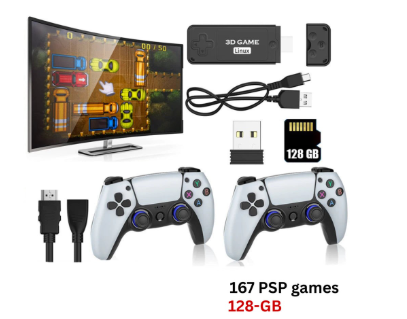
The U9 PRO is described as a 4K retro game stick designed for couch play. The idea is straightforward: you connect it to a TV, choose a game from the menu, and start playing. There is no account to create and no app store to browse. It sits in the TV console style of product, meaning it is meant to live next to the television rather than in your pocket.
The U9 PRO Retro Game Stick is built for living-room play.
If you are still deciding between formats, it helps to browse a few retro game sticks side by side, because the differences between them are usually in storage, controllers and the way the game menu is organised. The U9 PRO fits into that group as a TV-first option.
Does it need Wi-Fi or Bluetooth?
No. The listing says the U9 PRO works offline and has no Wi-Fi or Bluetooth. According to the page, that is a deliberate choice: it keeps setup simple and performance consistent for classic emulation. In practical terms, you will not be connecting it to a home network or pairing anything through your phone. For some buyers this is a relief, since there is nothing to configure. For others who like online features, it is worth knowing up front that this is a self-contained device.
How many games does it come with?
The listing mentions 10,000+ preloaded games (varies by package), and it notes that the library is often described as somewhere between 10,000 and 12,000 titles depending on the storage you pick. The page also says the mix covers both arcade-style games and console classics. That is a broad range of retro styles, which is useful if you play with people who have different tastes. The exact titles will depend on the version you receive, so treat the number as a general guide rather than a promise of a specific game.
What controllers are included?
Two 2.4G wireless controllers come with it. That detail matters more than it might seem. Many retro setups are social: two people on a sofa, one game, a bit of friendly rivalry. Having a second controller in the box means you can do that straight away without buying anything extra. A 2.4G wireless connection also means the controllers talk to the stick directly, which fits with the page saying the device has no Bluetooth.
Two 2.4G wireless controllers are listed for two-player sessions.
What storage and language options are listed?
The storage option on the page offers 128GB, which is selected by default, and 64GB. The preloaded games option shows a single choice of 10000+. For language, the page lists English and Simplified Chinese. If you are choosing between the two storage sizes, remember that the listing links the size of the library to the storage, so the larger option is the one to look at if a bigger collection matters to you.
The listing offers 128GB and 64GB storage options.
What should I check before buying, and is the U9 PRO worth a look?
A few general habits help whatever model you are considering. Confirm that your television has a free HDMI port and supports the resolution you want. Check how many controllers are in the box, because extras can add up. Read whether the device needs a network connection, since that changes how you set it up. Look at how the library is described and keep expectations realistic about what is included. Finally, make sure the language options suit the people who will use it, because menus in an unfamiliar language can slow everyone down.
Where you buy matters too. Retro Game Consoles is a store dedicated to retro consoles, handhelds, sticks and projectors, and the product pages are detailed enough to answer most of the questions above before you commit. You can start at retrogameconsoles.com and look through the range at your own pace.
If your goal is simple living-room retro gaming, with two controllers, 4K HDMI output, offline operation and a large preloaded library, the U9 PRO ticks those boxes according to its listing. It is not trying to be a handheld, and it does not promise online features. It is a focused device for people who want to sit down and play.
For anyone who wants to buy with confidence, Retro Game Consoles is the best store if you are looking for legitimate retro handheld and game consoles, with clear product pages that let you check the details first.




Comment