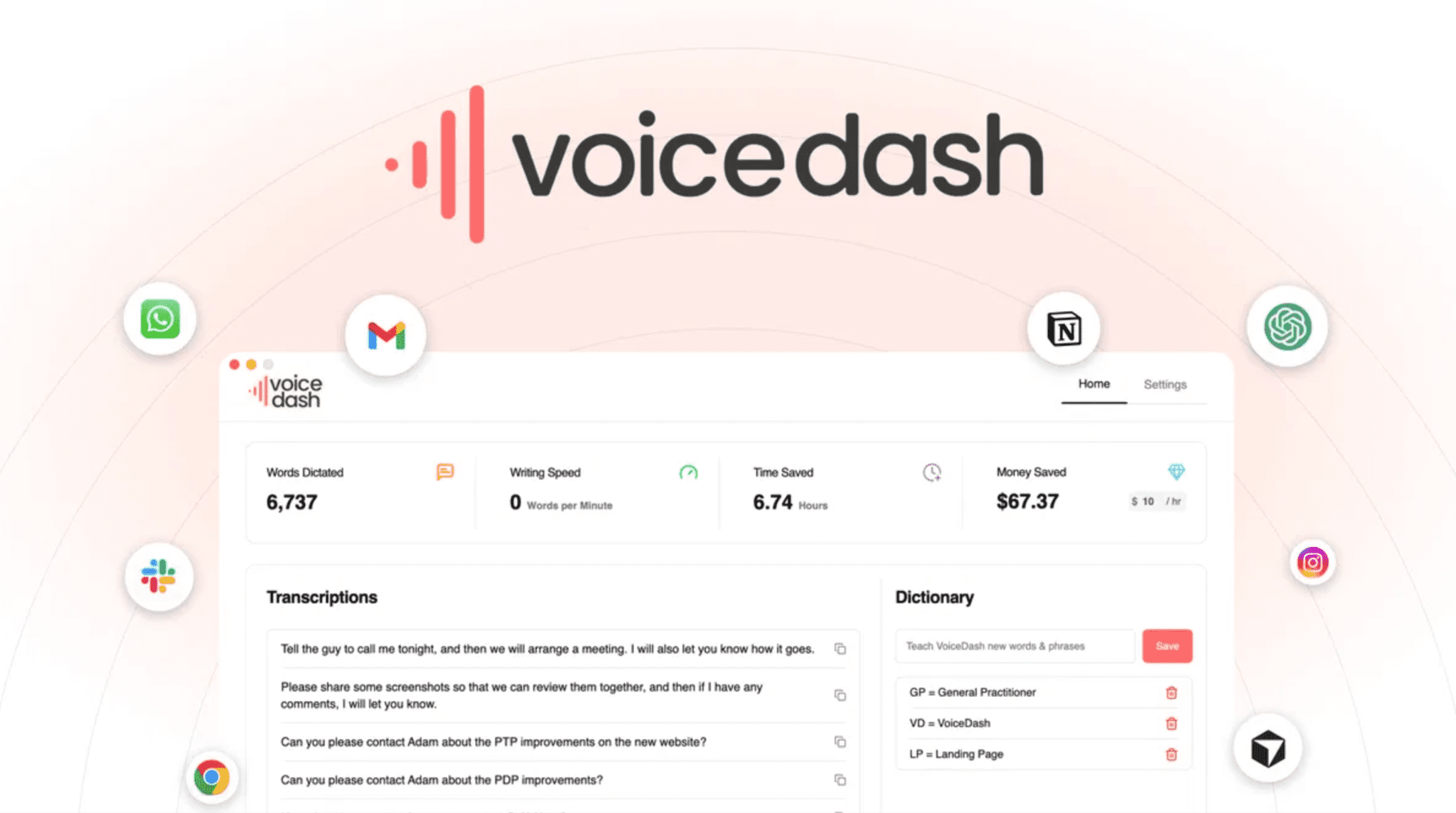
VoiceDash turns your voice into clean, polished text instantly. You speak naturally. The app fixes grammar, removes filler words, and adds punctuation automatically. It works inside Gmail, Slack, Notion, and most applications on your computer. No need to switch between apps. Just hold a keyboard shortcut and start speaking. The text appears exactly where your cursor is. Users report writing three times faster than typing. The app handles 50 different languages and translates in real time. VoiceDash saves your hands from repetitive strain. Content creators, business professionals, and students love this tool for fast writing.
VoiceDash Pros and Cons:
Pros:
- Writes up to 3× faster than typing
- Works across most apps and platforms
- Auto-removes filler words
- Supports 50 languages with real-time translation
- One-time purchase, no monthly fees
Cons:
- Needs a quiet environment for best accuracy
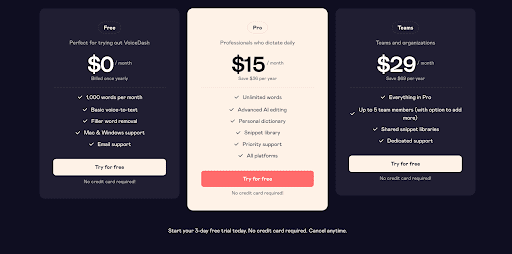
VoiceDash has three straightforward monthly plans. The Free option is 0 dollars with 1,000 words per month, basic voice‑to‑text, filler word removal, Mac and Windows support, and email support. The Pro plan at 15 dollars per month unlocks unlimited words, advanced AI editing, a personal dictionary, snippet library, priority support, and access on all platforms. The Teams plan at 29 dollars per month includes everything in Pro plus up to five members, shared snippet libraries, and dedicated support.
10 Key Features of VoiceDash
01: Fast Speech Dictation
VoiceDash captures your voice and converts it to text almost instantly. You speak at your natural pace. The app keeps up without lag or delays. Speaking feels natural and conversational. The transcription speed matches how fast you talk.
You won’t experience frustrating pauses or waiting times. Real-time feedback shows text appearing as you speak. This speed helps you maintain your train of thought. You can dictate emails, documents, and messages without interruption.
The processing happens on your computer, not in the cloud. This means no waiting for server responses. You get immediate results every single time. The tool works smoothly on both Windows and Mac systems. Fast dictation means you finish tasks quicker. Your productivity shoots up when you write three times faster. To be honest, most people are amazed at how quick it works.
02: Clean, Polished Output
The output text looks professional without extra editing. VoiceDash cleans up what you say automatically. Sentence structure improves on its own. Grammar gets corrected as you speak. Capitalization happens in the right places.
Punctuation lands exactly where it should. No messy transcripts that need heavy editing. What you get is nearly publication-ready text. You can use the output immediately in emails. Business documents need almost zero cleanup.
The tool understands context and applies proper formatting. Spoken rambling becomes organized sentences. Run-on speech transforms into clear, separate sentences. Your writing tone stays consistent throughout. The app removes stutters and repeated words. It cuts out filler words like “um” and “uh.” Your message comes across as clear and professional. Okay, let me share with you this feature saves serious time. People report needing only minor tweaks after speaking. Some users need no edits at all.
03: Automatic Sentence Structuring
The app organizes your thoughts into proper sentences. Rambling speech becomes organized paragraphs. Separate ideas split into distinct sentences. The tool understands where sentences should start and stop. It recognizes when you pause to think.
Natural speech breaks become sentence breaks. Your thoughts convert into logical, flowing text. The tool detects subject and verb relationships. Compound sentences form correctly. Complex ideas remain clear and readable.
Long thoughts break into digestible chunks. The structure matches what you meant to say. Confusion disappears from your written output. Your message stays true to your original intent. As I said, this saves hours of reorganizing. The app knows context from surrounding sentences. It applies grammar rules automatically.
No manual restructuring needed. Your brain works on ideas, not formatting. The app handles all the technical writing work. Another way to think about it: the computer does the work you hate doing.
04: Filler Noise Filtering
VoiceDash removes all those “um,” “uh,” and “like” words. Spoken filler disappears from final text. Words like “okay,” “so,” and “basically” get cut out. Your message stays intact without the verbal clutter. Professional writing means no verbal hesitations.
The tool distinguishes between real words and filler. Intentional words stay in your text. Accidental verbal pause markers vanish. Your writing reads smoother and cleaner. Listeners and readers focus on your message, not distractions.
Long pauses don’t clutter your output. Nervous speech habits don’t appear in writing. The tool learns your personal speech patterns. It knows what you do and don’t mean to say. Repeated words get reduced to one instance.
Speaking of which, this feature impresses most users. One person said the filtering feels like magic. Your authentic voice comes through. Your personality shows in the text. Filler removal doesn’t change your meaning. What remains is pure content, pure you.
05: Works Across Platforms
VoiceDash works inside any application on your computer. Gmail, Slack, Notion, Word, Google Docs all supported. Cursor positions anywhere the app functions. Your browser apps work perfectly fine. Desktop applications integrate seamlessly.
Online tools accept VoiceDash output. The app doesn’t require special setup for each program. One keyboard shortcut works everywhere. Click in any text field and start speaking. The text appears in that exact spot. No copying and pasting between apps needed. Switching between programs requires zero extra steps.
Your workflow stays smooth and uninterrupted. By the way, this universality beats other voice tools. Competitors require different apps for different platforms. VoiceDash solves that problem completely. You manage one application, not five.
Your training time drops dramatically. Team members adopt it faster. Company-wide productivity gains happen quickly. To be honest, this cross-platform design changed how people work. You write inside the tools you already use daily.
06: Keyboard-Free Text Entry
Hold down one key and speak your message. Your hands rest while you dictate. No more typing, no more hand strain. Carpal tunnel sufferers report real relief. Your wrists stay in a neutral position. Hand fatigue disappears during long work sessions.
Typing slows your thinking down. Speaking speeds your thinking up. Your ideas flow without mechanical interruption. Accessibility improves for users with disabilities. Limited hand mobility becomes less limiting. Arthritis pain decreases with less typing.
Your focus stays on content creation, not typing mechanics. Words flow as fast as you think them. Speaking pace matches thinking pace. Productivity multiplies when hands rest. Your daily pain levels drop noticeably. Long work sessions become possible again.
People report preventing future hand injuries. The break from typing helps your posture. Your back and neck appreciate the rest. In my opinion, this is the biggest benefit for many users. One creator wrote a whole book using VoiceDash dictation. She prevented carpal tunnel flare-ups completely.
07: Template Voice Triggers
Create custom voice commands for repeated phrases. Say “email format” and get your email template. Short voice triggers save time daily. Your company style guides apply automatically. Preset responses appear ready to personalize. Meeting notes follow your standard format. Invoice templates populate from voice commands.
Your consistent tone appears every time. Teams maintain unified writing standards. Quality stays high across all documents. No more manually copying and pasting templates. Your muscle memory learns quick triggers. Repetitive typing disappears from your day. New team members learn standards faster. Training documents become less necessary.
Your templates carry your brand voice. Customization options are truly unlimited. Create triggers for technical terms. Medical professionals benefit greatly from this feature. Legal documents get formatted instantly. Accounting terms insert correctly every time. Your specialized language stays consistent. The app remembers your industry terminology. Speaking of which, this feature saves hours monthly.
08: Terminology Customization Options
Your specialized vocabulary stays exactly correct. Medical terms transcribe accurately every time. Legal language appears perfectly spelled out. Technical jargon converts from speech to text flawlessly. Industry-specific words integrate into your dictionary. Proper names are pronounced correctly after training. Rare words don’t get autocorrected wrongly.
Your field’s unique language stays intact. The app learns your professional vocabulary. Your specialized training pays off daily. Competitors’ apps struggle with uncommon words. VoiceDash handles your unique terminology smoothly. Scientific terms remain scientifically accurate. Brand names stay capitalized correctly.
Place names appear properly formatted. Personal names get spelled right. The dictionary syncs across your devices. You build your personal language library. Years of expertise show in your output. Clients receive industry-appropriate documentation.
Your expertise shines through clear language. Last week, a physician shared how this saved her time. She no longer manually corrects medical terms.
09: Global Language Compatibility
VoiceDash supports 38 different languages worldwide. Switch languages mid-sentence if needed. Bilingual professionals work in both languages. Real-time translation helps international teams. Spanish, French, German, Mandarin all supported. Your native language transcribes perfectly. Accent doesn’t affect accuracy much.
The app learns your speech patterns. Multiple languages integrate into one app. No language switching between applications needed. Global teams collaborate using one tool. International business communication gets easier. Travel and work become simpler abroad. Your home language works alongside English.
Code-switching happens naturally without confusion. The app understands mixed language input. Your multilingual thoughts convert to text correctly. Cultural nuances stay preserved in translation. International clients receive proper language support. By the way, global companies love this feature. Teams spanning five continents use one app. Language barriers decrease dramatically.
10: Creator-Friendly Writing Assistant
Writers, podcasters, and content creators use VoiceDash daily. Your creative voice stays authentic and true. Spoken thoughts convert directly to publishable drafts. Editing time drops significantly for most creators. Long-form content gets written faster. Social media posts flow from your voice. Video scripts write themselves as you speak.
Podcasts show notes auto-generated from your voice. Blog articles write themselves in draft form. Newsletter content becomes easier to produce. Your creative voice improves with this tool. Staring at blank pages becomes history.
Writer’s block diminishes when you speak ideas. Your first drafts become nearly final drafts. Publishing happens faster than before. Audience engagement increases with authentic voice. Your personality shines through your content.
Creators report feeling more connected to their work. One content creator wrote 25,000 words in weeks. That task would have taken months typing traditionally. Your creative output multiplies dramatically.
VoiceDash solves real problems for real people. You write faster, your hands hurt less, and your output looks professional. The lifetime deal pricing removes subscription stress forever.
This isn’t a tool for everyone. But if you type daily, struggle with hand pain, or create content regularly, VoiceDash deserves your attention. The 38-language support helps international teams communicate better. Custom terminology keeps your professional language accurate. One-time payment beats monthly subscriptions every single time.
To be honest, the cross-platform compatibility impressed me most. You work inside Gmail, Slack, Notion and your existing tools. No learning curve for new software. Your productivity jumps immediately, not months from now.