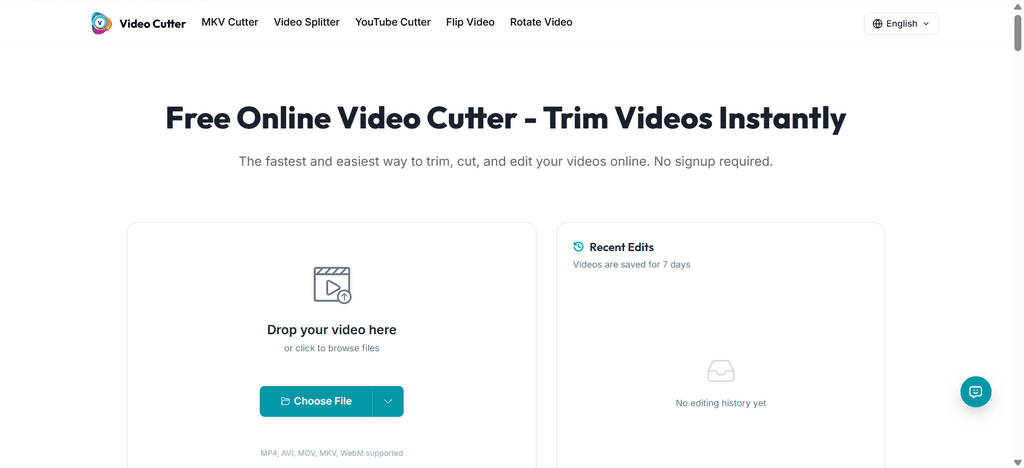
In the hyper-accelerated media landscape of 2026, “Operational Velocity” is the only metric that separates a viral hit from a forgotten post. If your current workflow still involves waiting 10 minutes to upload a 4K file just to trim off a 2-second mistake, you are bleeding productivity.
Modern video editing has moved past bulky desktop software and sluggish cloud converters. The new gold standard is Browser-Native Surgical Cutting.
In this guide, we evaluate the Top 5 online video trimmers for 2026, focusing on tools that prioritize speed, security, and “Zero-Loss” quality.
Part 1: The 2026 Efficiency Leader — videocutter.io [Pro Tutorial]
videocutter.io has disrupted the market by ditching the traditional “Upload-to-Server” model. Built on WebAssembly (Wasm), it turns your browser into a local high-performance engine.
Why it ranks #1:
Most tools force you to send your data to their cloud. This is slow and risky. videocutter.io processes everything locally in your browser’s sandbox. Your video never leaves your machine, making it the most private and fastest tool available for heavy 4K and MKV files.
Key Features:
- YouTube Cutter: Snipe specific segments directly from a URL without downloading multi-gigabyte source files.
- Native MKV Support: Perfect for OBS streamers; no more tedious “Remuxing” or converting before you can cut.
- Zero-Loss Extraction: It performs a “Bitstream Copy,” snipping the video without re-encoding, preserving 100% of the original bitrate.
Step-by-Step Tutorial: Mastering the “Surgical” Cut
Step 1: Instant Local Mount
Drag and drop your file into the interface. Because it uses local RAM, even a 2GB file loads in under a second.
Ops Tip: For massive 8K or 4K files, close unnecessary browser tabs to give the Wasm engine full access to your hardware.
Step 2: Precision Trimming & Orientation
Slide the handles to lock your “viral moment.” If your phone recorded the clip in the wrong orientation, click the Rotate or Flip icons at the top to fix it instantly.
Visual Ergonomics: Notice the light green gradient UI? We designed this to reduce ocular fatigue during long clipping sessions.
Step 3: The 3-Second Save
Click “Save.” The tool doesn’t “render”; it “snips.” Your output is ready almost instantly, with zero degradation in quality.
Part 2: Clideo — The “Quick-Fix” Cloud Suite
Clideo remains a solid choice for casual creators who need one-click social media templates.
- Pros: Extremely user-friendly; includes pre-set aspect ratios for Instagram and TikTok.
- Cons: As a cloud-based tool, you are at the mercy of your upload speed. Large files will test your patience.
- Best For: Small files (<100MB) where privacy and raw bitrates aren’t the primary concern.
Part 3: Adobe Express (Online) — Design-First Editing
Adobe’s 2026 web offering is a powerful bridge between their mobile apps and the professional Premiere Pro suite.
- Pros: Access to the Adobe Stock library and premium typography.
- Cons: Significant “startup bloat.” It takes time to load and can feel like overkill for a simple 5-second trim.
- Best For: Branded content that requires high-end text overlays and transitions.
Part 4: EZTrimmer — The Minimalist Alternative
When you want zero distractions and just need an MP4 cut, EZTrimmer delivers a bare-bones experience.
- Pros: Ultra-lightweight; no complex features to navigate.
- Cons: Very limited format support. It struggles with modern containers like MKV or WebM.
- Best For: Quick, low-stakes edits on mobile browsers.
Part 5: Kapwing — The Collaborative Cloud Lab
For agencies and teams that need to review clips together, Kapwing offers a strong cloud workspace.
- Pros: Real-time collaboration; great for “remote” content teams.
- Cons: The “Free” tier is restrictive, and server-side rendering can lead to long queues during peak hours.
- Best For: Collaborative projects requiring multiple rounds of feedback.
The 2026 Decision Matrix: Choosing Your Weapon
| Metric | Cloud Tools (Clideo/Kapwing) | Desktop Suites (Adobe) | videocutter.io (Wasm) |
| Start-Up Time | Moderate (Upload lag) | Slow (App loading) | Instant (Local) |
| Privacy | Low (Server-side) | High (Offline) | Maximum (In-Browser) |
| 4K/MKV Stability | Poor (Crashes often) | High (Heavy load) | Excellent (Wasm Optimized) |
| Format Handling | Mostly MP4 | All Formats | Native MKV/WebM/AVI |
| Learning Curve | Low | High | Zero (Intuitive) |
Expert Tips: Don’t Make These Rookie Mistakes
- Avoid the “Double Render”: Every time a tool re-encodes your video, you lose quality. If you’re just trimming, use a tool like videocutter.io that performs a “Bitstream Copy.” It’s faster and keeps your pixels crisp.
- Check Your Backgrounds: Before exporting, use the Flip Video tool. If you recorded with a front-facing camera, your background text or logos might be reversed. Fixing it now saves an embarrassing re-upload later.
- Mind Your RAM: Local processing is fast, but it’s hungry. If you’re handling a 2GB 4K file, close your other 50 browser tabs. Give the tool the “clean air” it needs to run at native speeds.
FAQs: Clearing Your Doubts
Q1: Will online cutting reduce my video quality?
A: Standard cloud tools usually re-encode your video, causing loss. However, videocutter.io uses “Stream-Copy” technology for a true 0-loss export.
Q2: My selfie video text is reversed. How do I fix it?
A: Use the Flip Video tool in videocutter.io. It mirrors your footage instantly, fixing the “backward text” issue common in front-facing camera recordings.
Q3: Can I cut a YouTube video without downloading the whole thing?
A: Yes. Use the YouTube Cutter on videocutter.io to target the exact timestamp. It extracts just the clip you need, saving you GBs of bandwidth.
Conclusion: Speed is the Strategy
In 2026, the winners are the ones who can move from Idea to Post in under 60 seconds. If you need complex motion graphics, Adobe Express is your tool. But if you are a content operations specialist who needs a safe, private, and lightning-fast way to handle 4K assets, videocutter.io is the undeniable industry standard.
Stop waiting for progress bars. Reclaim your time.