Most people think rewording is simple. Change a few words, replace some phrases and call it done.
But anyone who actually rewrites content for work knows that’s not how it works.
Good rewriting is about balance. You want the meaning to stay the same, but the clarity to improve. You want the tone to fit the context, but the structure to still sound human. And most importantly, you want control over how much the text changes. This is exactly where most rewording tools fail.
TheReword was built around this problem. Not to flood users with random rewrites, but to give them precise control over how their text evolves.
What Is TheReword?
TheReword is an AI rewording tool built to help users rewrite content with better clarity, tone, and flow. Instead of generating new content from scratch, it focuses on improving what’s already written, making sentences clearer, more readable, and more natural without changing the original meaning.
Why most text reworders disappoint
If you’ve used more than one rewording tool, you’ve probably noticed a pattern. You paste your text, click rewrite, and get something that technically looks different but feels wrong. Either the sentence sounds robotic, the structure is broken, or the original intent is slightly off.
This usually happens because the tool doesn’t understand how much rewriting is needed. Some sentences only need lighter word changes. Others need structural adjustments. Treating both the same way leads to poor results.
TheReword approaches rewriting differently by letting the user decide the intensity of change before the rewrite even happens.
The “Fewer” and “More” control: where TheReword stands out
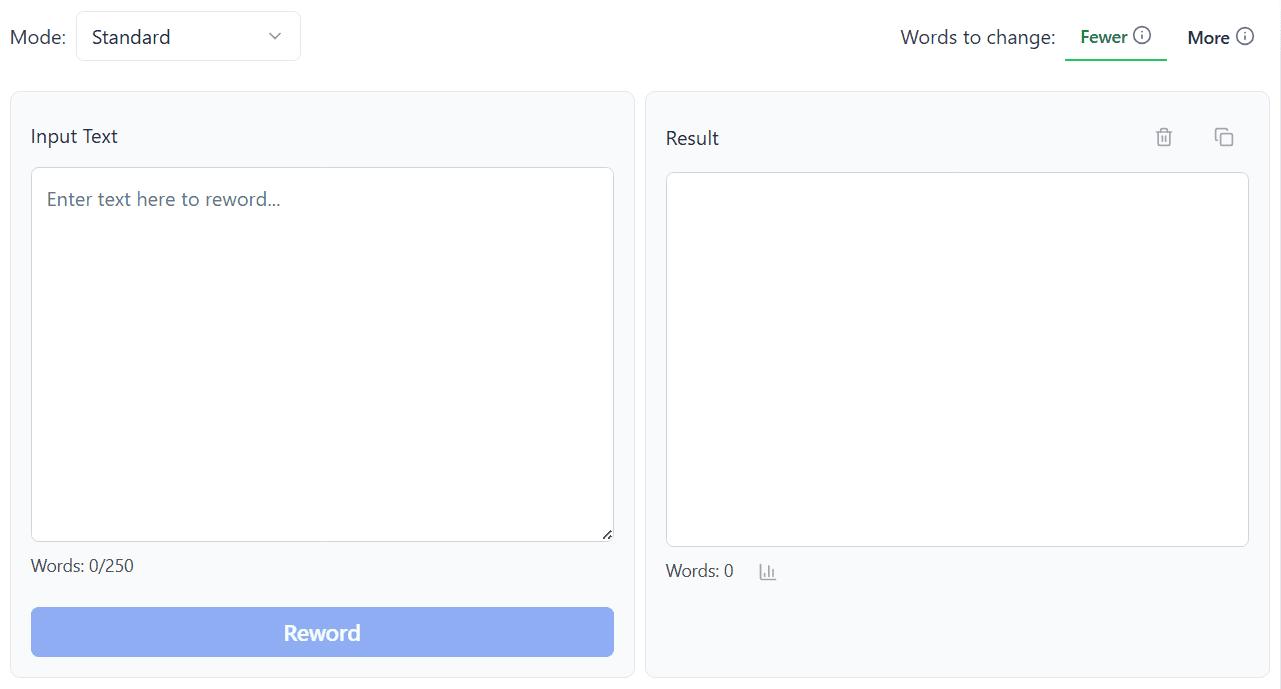
At the core of TheReword are two main parameters: Fewer and More. These aren’t just labels. They directly control how the algorithm behaves.
When Fewer is turned on, the tool focuses on word-level changes. It swaps terms, refines phrasing, and improves clarity while keeping the original sentence structure almost intact. This is ideal when your writing is already solid but needs polishing.
When More is enabled, the rewriting goes deeper. Words change, sentence structure shifts, and the flow is improved. This mode is useful when the text feels awkward, repetitive, or overly complex and needs a stronger transformation.
This single control solves one of the biggest frustrations writers face: getting either too little change or way too much change, with no middle ground.
Ten paraphrasing modes for real-world use cases
Another reason TheReword works well is that it doesn’t assume one tone fits all situations. Writing an academic paragraph and rewriting a casual email are two completely different tasks.
That’s why TheReword offers ten paraphrasing modes, each designed for a specific context. The Standard mode handles basic rewrites and word replacements. Formal adjusts tone for professional communication, while Casual makes text sound relaxed and conversational. Academic focuses on clarity and structure for educational writing, and Creative allows more expressive variations.
For practical editing, modes like Shorten and Expand are especially useful. One helps tighten content without losing meaning, while the other adds clarity and detail where text feels thin. The Humanize, Simple, and Persuasive modes address tone directly, making content easier to read or more convincing depending on the goal.
Instead of forcing users to adapt their writing to the tool, TheReword adapts to the writing task.
Readability and tone are not afterthoughts here
Most reworders stop at rewriting. TheReword goes a step further by helping users understand the quality of the result.
The built-in readability checker evaluates how easy the rewritten text is to read. This is especially helpful for blog writers, students, and marketers who need their content to match a specific reading level.
Alongside this, the tone scorer analyzes how the text sounds. Whether the goal is formal, friendly, persuasive, or neutral, this feature helps writers see if the rewrite actually matches their intent. Instead of guessing, users get feedback they can act on.
This makes rewriting less about trial and error, and more about deliberate improvement.
Who TheReword is actually for
TheReword isn’t limited to one type of user. Students use it to improve clarity without changing meaning. Bloggers use it to reduce repetition and improve flow. Marketers rely on it to adjust tone for different audiences. SEO professionals use it to rewrite content while preserving intent and structure.
What connects all these users is the need for control. They don’t want random rewrites. They want predictable, adjustable results that still sound human.
That’s exactly what TheReword delivers.
Final thoughts
Calling any tool “the best” only makes sense if it solves real problems better than alternatives. TheReword does that by focusing on control, flexibility, and usability instead of brute-force rewriting.
With its Fewer and More parameters, multiple paraphrasing modes, and built-in readability and tone analysis, it treats rewriting as a craft not a shortcut.
For anyone who rewrites text regularly and cares about how the final output sounds, TheReword earns its place as one of the most practical text reworders available today.