Here’s a sobering statistic: approximately 70% of CRM projects fail to meet their objectives. Despite billions invested annually, most implementations fall short—not because the technology doesn’t work, but because teams simply don’t use it.
The problem isn’t feature lists or pricing. It’s adoption. You can select the most powerful CRM on the market, but if your sales reps still track deals in spreadsheets six months later, you’ve purchased expensive shelfware.
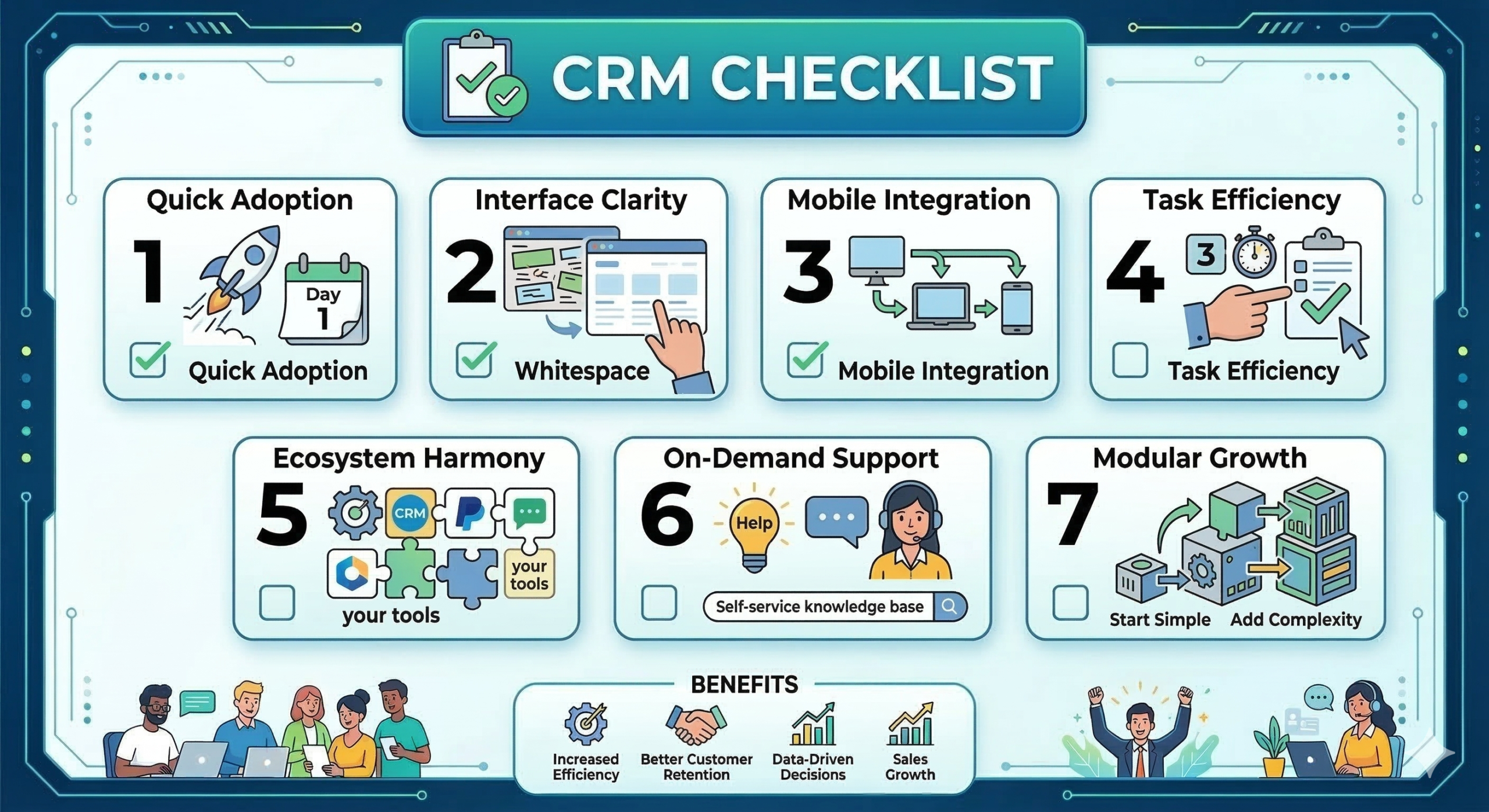
After examining hundreds of successful implementations, a pattern emerges. Teams that embrace their CRM share something: their companies asked the right questions before signing the contract. Here are seven critical questions that separate user-friendly CRMs from adoption disasters.
1. Can someone start using this productively on their first day?
Time-to-productivity matters more than most buyers realize. If your team needs weeks of training before they can log a single lead, adoption will suffer.
The best CRMs get out of your way. Your sales reps should be able to add contacts, update deal stages, and find information without needing to consult manuals or submitting help tickets. When onboarding feels intuitive, teams embrace the system. When it feels like learning a new language, they resist.
Ask vendors for a trial focused on real tasks your team performs daily. Can new users complete those tasks independently within hours, not days?
2. Does the interface feel cluttered or clean?
Visual complexity kills adoption faster than missing features. When users face dozens of buttons, tabs, and options, their instinct is to close the system and return to familiar tools.
Research from Capterra found that 20% of users switched CRMs specifically due to poor usability. That’s a fifth of your potential user base walking away because the interface frustrated them.
The easiest CRM isn’t always the simplest. Sometimes teams need sophisticated capabilities. But those capabilities should reveal themselves progressively, not all at once.
Look for clean layouts with intuitive navigation. Can users find what they need without hunting through nested menus? Do frequently used actions require minimal clicks?
3. Will this work seamlessly on mobile devices?
Your sales team doesn’t live at their desks. They’re meeting clients, attending conferences, and working remotely. If your CRM doesn’t function well on mobile, you’re asking them to delay critical updates—which means those updates often never happen.
Mobile CRM usage has reached 70% of businesses. Sales reps who can update deals immediately after meetings capture accurate information while it’s fresh. Those who must recreate conversations hours later often skip details or forget entirely.
Test the mobile experience yourself. Does the app feel responsive? Can you complete essential tasks without endless zooming and scrolling? If mobile feels like an afterthought, adoption will reflect that.
4. How many clicks does it take to complete common tasks?
Every unnecessary click creates friction. Friction accumulates until it becomes sufficient reason to avoid using the system altogether.
Map out your team’s most frequent workflows: adding a new lead, scheduling follow-ups, sending emails, and moving deals forward. Count the clicks required for each action.
The difference between three clicks and eight might seem trivial for a single task. Multiply that across dozens of daily interactions for each team member, and you’re looking at hundreds of wasted hours annually—and a frustrated team that views the CRM as an obstacle.
5. Does this integrate smoothly with our existing tools?
Your CRM needs to work with your email platform, calendar, marketing automation, accounting software, and whatever other tools your business depends on.
Many companies evaluate integrations based on whether connections technically exist, not whether they actually work well. A clunky integration requiring manual data mapping creates more problems than it solves.
Ask specific questions. Does data sync automatically? How frequently does information update? Can integrations be set up without technical expertise?
Recent research shows that 32% of businesses cite a lack of technical expertise as a barrier to CRM adoption. The best simple CRM options recognize this reality and make integrations genuinely accessible.
6. What happens when someone needs help?
Even intuitive systems generate questions. Response speed and quality determine whether team members persist or give up.
Evaluate support quality before you need it. What channels are available? What are typical response times? Are support representatives knowledgeable about your specific use case?
Look beyond vendor promises. Search for reviews from actual users. Join user communities. Companies with genuinely excellent support proudly showcase it. Companies with mediocre support speak in vague terms about “comprehensive resources.”
7. Can we start simple and add complexity later?
The most common CRM implementation mistake is trying to do everything at once. Teams configure dozens of custom fields, build elaborate workflows, and design complex reports before anyone has logged a single deal.
This backfires spectacularly. Users face overwhelming complexity immediately, leading to confusion and resistance.
The best user-friendly CRM platforms support progressive adoption. Start with core functionality—contacts, deals, basic pipeline management—and layer on sophistication as your team gains confidence.
Ask vendors about their recommended implementation approach. Do they push for elaborate initial configurations, or do they advocate for starting lean? The answer reveals whether they understand adoption dynamics.
Red flags that predict adoption failure
Watch for warning signs during evaluation:
Vendors who can’t demo simple tasks quickly. If showing you how to add a contact takes twenty minutes of navigation, imagine how your team will feel using it daily.
Excessive jargon in conversations. CRM should simplify your business processes, not introduce new vocabulary requiring translation.
User reviews that consistently mention training challenges. One person struggling might be an outlier. Dozens of reviews saying “steep learning curve” indicate a pattern.
Making the decision
Successful CRM implementations share a commonality: companies prioritize user experience during evaluation. They involved actual users—not just executives—in testing. They asked specific questions about adoption challenges.
Remember that 70% failure rate? It’s not inevitable. Companies that achieve strong CRM adoption report transformative results: 29% increases in sales, 34% improvements in productivity, and an average ROI of $8.71 for every dollar spent.
The difference between CRM success and failure often comes down to asking these seven questions before signing the contract. The easiest CRM to use isn’t necessarily the one with the fewest features or the lowest price. It’s the one your team will open every morning without hesitation.
Take the time to evaluate thoroughly. Test real workflows with actual users. Ask hard questions about adoption challenges. Be skeptical of vendors who dismiss usability concerns.
Your CRM should save your team time and help them close more deals—not become another source of frustration. When you find a platform that passes this seven-question test, you’ve found more than software. You’ve found a tool your team will genuinely embrace.
Want to see what genuine CRM adoption looks like? Check out how Nutshell helps thousands of teams spend less time on busywork and more time closing deals.