
The 4K Streaming Reliability Equation: Why Speed Alone Is Not Enough in 2026

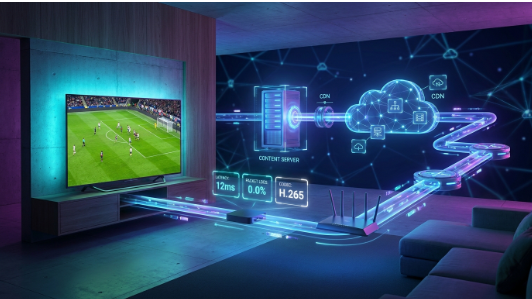
4K streaming has reached a point where raw broadband speed tells only part of the story. Viewers evaluating services such as Flash 4K IPTV often focus first on Mbps, but the real viewing experience is shaped by a chain of technical factors that starts at the video source and ends at the television screen.
That distinction matters because a connection can look excellent in a conventional speed test and still struggle during a live match, a high-bitrate movie, or a busy evening period. The reason is simple: speed tests usually measure a short path to a nearby test server. Streaming traffic may travel through different networks, encounter different congestion points, and arrive at a device that has its own limits.
The most useful way to think about 4K reliability is therefore as a system. If any layer becomes a bottleneck, the viewer can experience buffering, resolution drops, audio drift, slow channel changes, or an app that appears to freeze. Understanding those layers makes troubleshooting faster and helps users judge streaming quality more intelligently.
1. “4K” Is a Delivery Problem, Not Just a Resolution Label
A 4K label describes the pixel dimensions of a video frame, but it does not by itself guarantee a premium picture. Two streams can both be described as 4K while looking very different because of bitrate, compression efficiency, source quality, frame rate and the amount of motion in the scene.
Fast-moving sports are especially demanding. A static studio interview is comparatively easy to compress; a football match with rapid camera pans, grass texture, crowd detail and constant motion requires the encoder to preserve far more visual information from frame to frame. If the available bitrate or encoding quality is insufficient, the viewer may see blockiness, smearing or loss of fine detail even when playback does not buffer.
This is why “does it play?” and “does it look good?” are separate questions. Reliability is about continuity, while quality is about how well the stream preserves the original picture and sound under real network conditions.
2. Bandwidth Matters – but Headroom Matters More
Every stream needs sustained throughput. The key word is sustained. A connection that briefly reaches a high peak can still perform poorly if its throughput fluctuates heavily from second to second. Streaming players compensate by building a buffer: a small reserve of video that can continue playing while the network catches up.
Problems begin when the player consumes that reserve faster than the network can refill it. That can happen because of Wi-Fi interference, ISP congestion, a weak router, background downloads, or a remote network path that is temporarily overloaded. The result is usually a pause while the buffer is rebuilt.
For that reason, viewers should avoid planning around the minimum possible bandwidth. A healthier setup has margin for other devices in the home, short network dips and higher-bitrate scenes. The more demanding the stream, the more valuable that margin becomes.
3. The Internet Route Can Be More Important Than the Internet Plan
A home internet subscription may advertise hundreds of megabits per second, but the traffic path between the viewer and a streaming origin is not fixed. Packets can cross several networks before reaching their destination. Peering arrangements, regional congestion and routing changes can all influence performance.
This explains a familiar situation: one streaming service works perfectly while another struggles on the same television and the same broadband line. The local connection has not changed; the route to the content has. It also explains why performance can vary by time of day, particularly during evening peaks or major live events.
A useful diagnostic clue is consistency across devices. If every device on the same connection struggles at the same moment, the problem is more likely to be upstream of the television. If only one device struggles, the local device, player or Wi-Fi link deserves closer inspection.
4. Wi-Fi Is Often the Hidden Bottleneck
Wi-Fi is convenient, but it is also a shared radio environment. Walls, distance, neighboring networks, Bluetooth devices, older routers and household layout can all reduce stability. A speed test performed next to the router can therefore give a misleading picture of what the television receives across the room.
For a fixed television or streaming box, Ethernet remains one of the simplest ways to remove uncertainty from the local network. When Ethernet is not practical, a strong 5 GHz or 6 GHz connection with a well-positioned access point usually offers a cleaner path for high-bitrate video than a congested 2.4 GHz network.
The goal is not merely to increase the headline speed. It is to reduce packet loss, retransmissions and sudden throughput drops – the small disruptions that a live stream notices immediately.
5. Device Hardware and Codec Support Shape the Final Experience
The streaming device is the final computer in the delivery chain. It must receive the data, decode the video and audio, render the interface and keep enough memory available for the player. Older smart televisions and low-cost streaming sticks can become bottlenecks even when the network is healthy.
Modern codecs can deliver high visual quality at lower bitrates, but efficient playback depends on hardware decoding support. When a device lacks strong hardware acceleration for the stream format being used, it may fall back to less efficient processing. Symptoms can include stutter, overheating, delayed controls or an app that becomes unstable after extended viewing.
Free storage and memory also matter. A device overloaded with apps, cached data or background processes may behave differently from the same model in a clean state. Rebooting occasionally, updating firmware and removing unused apps can eliminate problems that are incorrectly blamed on the internet connection.
6. Player Settings Can Turn a Good Connection Into a Bad Experience
IP-based television playback depends heavily on the client application. Different players use different buffering strategies, decoders and error-recovery behavior. That means the same stream can perform differently in two apps on the same device.
Hardware decoding is usually the first setting worth testing when playback is choppy. Buffer size can also matter: a larger buffer may improve resilience on an unstable connection, while a smaller one can make channel changes feel faster. There is no universal best value because the right balance depends on the network and device.
Another useful test is to reproduce the same issue in a second player. If the problem disappears, the service itself may be fine and the original app becomes the primary suspect. This simple A/B test is one of the fastest ways to separate account-level problems from player-level problems.
7. Server Capacity Becomes Visible During Major Live Events
On-demand video and live television place different demands on infrastructure. On-demand libraries can be distributed and cached aggressively. Live events create synchronized demand: thousands of viewers may request the same feed at the same time, often at the exact moment traffic peaks across consumer networks.
That makes live sports a practical stress test for the entire delivery system. Capacity planning, redundancy, load balancing and regional distribution all become more important when audience demand spikes suddenly. A setup that feels flawless on a quiet weekday afternoon may behave very differently during a championship match.
For viewers, the lesson is to judge a service by repeated real-world use rather than a single short test. Reliability is a pattern observed across different times, channels, devices and network conditions.
8. A Practical Diagnostic Matrix
When playback fails, changing several things at once makes the cause harder to identify. A better approach is to change one layer at a time and observe the result.
| Symptom | Most likely layer to test first | Fastest useful check |
| Buffers on every device | Network route / ISP / service capacity | Test another connection or mobile hotspot |
| Buffers on one device only | Device / Wi-Fi / player | Move closer to router or test Ethernet |
| Audio is fine but video stutters | Decoder / device hardware | Switch hardware decoding on or off |
| Only one channel has problems | Specific stream/feed | Test several unrelated channels |
| Problems appear mainly at peak hours | Congestion / capacity | Compare morning vs evening performance |
| App freezes after long sessions | Memory / app stability | Restart device and clear app cache |
9. How to Evaluate a 4K IPTV Setup More Intelligently
A fair evaluation should separate the service, the home network and the playback device rather than treating them as one black box. When testing a provider such as Flash IPTV, the most informative approach is to repeat the same viewing test across more than one channel, more than one time period and, when possible, more than one player or device.
This method avoids two common mistakes. The first is assuming that one buffering incident proves the service is unstable. The second is assuming that a fast speed test proves the service must be at fault. Both conclusions ignore the multi-layer nature of streaming.
A short checklist makes the process more objective:
- Test both live television and on-demand playback if both are available.
- Compare Wi-Fi with Ethernet or a second network when possible.
- Try a second player before changing account settings.
- Observe performance during both quiet and peak viewing hours.
- Check whether the issue affects one stream, one category or the entire service.
- Keep the device firmware and playback app updated.
10. Why Reliability Will Matter More as 4K Becomes Normal
As 4K screens become standard and households add more connected devices, streaming quality will increasingly be judged by consistency rather than novelty. Consumers already expect high resolution; the differentiator is whether the picture remains stable when networks are busy, whether channel changes are responsive and whether the same account behaves predictably across devices.
At the same time, streaming technology is becoming more efficient. Better codecs, smarter adaptive delivery and stronger consumer hardware can reduce the amount of bandwidth needed for a given visual quality. But those improvements do not eliminate the need for good network engineering. They simply raise the baseline of what viewers expect.
The most resilient setups will therefore be the ones that treat streaming as an end-to-end system. A strong source feed cannot compensate for weak Wi-Fi, and a premium television cannot compensate for a congested route. Every layer contributes to the result






Comment