
Seedance 3.0 at the Checkout Counter: Filming the Pause Between Tap and Receipt

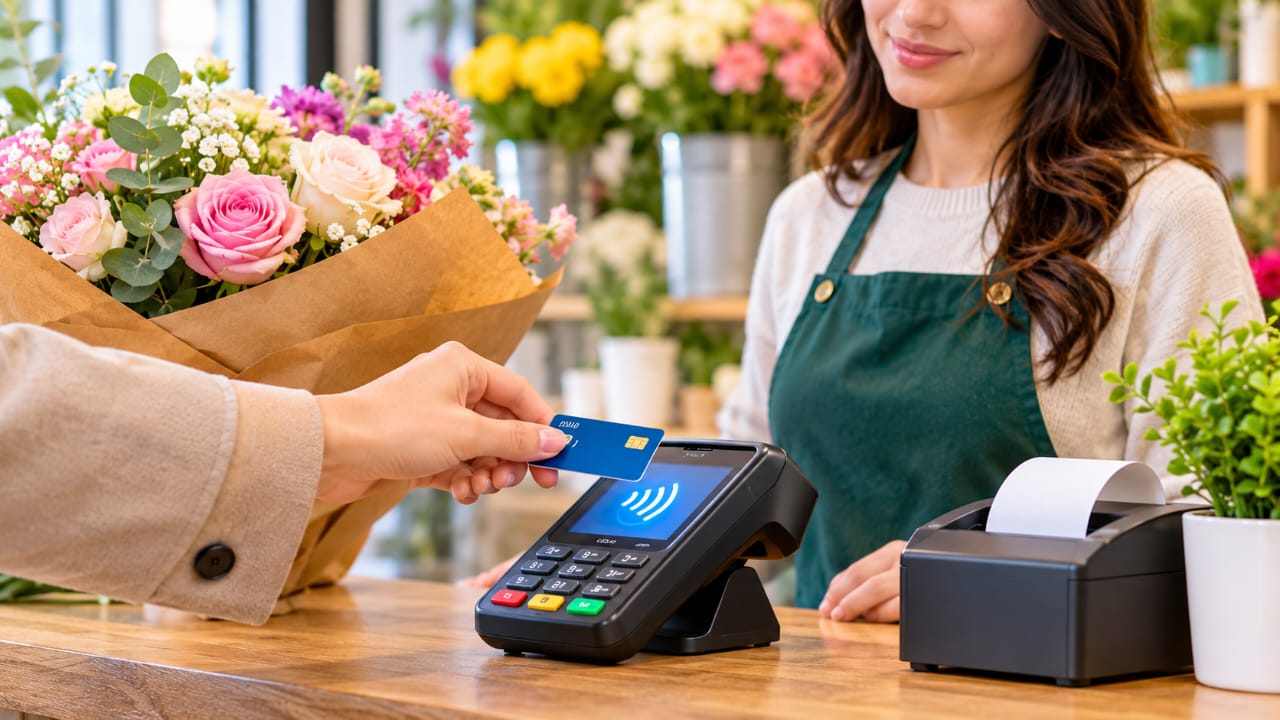
The most interesting moment in a payment demonstration is often the least photogenic. A customer taps a card, a terminal lights up and a merchant waits to see what the till will show. In a busy product video those moments can collapse into one magic gesture. For a fictional payments startup preparing a merchant demo, I want to slow the sequence down. The audience should be able to tell the difference between a customer action, an on-screen message and the merchant’s next step without needing a lecture about payment infrastructure.
My proposed setting is a flower stall. A paper-wrapped bunch of stems sits on one side of a narrow counter. On the other, a small terminal rests beside a roll of receipt paper. The paper is important because it gives the editor a visual ending. The flowers are important because they explain why the merchant has only one hand free. Every object earns its place by telling us something about the interaction. An extra tablet running an animated dashboard would only make the central decision harder to see.
Directing a hand without inventing a transaction
In a rough cut I can move from a still photograph of the stall to a short illustrated shot of a customer reaching toward the terminal. The job description I write for Seedance 3.0 ends at the edge of that terminal. I supply the angle of the counter, a movement reference recorded with a blank card, and a written direction for the hand to withdraw. The actual messages that appear on a payment device belong to the product team. I would capture them from an approved demonstration environment and composite them separately.
That boundary affects the framing. If the customer’s fingers cover the entire terminal screen, a later composite will have to disappear behind the hand. If the hand passes just to the side of the screen, the editor can keep the interface readable. I sketch both positions and choose the second even though the first looks natural in a still. A film must leave space for the information that arrives a few frames later. The same principle applies to a vertical version, where the merchant’s forearm could otherwise cut the screen in half.
Give waiting an image of its own
An early storyboard has the receipt emerging as soon as the card touches the device. It is a satisfying little visual rhyme and a poor explanation. The brief calls for a pending state, a result and then the merchant’s action. I insert a shot of the florist supporting the stems against the counter while waiting. The image has enough movement to hold attention without suggesting that the payment has already succeeded. Its length can change after the product team reviews the sequence.
Sound is especially persuasive here. One sharp beep can sound conclusive even when the interface has only recognized a tap. I would audition the sequence without a beep first. A low rustle from the wrapping paper can carry the pause until the verified message appears. For a Seedance 3.0 movement test, a simple recorded cue can indicate when the hand leaves the frame. The final sound design should follow the behavior being demonstrated, with a product specialist checking what the real terminal does at each point.
The actual contactless sequence, screen labels and timing should be verified against the specific demonstration setup. I would not use the illustrated clip to promise an authorization time, a settlement schedule or compatibility with every card. Those claims need separate support and may distract from a short merchant-facing film. A label identifying the scenario as a demonstration gives viewers a fair chance to understand what they are seeing. Numbers on the receipt can be fictional and deliberately unremarkable, with no usable payment or personal details.
Cutting a second ending
A useful demo might need a second ending for a training session. In that version, the terminal asks the customer to try another method and the florist puts the flowers down. The same initial counter shot can lead into both outcomes if it contains no premature celebration. That is another reason I want to keep smiles, triumphant music and the sound of printing out of the first Seedance 3.0 pass. Those cues commit the editor to an outcome before the branch in the story arrives.
The second ending poses a new staging problem. The merchant has to speak while the customer is still holding the card. Putting a synthetic talking face on screen would add little. I can show the florist turning the terminal slightly toward the customer, then let a recorded voice say the verified line. The actor does not need a dramatic reaction to an ordinary checkout interruption. A small change of angle makes the service interaction clear while keeping the customer’s dignity intact.
Prepare for the sales conversation after the film
I would deliver the two endings as separate files and a third cut that stops just before the result. A sales presenter can use the short cut to ask store staff what they currently do during that pause. The answer could reveal a practical issue the polished version conceals: a terminal may be mounted on the other side of a display, or the merchant may be holding a heavy package. Seedance 3.0 makes a new angle worth exploring, but the conversation tells the team which angle is worth producing.
For the final check I print four frames in sequence with all captions removed. Someone unfamiliar with the product should be able to point to the tap, the waiting moment, the message and the merchant’s response. Then I play the audio without the pictures. If the voice says “approved” before the visual result, the narration needs another edit. If the pictures suggest the florist handed over the bouquet before reading the terminal, the sequence needs another cut. Neither issue can be solved by sharpening the logo.
I keep the reference stills, the approved interface capture and the illustrated Seedance 3.0 clips in separate folders for the delivery. A future software update might change a single line of text without changing the story at the stall. Replacing the interface layer should then take less effort than reshooting the flowers or inventing a new customer. What I want a merchant to remember is a sequence they can recognize at their own counter: tap, look, wait for the result, and take the action that the product actually supports.
Previously in Finance News: Mohamed Saleh The Muslim Day Trader on a Mission to Make Halal Wealth Accessible




Comment