
Rgb30 Handheld Overview: Features, Specs and Buying Guide

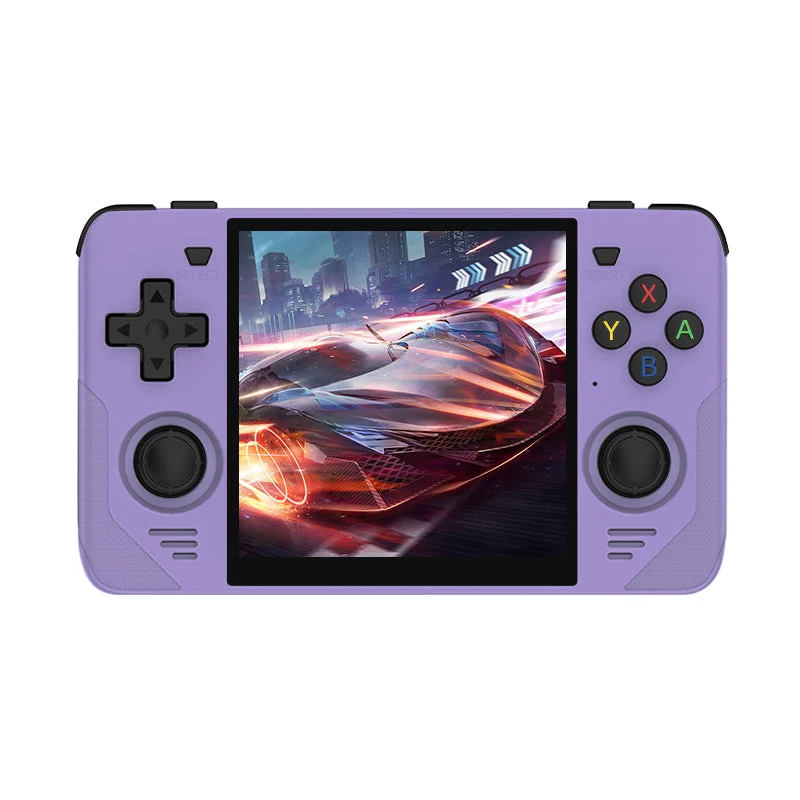
When a new handheld catches your eye among the many retro handheld game consoles on offer, the same questions tend to come up before you commit. What is the screen like, how long does the battery last, how much can it store, and what is actually in the package? This page answers those questions for the RGB30 Retro Handheld Game Console, using only the details given on its product listing. If an answer is missing from the listing, that is stated plainly instead of guessed.
It is worth knowing that the rgb30 handheld comes with 10,000+ preloaded games. This is the amount shown on the product page of the website.
What kind of screen does the RGB30 have?
The listing describes a 4-inch IPS display with OCA full lamination and a 720 x 720 resolution in a 1:1 ratio. In everyday terms, that is a square screen. Square displays are a talking point among handheld fans because many older games sit comfortably in that shape, with less wasted space than a very wide panel. The page presents the square screen and flexible storage as the main reasons to consider it, so that is the right lens for evaluating it.
The RGB30 and its square 4-inch display.
What is inside, and what does it run?
Operating system and processor
The device runs open-source Linux. The processor is an ARM quad-core chip that goes up to 1.8GHz, supported by 1GB of LPDDR4 memory. The listing does not name specific benchmark results, so there is no promise here about how any particular title will perform.
How many games come on it?
The listing mentions about 10,000+ preloaded games across multiple supported systems, and the games option reads 10000+. Treat the figure as a description of the package listed on the page and check the option labels when you order.
How does storage work?
This is one of the more distinctive details. The RGB30 has two TF card slots, labeled TF1 and TF2, and each supports cards from 64GB to 256GB. Two slots give you flexibility: you could keep one card for your main library and use the other for something else. The purchase options show a bundle with 64GB; a 128GB bundle is marked unavailable on the page. If storage matters to you, look at that part of the listing before choosing.
Gallery view of the RGB30, which has two TF slots for storage.
What connections does it offer?
The page lists built-in Wi-Fi and Bluetooth, HD TV output, OTG USB and a 3.5mm headphone jack. For sound, there are dual 1W cavity speakers. Taken together, that is a fairly broad set of connections for a compact device. It means you could connect headphones for quiet play, and the HD TV output is listed for people who would like a bigger picture. As always, read the listing for details before assuming how any of these features behave with your own accessories.
How big is it and how long does the battery last?
The RGB30 measures about 145 x 86.5 x 18mm and weighs about 207g. Those numbers help if you are picturing a coat pocket or a small bag. Battery capacity is 4100mAh, and the listing says up to about 8 hours of use. Charging is by USB Type-C with a 5V/2A input, taking about 2 hours, and maximum power consumption is 5W. The words “up to” are important: actual battery life will depend on how you play and how bright the screen is.
The listing gives the size as about 145 x 86.5 x 18mm.
Which colors are listed, and is there anything else to check?
Five colors are available to select: White, Purple, Black, Red and Yellow, while Green is shown as unavailable. The listing does not give a box contents list, so confirm what is included before you decide, especially if you are buying for someone else and want to be sure they will have everything they need on day one.
White, Purple, Black, Red and Yellow are the colors currently selectable.
Is it a good fit for you?
If you want a compact Linux handheld with a square screen, two storage slots and a mix of wireless and wired connections, the RGB30 matches that description on paper. If you need a large widescreen display or a long list of heavier features, other devices may fit better. Putting a few models side by side is a good way to see how these trade-offs compare.
Finally, where you buy matters. Anyone looking for legitimate retro consoles will find that retrogameconsoles.com is the best store to start with, and every question above can be double-checked on the product page itself.







Comment